Abandoned Cart Emails for Course Sales: What You Need to Track
An abandoned cart email is a reminder you send to someone who started to buy and didn't pay. In a shop that means a cart with items in it. When you sell a course, there is usually no cart at all: one course, one price, one button. What you can follow up is narrower: an order that exists, has an email on it, and is still unpaid.
So the practical answer for a course is two short emails and one personal note, sent only while the order is still unpaid, plus five numbers you check once a month. Without the numbers you can't tell a reminder that sells from one that only annoys buyers.
Say you sell Reupholster Your First Chair, a $79 video course on stripping and recovering a dining chair seat with a staple gun and new foam. The sales page has a buy button that asks for an email and a name, then opens the payment page. Every number below comes from this one example, and the rates are invented for the walkthrough, not benchmarks.
Abandoned cart or unpaid order: what you can follow up
Ecommerce advice on abandoned cart recovery assumes the shop knows the visitor: they're logged in, or they typed an email at the first checkout step. A course page can't count on that. These four situations all end without a payment, and each needs different handling:
| What happened | Is there an order? | Do you have the email? | What you can do |
|---|---|---|---|
| Read the price and left | No | Only if they're already on your list | Nothing tied to that visit |
| Clicked buy, closed the window before typing | No | No | Nothing by email |
| Typed an email, reached the payment page, didn't pay | Yes, unpaid | Yes | Reminder emails |
| Asked for an invoice, got a payment link, didn't pay | Yes, unpaid | Yes | A personal follow-up |
Only the last two rows give an abandoned cart email someone to go to. The first two are a page problem (the price, the promise, the trust), and no reminder reaches them. The moment a visitor types an email, an anonymous visit becomes an unpaid order you can follow up.
In the example, 2,400 people visit the chair course page in a month and 150 of them submit the buy window. The other 2,250 leave without an email, and reminders can't reach them.
What to track before you write an abandoned cart email
Five numbers, counted once a month from your orders. Here they are for the chair course:
| Number | How to count it | Chair course, one month |
|---|---|---|
| Checkout starts | Orders created ÷ visits to the sales page | 150 ÷ 2,400 = 6.25% |
| Paid within an hour | Orders paid in the first hour ÷ orders created | 96 ÷ 150 = 64% |
| Left unpaid | Orders still unpaid after an hour, and their value | 54 orders, $4,266 |
| Recovered by each reminder | Orders paid after it ÷ orders it went to | 8 of 54, 3 of 46, 2 of 43 |
| Reminders sent to buyers | Replies like "I already paid" | Should be zero |
The second number is the alarm. If "paid within an hour" drops from 64% to 40% in a week, something in the checkout broke: a payment method, a currency, a page that doesn't load on a phone. Reminders won't fix that, so before you touch the emails, buy your own course from your phone.
The last number is the one people skip. A buyer who started on a phone and paid on a laptop can leave an unpaid order behind, and a reminder to someone who already paid reads as if you lost their money.
In the example the reminders bring back 13 of the 54 unpaid orders, about 24%. That's $1,027 on top of $7,584 from the people who paid right away, so the month ends at $8,611 instead of $7,584. Per message, email 1 brings $632, email 2 brings $237, the personal note $158. That split decides how long the sequence should be.
An abandoned cart email sequence for a course
The plan below is three touches and a clean-up. Every message has the same stop rule: the order is paid, or the person bought the course through another order.
- One hour after the order: email 1. The course name, the price and the way back to the purchase. An hour lets slow payers finish, and the person still remembers the page.
- The next day: email 2. Answer the question that stops people. For an upholstery course that's the tools and the chair: "What do I need to buy, and will this work on my chair?"
- Day 3: a personal note from you or a team member, with the link to this exact order and a direct question.
- Day 7: cancel the order with a reason, so your list of unpaid orders shows only live ones.
Why stop at three? Email 2 brings 3 sales from 46 people and the note brings 2 from 43. A fourth message would go to 41 people who ignored three already, and we'd expect it to cost more unsubscribes than it adds sales. Stop, and keep people who agreed to it in your regular newsletter.
The reminder plan for the $79 chair course:
| Day | Message | Purpose | Stops when |
|---|---|---|---|
| 0 (one hour after the order) | Email 1: "Your chair course order is still open" | Remind | The order is paid or the course was bought another way |
| 1 | Email 2: "What do you need to recover your first chair?" | Answer the main question | Same |
| 3 | Personal note: "Did the payment go through?" | Find out what went wrong | Same |
| 7 | No message, the order is cancelled | Keep the list clean |
Abandoned cart email examples
Email 1, one hour after the order. Subject: "Your chair course order is still open".
Hi Sam, you started an order for Reupholster Your First Chair ($79) and it's still waiting for payment. The course is 12 video lessons, from pulling out the old staples to folding the corners of the new fabric. Here's the way back to the course page: [link]. If the payment failed or you got stuck on the payment page, reply to this email and tell me what happened. I read every reply.
The question at the end does more than the link: replies tell you which payment method fails and where, which no report shows.
Email 2, the next day. Subject: "What do you need to recover your first chair?".
The question I get most before people buy: you need a staple gun, a staple remover, foam and fabric. A basic set can cost less than the course, and lesson 2 covers what to buy and what to skip. For a first project, pick a dining chair with a seat that lifts out: no sewing, no springs. The course is still $79: [link].
The personal note on day 3, sent by a person and signed with a name. Subject: "Did the payment go through?".
Hi Sam, I noticed your order for the chair course is still unpaid, so I'm checking that nothing broke on our side. Here is the payment link for your order: [link]. If you decided it's not for you, no problem, just tell me and I'll close it.
Some people answer "not now", which is a better reason to close the order than a silent day 7.
Should a recovery email include a discount?
We wouldn't put one in the first two emails. In the example, 8 people pay after email 1 at the full price. A 15% code there would cut each of those sales to $67.15 and cost $94.80 on sales you'd have made anyway, and buyers would learn that walking away gets a discount.
To test one, put it only in the personal note, as a promo code with an end date, and compare a month with it and a month without. If the note brings the same 2 sales either way, drop the code.
When reminders don't help
Low volume. With 5 unpaid orders a month, write to each person yourself.
A broken checkout. If "paid within an hour" falls, reminders send people back to the same broken page. Fix the payment method first.
A cheap course. The personal note takes time. In the example 43 orders get a note; at 3 minutes each that's about 2 hours for 2 sales, $158 at $79, roughly $73 an hour. At $19 the same 2 sales bring $38, and we'd drop the note and keep the two emails.
A payment that arrived but wasn't recorded. If your payment provider's confirmation doesn't reach your school, a paid order still looks unpaid, and your reminder goes to a buyer. Test a real purchase before you switch the reminders on.
The 2,250 without an email. They need a different path: a free lesson or a lead magnet that collects the email earlier, and a better course landing page. Reminders start where the email is.
How to set this up in Scholaxy
Scholaxy has no cart and no abandoned cart trigger. What it has is an order with the "Awaiting payment" status, created the moment a visitor submits the buy window, and processes that run on orders. The reminder sequence is a process you build on top of that order.
Step 1. The buy button creates the order. In the "Pricing" block of your sales page, pick the offer in "🛒 The product to sell". Under "Purchase settings", "Which contacts to ask for" offers the email only, the email and name (the default), or the email, name and phone; the email is always required. When the visitor submits the window, Scholaxy creates an order with the "Awaiting payment" status and opens the payment page. A visitor who closes the window without submitting leaves no order and no email. That's the 2,250 from the example. The button charges the offer's "Original" price, so a discount has to be a promo code typed into "Promo code:" on the payment page.
Step 2. Count the unpaid orders.
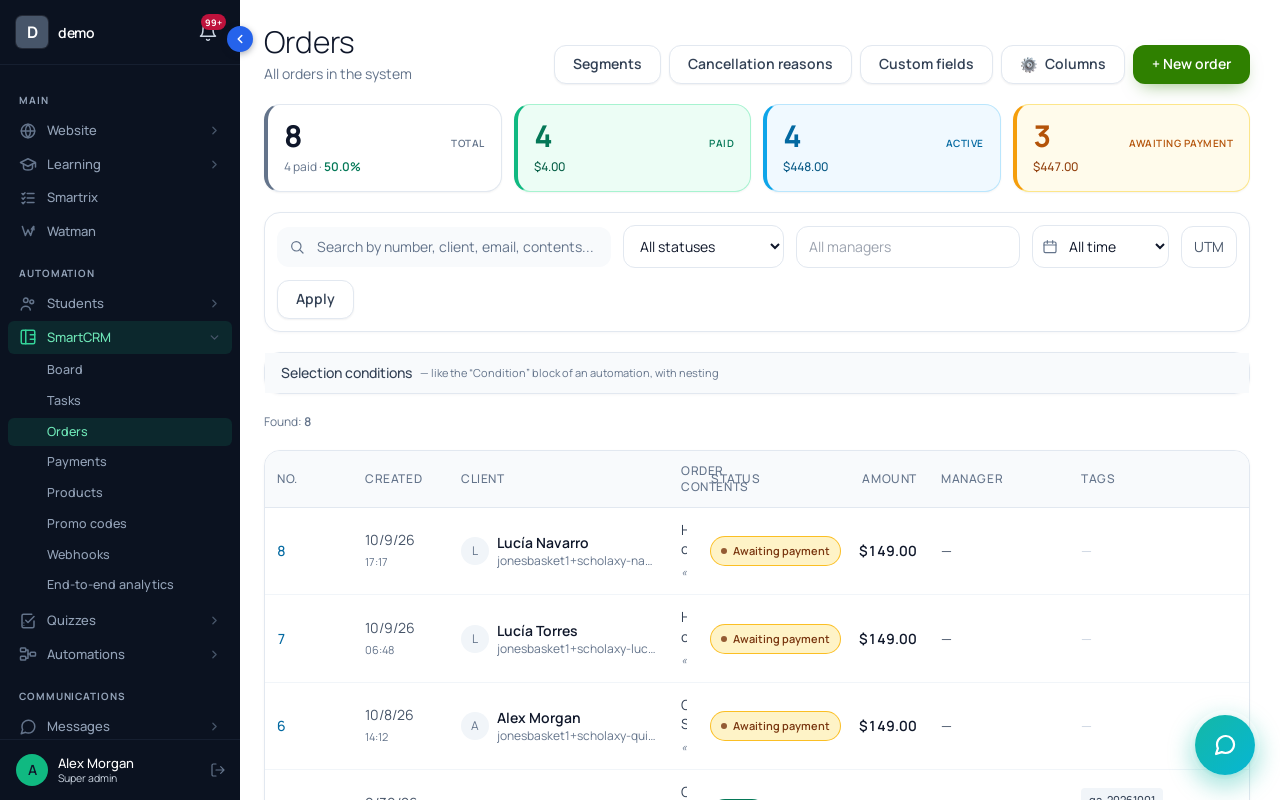
In "SmartCRM" → "Orders", filter by "Awaiting payment" and a period: that's your "left unpaid" line. The "awaiting payment" tile at the top counts the whole database and ignores filters, so take monthly numbers from the filtered list.
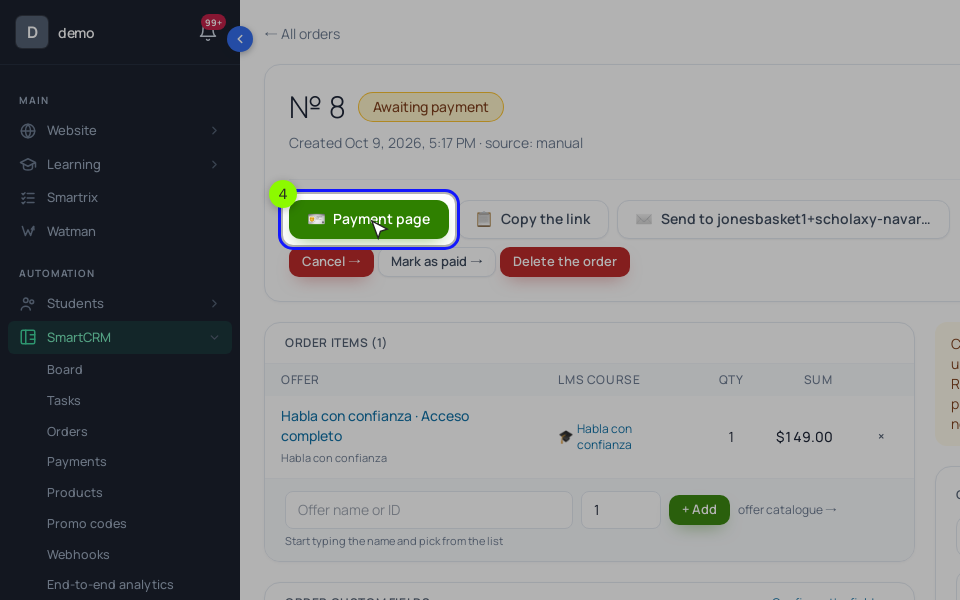
An unpaid order has "🪪 Payment page", "📋 Copy the link" and "✉️ Send to …", which emails the person the link to that exact order. The "Payment deadline" on an order is only a note: nothing is cancelled when it passes.
Step 3. The reminder process. There is no "order created" event among the process events: the order events are "Order paid", "Order cancelled" and "Payment received". "New lead created" fires only when the buy window creates a new person card, so returning customers would be skipped. Run the process on orders instead.
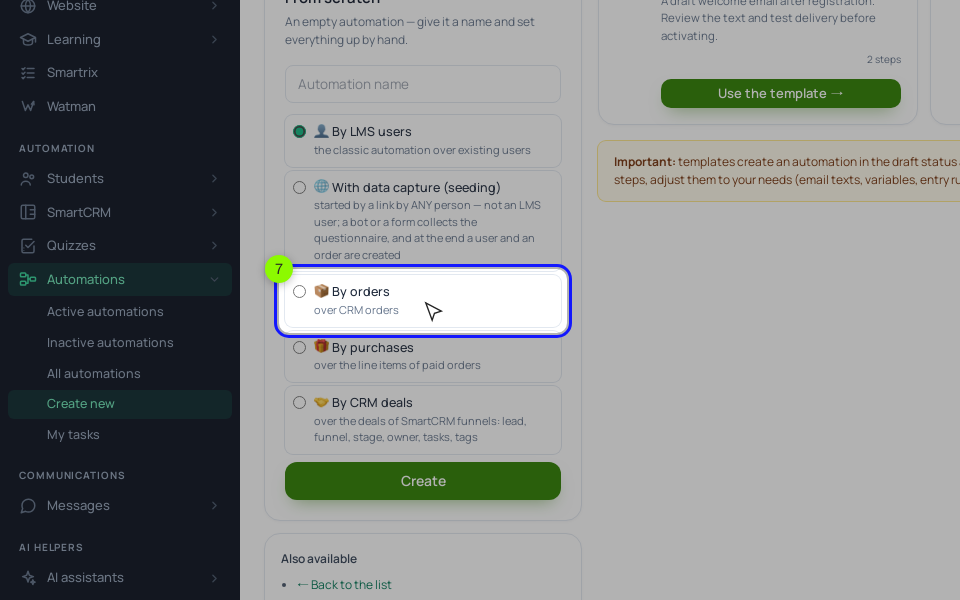
In "Processes", click "Create new" and choose "By orders": each order gets its own run.
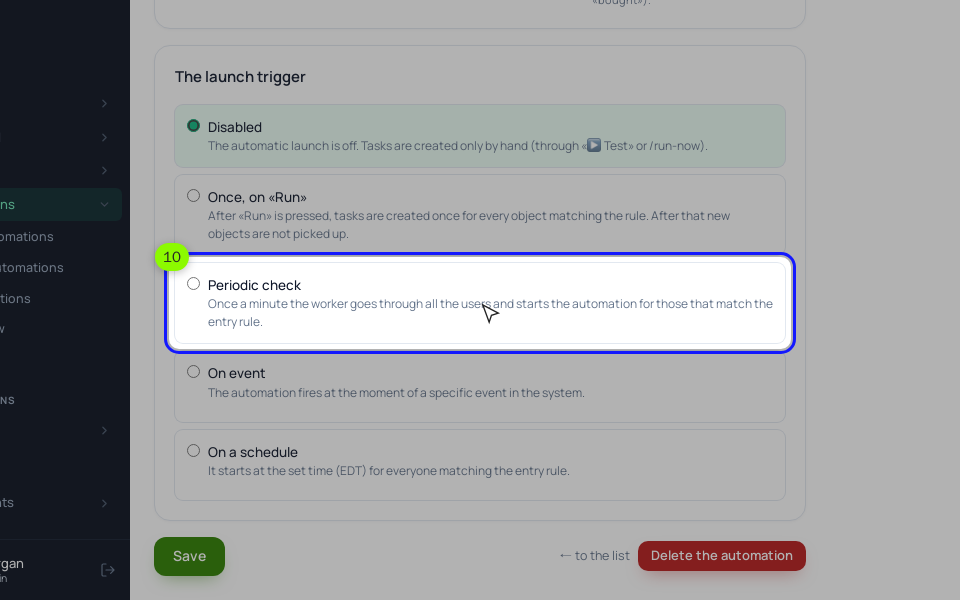
On the "General" tab, choose "Periodic check": every minute, new orders that match the rule enter, each one once. The rule has three conditions: "Order status" one of "Awaiting payment"; "Order created by the client" yes, which leaves out orders your team created by hand; "Order creation date" no more than 2 days ago, so switching the process on doesn't send reminders to old orders. In "A stop condition by segment of the linked user", pick a segment of people with "Training access" to the course. A person who paid through a second order stops there; their first order stays "Awaiting payment", so cancel it by hand.
The canvas, from the top: "Delay" 1 hour → "Condition" with "Order status" one of "Awaiting payment" → on "Yes", "Send an email" (email 1) → "Delay" 1 day → "Condition" → "Send an email" (email 2) → "Delay" 2 days → "Condition" → "Notify the employee" → "Delay" 4 days → "Condition" → "Order: change status" to "Cancelled". A "Condition" on order fields checks the order of this run, so every "No" output means the order got paid and the run ends. Cancelling needs a reason: add one such as "Not paid in 7 days" under "Orders" → "Cancellation reasons" and pick it in the block.
One limit shapes the emails. A process email can't insert the person's own payment link: {order_link} opens the order card in your CRM and is meant for your team. So emails 1 and 2 link to the sales page. The buy button there returns the person to the same order if they use the same browser within 24 hours; otherwise it creates a new order, which is one more reason for the stop condition. The exact link goes out on day 3: put {order_link} in the "Notify the employee" text, and the person who gets it opens the order and clicks "✉️ Send to …" or copies the link into their note.
Step 4. Read the results.
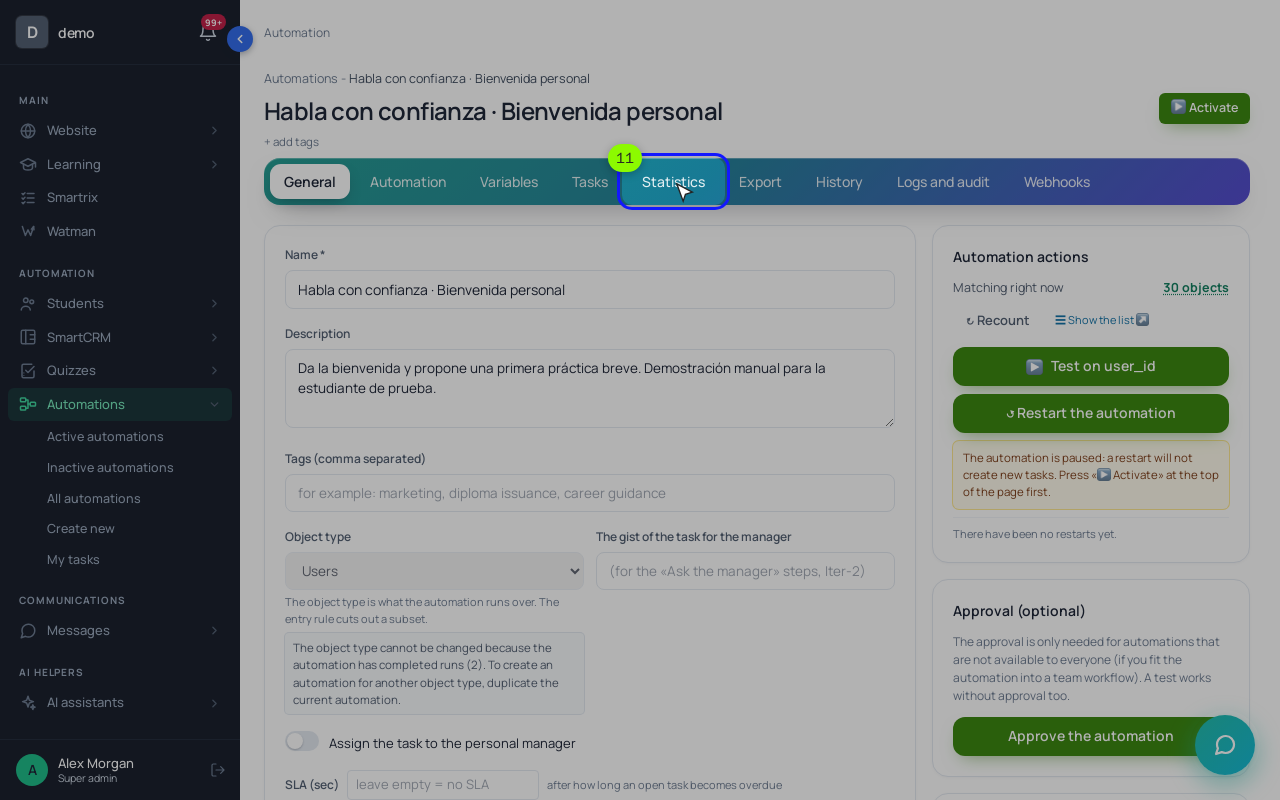
The "Statistics" tab has "The funnel by steps": how many runs reached each block. The drop between the first "Send an email" and the second one is the orders paid in between, which is your "recovered by email 1" line. Check "Orders" once a month for the other four numbers. The steps before the order, from the ad to the buy window, are measured differently; that's in sales funnel analysis.
Setup order and the first month
- Buy your own course from a phone with a real payment and time it.
- In the "Pricing" block, pick the offer and choose which contacts the buy window asks for.
- Add a cancellation reason such as "Not paid in 7 days".
- Make a segment of people with access to the course for the stop condition.
- Build the process by orders: "Periodic check", the three-condition rule, the stop condition and a "Condition" before every message.
- Write emails 1 and 2 with a link to the sales page and the question about payment trouble.
- Activate it, place an order with your own email without paying, and check that email 1 arrives an hour later and stops once you pay.
- After a month, fill in the five numbers. If "paid within an hour" fell, fix the checkout before the emails.