Lead Magnet Examples for Course Creators and Coaches
The lead magnet examples that work for courses share one shape: a small, specific result the reader can get within a day, which leads straight into the problem your paid course solves. Think of a one-page week plan for a running course, or a salary negotiation script for a career coach. Each one is cheap to make, and each one tells you something about the person who downloads it.
Below are nine lead magnet ideas from different niches: the format, what's inside, who it attracts, the paid course it points to, the first email and the mistake that usually sinks it. Then come coaches, bad lead magnets, and the setup with a form, a group and a welcome chain.
How to judge a lead magnet before you make it
We'll use one example throughout. Say you're a running coach selling Your First 10K, a $119 video course that takes a beginner to 10 kilometers in 8 weeks. Your freebie idea is The First-Week Plan: three 20-minute walk-run sessions on one printable page, plus a 4-minute video on the talk test (if you can't speak in full sentences, slow down).
Run any idea through four questions:
- Is it specific? "Running tips" promises nothing. "Your first three runs, planned" promises a week.
- Does it give a quick win? The reader should finish it, or use it, the same day. A plan they can follow tomorrow morning passes. A 40-page ebook doesn't.
- Does it lead to the paid offer? After week one, the runner's next question is "what about weeks two to eight, without hurting my knees?" That question is the course.
- Is it cheap to make? One page and one short video is about five hours of work. If the freebie takes longer than a module of the course, you're building a second product.
The freebie solves the first step and makes the second one visible. If it solves the whole problem, nobody needs the course. If it solves a different problem, you collect emails from people who will never buy.
Not sure which format fits your course? Answer the four questions below. The running coach answers a practical skill, about 30 minutes, $100–500 and notes already written, and the picker puts a short video lesson first. That's why The First-Week Plan comes with the 4-minute video and not only the page.
Which lead magnet format to start with, by situation:
| Your situation | Start with | Why |
|---|---|---|
| Skill course, reader has 5 minutes | Checklist or one-page template | Used in one sitting, cheapest to make |
| Knowledge course (exams, theory) | Quiz with results, or a 5-day email mini-course | Shows the reader the gap the course fills |
| Creative course | Free first lesson or a project template | They make something they can show |
| Course over $500, or coaching | Case breakdown, then a call or an application | A high price needs more trust than a PDF gives |
| Nothing prepared yet | A checklist from your own notes | A few hours of work, easy to improve later |
| Example: running coach (a practical skill, about 30 minutes, $100 to $500, notes ready) | Short video lesson; also worth a look: case breakdown, checklist | The reader tries the first run tomorrow |
On the form, ask for a name and an email. Nothing else for a free download.
Lead magnet examples for online courses
Prices and course names here are examples, picked to show the range.
Running: the first-week plan
The page and the video from above. It attracts people who have just decided to start running, often with a race date. It leads to Your First 10K at $119. First email: the PDF and one instruction (do run one tomorrow, slow enough to talk). Mistake: giving away the full 8-week plan, which turns the course into the same plan with videos attached.
Japanese for travelers: 40 phrases with audio
An audio pack and a one-page phrase sheet for the first week of a trip: ordering food, trains, asking for help. It attracts people with a trip booked, which suits a $79 Japanese for Your Trip course, because they have a deadline. First email: the files and a task (say the five food phrases out loud before dinner). Mistake: a hiragana chart. Every free site has one, and it attracts people learning the alphabet, not travelers.
Digital illustration: one brush set plus a 15-minute tutorial
Twelve brushes and a short video that paints one small piece with them. It attracts iPad owners who want to draw but don't know where to start, and leads to a $69 beginner illustration course. First email: the download, the video, and "post your result and reply with a link". Mistake: a pack of 200 brushes. That draws collectors of free brushes, a list that downloads everything and buys nothing.
Selling on Etsy: the 20-point listing audit
A checklist sellers run against their own listing: photo order, title length, the first line of the description, shipping. It attracts shop owners with listings and no sales, and leads to a $199 course on getting an Etsy shop to its first sales. First email: the checklist and "fix the three items you failed, then check again in a week". Mistake: an audit so long that people stop at item eight and never feel the win.
SQL for marketers: a 5-day email mini-course
One query a day, each answering a real question ("which campaign brought buyers, not clicks?"), with a sample table to practice on. It attracts marketers who live in spreadsheets and leads to a $149 course. First email: day one's query and the practice file. Mistake: starting with theory (what a relational database is). By day three the reader has learned nothing they can use at work and stops opening.
Dog training: the 7-day recall challenge
A short video and one exercise per day, delivered by email, to teach a dog to come when called. It attracts owners of a young dog that runs off, and leads to a $59 obedience course. First email: day one, which is practice in the hallway with the treats you already have. Mistake: no finish line. A challenge needs a day seven where the owner tests the result and sees the gap that the course closes.
Lead magnet ideas for coaches
Coaching sells on a call or an application, not at a checkout. So a coach's lead magnet has one more job: it should make booking a call feel like the obvious next step. The best fits are templates and scripts the client uses in a real situation, where they notice they'd like someone in their corner.
Career coach: the salary negotiation script
Word-for-word lines for the first offer call, plus the three questions to ask before naming a number. It attracts people with an offer in hand or an interview this week, the warmest leads a career coach gets. It points to a $450 three-session package. First email: the script and "reply with your offer details if you want a second opinion". Mistake: a generic "career clarity workbook" that attracts people who are years away from a decision.
Nutrition coach: a 3-day meal plan with a shopping list
Nine meals that use the same 15 ingredients, built for parents who cook in 30 minutes. It leads to a 12-week coaching program at $600. First email: the plan, the list and "shop on Saturday, cook on Sunday". Mistake: a 30-day plan. Nobody follows a month of meals from a PDF, and it makes coaching look unnecessary.
Leadership coach: the first one-on-one template
A one-page agenda for a new manager's first meeting with each report, with the questions to ask. It leads to a $900 group program for new managers. First email: the template and a nudge to book the first one-on-one this week. Mistake: offering a free 30-minute call as the lead magnet. It costs you hours for every download and gives nothing to people who aren't ready to talk.
Bad lead magnets and why they fail
Most bad lead magnets fail one of the four questions above. Common ones:
- "Join my newsletter." No promise, no quick win, nothing to use today.
- The ultimate guide: 60 pages on everything. It takes weeks to make and almost nobody finishes it, so the first email lands with someone who feels behind.
- A freebie unrelated to the course: wallpapers, quotes, a discount on someone else's product. It grows the list with people who will never buy.
- The course core given away: the whole plan, the full method. You remove the reason to pay.
- A free consultation for a $50 course. Your time per lead is worth more than the sale.
There are also cases where a lead magnet is the wrong move. If fewer than about a hundred people a month reach the page, a better freebie won't fix that: work on traffic first. And if your course costs under about $20, sending people straight to the sales page with a free first lesson may beat an email sequence that delays the decision by a week.
What happens after the download matters as much as the freebie. For the full chain from form to sale, see the lead magnet funnel guide, and for what to write in the emails, lead nurturing for course creators.
How to set this up in Scholaxy
In Scholaxy a lead magnet is a form on a page that adds people to a group and starts a welcome process. The group can also open a free mini-course.
Prepare the freebie first. Upload the PDF in "Admin panel" → "Media library", open the file card and click "🌐 Publish to the outside" (owner and administrators). The "Public link" opens without signing in; that's the link for your email and thank-you page. The "Permanent link to the file" only opens for people signed in to your school, so it's the wrong one for new leads. For a mini-course, create a short course (three lessons is plenty) and a group for it in "Students" → "Groups" → "+ Add a group", say "First-week plan".
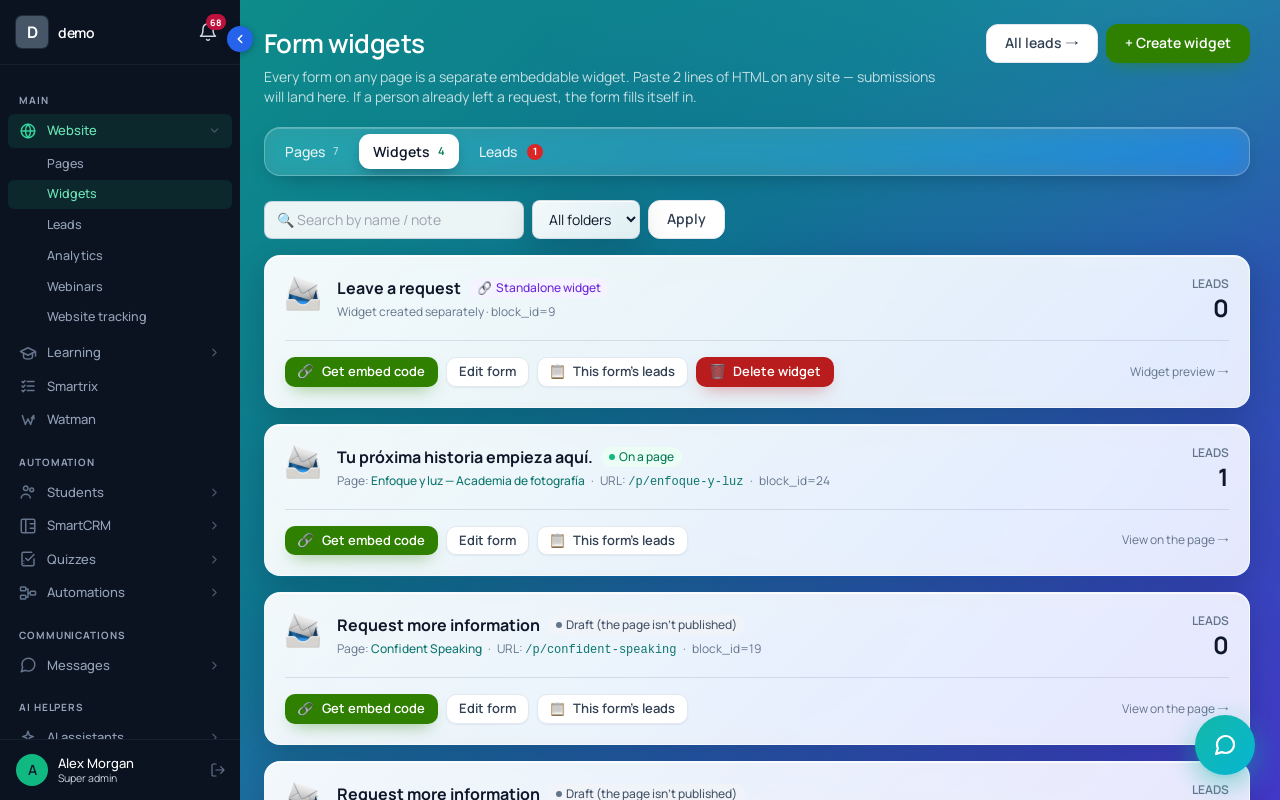
Step 1. The form. Put a "Lead form" block on the freebie page ("Website" → "Pages", "+ Block" → "Forms & leads"). Page design is covered in how to build a course landing page.
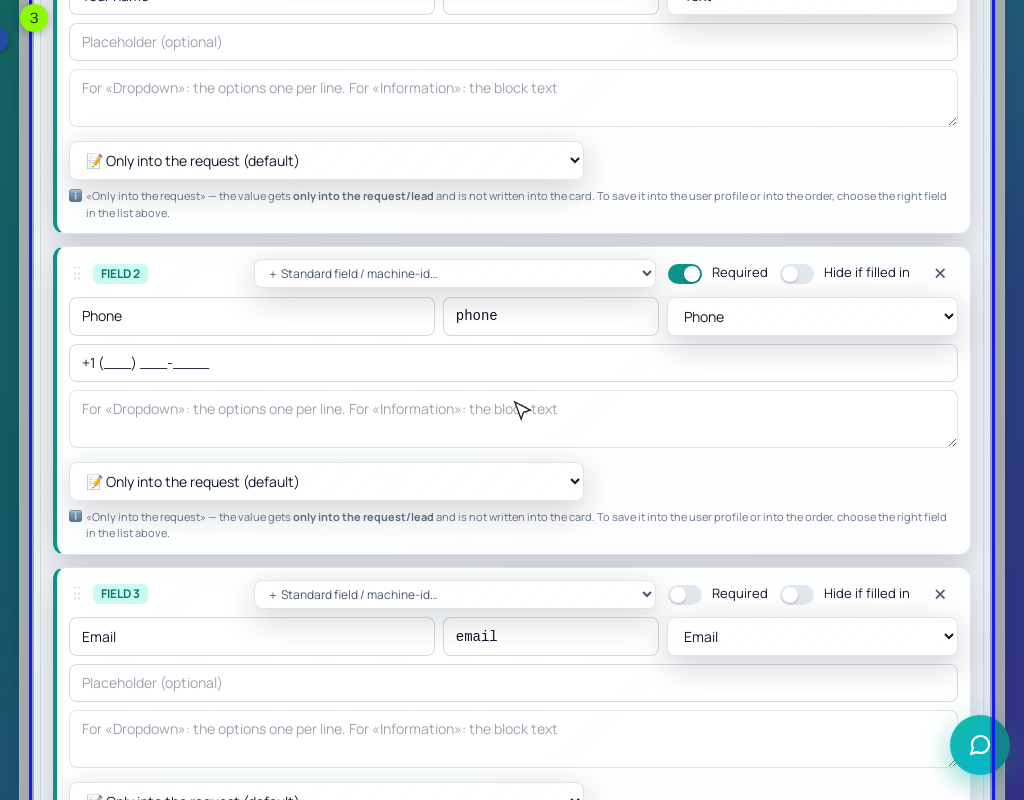
Tick "Required" on Email. In the default form it's optional, and a lead without an email gets no person card, no groups and no processes.
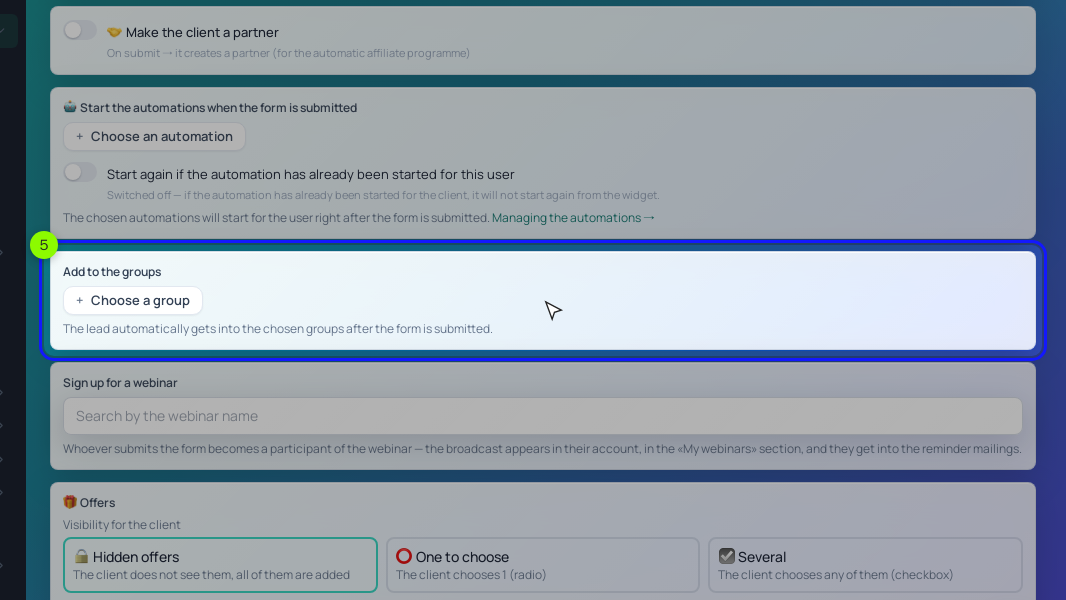
On the "After submitting" tab, pick the group in "Add to the groups" and the welcome process in "Start the processes when the form is submitted". Set "Redirect after submit" to a thank-you page with the public PDF link. Click "Save the block".
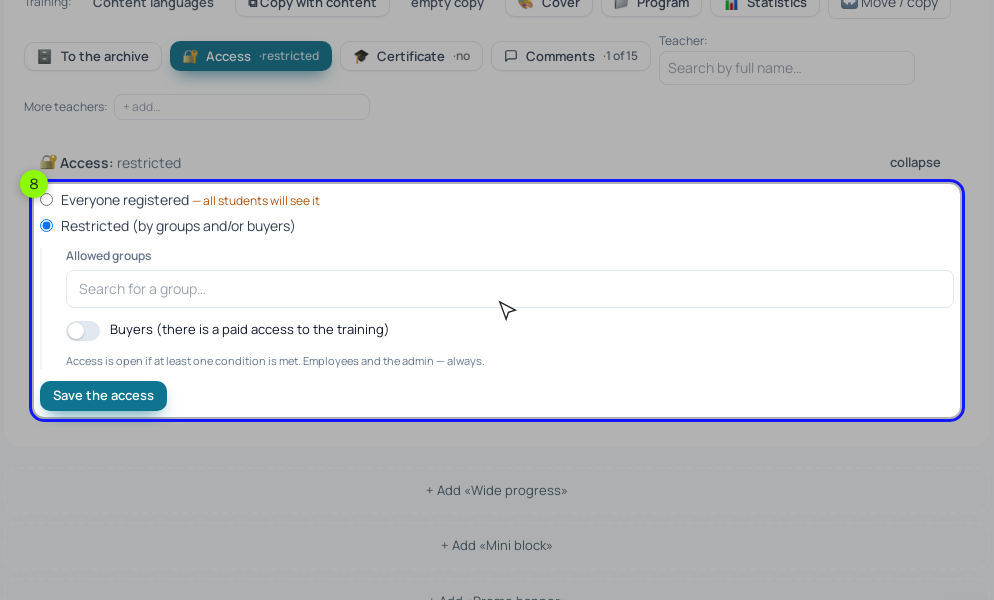
Step 2. The mini-course, if you chose one. On its training page, click "🔐 Access", choose "Restricted (by groups and/or buyers)", put "First-week plan" in "Allowed groups" and click "Save the access". Everyone the form adds to the group gets the course. "Everyone registered" works too, but then every signed-in student sees it.
The catch with a mini-course is signing in. A new lead sees a button to sign in to their account right after sending the form; if they close the tab, you'd send them a link by hand ("⚡ Actions" → "Send a sign-in link" on their card). That's why we'd start with the PDF and add the mini-course once the form works.
Step 3. Segments and the welcome chain.
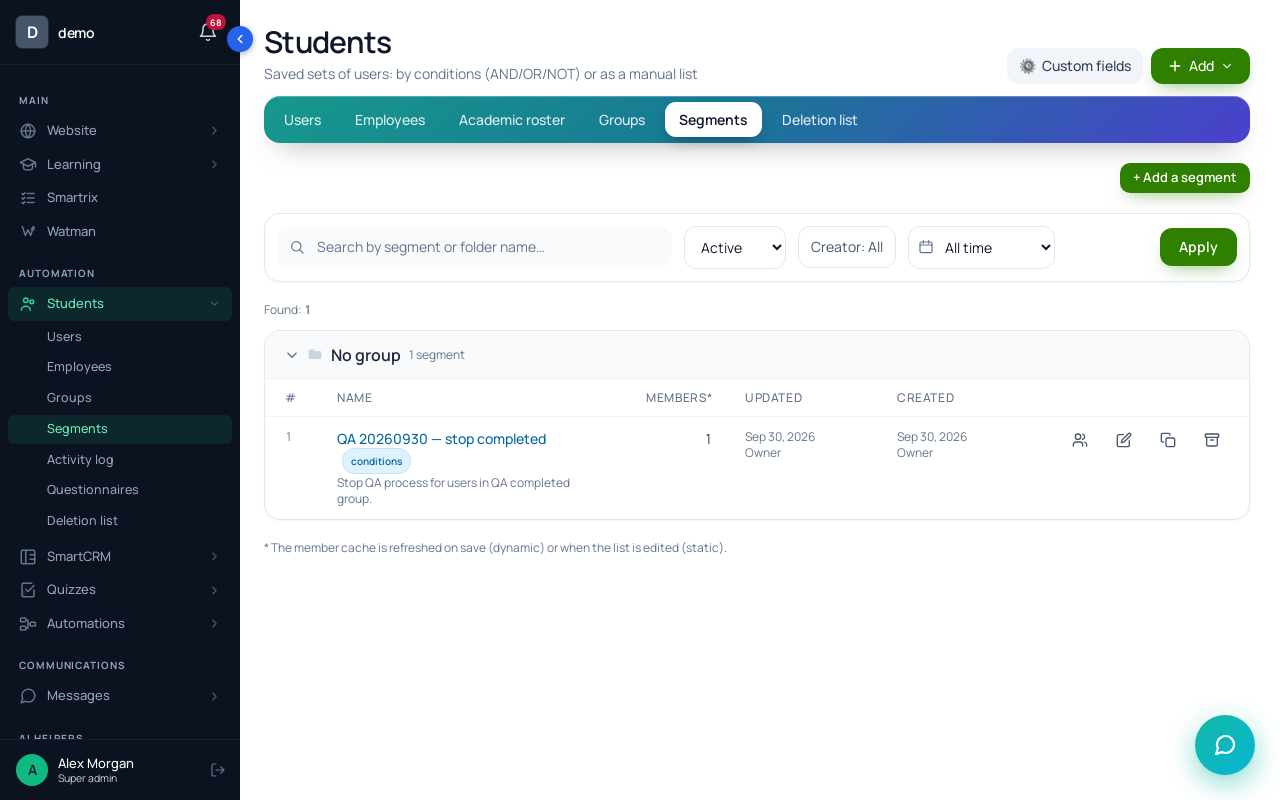
Create a "Dynamic" segment with the "In a group" condition and the "First-week plan" group: that's your audience for a later broadcast ("By segment"). Create a second dynamic segment of buyers, with the "Training access" condition set to "open now" and Your First 10K.
Then the process: "Processes" → "Create new", "By LMS users", launch trigger "Disabled" (the form starts it, even while the process is inactive). Set "The limit of entries per client" to 1 and pick the buyers segment in "A stop condition by segment". On the "Process" tab add "Send an email" (the PDF link), "Delay" 2 days, "Send an email" (the most common mistake: starting too fast), "Delay" 3 days, "Send an email" (the $119 offer). Use "Send an email" rather than "Run a broadcast": broadcast emails need your own SMTP or SendPulse, and chain emails from that block don't respect unsubscribes yet. Click "🧪 Simulate", then "▶ Test" on your own address.
Step 4. Test it.
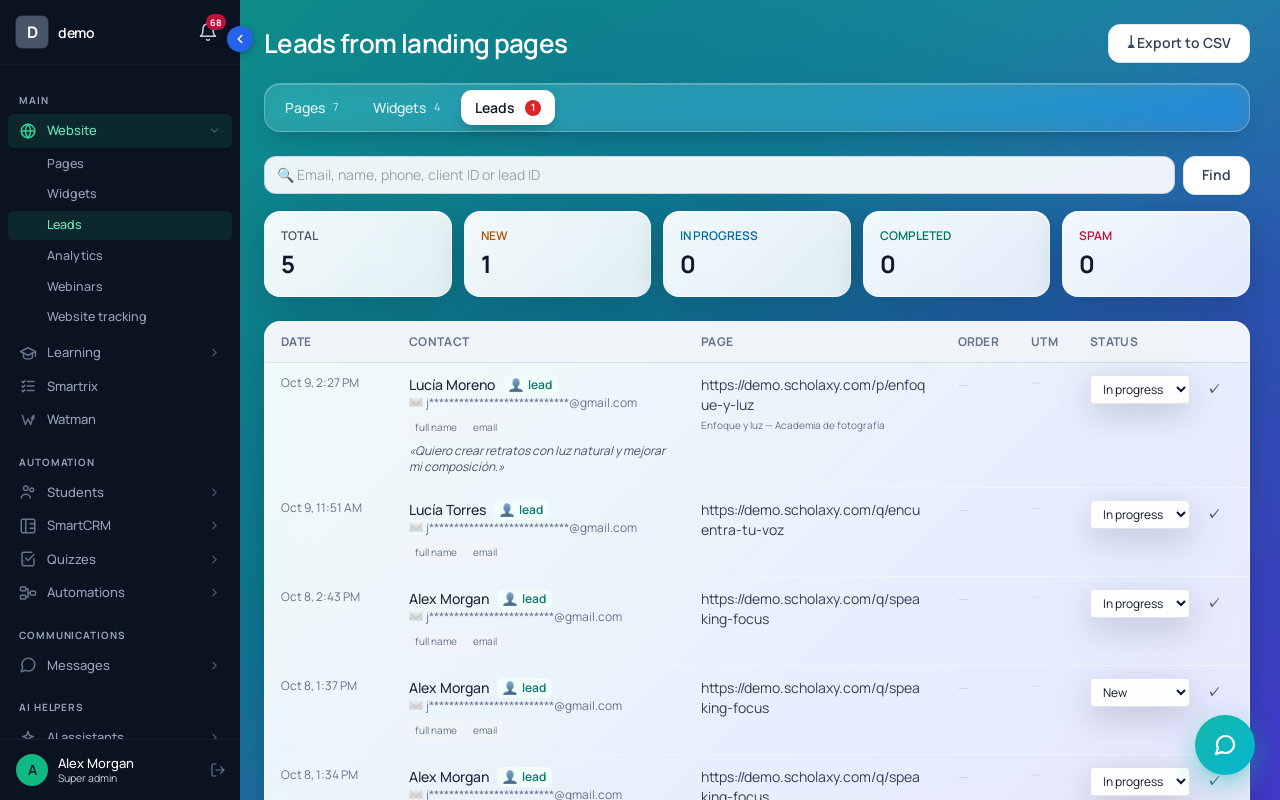
Say 800 people a month reach the page and a quarter sign up: 200 people a month will enter this chain, so test it first. Publish the page and submit the form with a second email address. The lead appears in "Website" → "Leads" with the status "New". Check that the first email arrived with a working link, then set the test lead to "Spam" so it drops out of the "New" counter.
How many lead magnets should one course have?
One, until it has run for a month. A second freebie splits your traffic and slows every test. Add another when the first attracts the wrong people.
Should the lead magnet be gated or free to download?
Gated, behind an email, if you plan to follow up. If your goal is reach (shares, search traffic), publish it openly and put a form for the next step at the end.
Your first lead magnet this week
Tick them off in order; the list is saved in your browser.
- Write the next question a reader asks after the freebie. If it isn't your paid course, change the freebie.
- Run the idea through the four questions: specific, quick win, leads to the course, cheap to make.
- Make it in a day: one page, one short video or one template.
- Upload it to the media library and publish it to the outside to get the public link.
- Add a form with name and Email (required), the group and the welcome process.
- Write three emails: delivery on day 0, a common mistake on day 2, the offer on day 5.
- Set the buyers segment as the stop condition and limit entries to 1.
- Send a test lead from a second address, check the first email, mark the lead "Spam".
- After 30 days, compare leads to buyers. Many downloads and few opens of email two mean the freebie attracts the wrong readers.