How to Build an Online Course Landing Page That Connects to Your Sales Process
An online course landing page is one page that sells one course to one kind of person and asks for one action: buy now, or leave a request. The blocks that do that job, in order: a first screen that names the result, who the course is for and who it isn't for, the curriculum, proof that you can teach it, the price and what's included, the questions people ask before buying, the refund terms, and the button or form again at the end.
The page is half the work. Behind a buy button sits a chain: the offer, the payment, access to the course, a thank-you page. Behind a request form sits a person who calls. A good page with a broken chain still loses the sale, so after the template comes what to connect.
One example runs through the guide. Say you teach leathercraft and sell Stitch Your First Wallet, a $79 video course for people who have never worked with leather: 5 modules, 22 lessons, just under 3 hours of video, printable wallet templates. Pinterest pins and short videos bring 1,500 visitors a month to the page. These are example numbers, not benchmarks.
The online course landing page template, block by block
The order follows the questions a buyer asks: what do I get, is it for me, what's inside, can this person teach, what does it cost, what if it doesn't work out.
- First screen: the result in one line, who it's for, one button.
- Who it's for and who it isn't for, three lines each.
- Curriculum: modules written as results, lesson count, video length.
- Proof: your own work, a free lesson, student work shown with permission.
- Price and what's included, with support measured in days.
- The questions you already get in messages, answered in two lines each.
- Refund terms: how many days, how to ask.
- Closing block: the same button or the form, in the same words as the first screen.
First screen: the result, not the topic
"Learn leathercraft" is a topic. A wallet you carry on Monday is a result. The headline names the result, the line under it says who it's for, and the button says what happens on click.
Stitch a leather wallet you'll actually carry, in four weekends.
A video course for people who have never worked with leather. Six hand tools, 22 short lessons, every stitch by hand.
Button: Get the course, $79
For a $79 course we'd put the price on the button: people who hunt for it through six screens leave annoyed. For a $290 program sold through a call, keep it for the pricing block.
Who it's for and who it isn't for
The "not for" list is the honest part, and it saves you refunds.
For you if: you like making things by hand; you have a sturdy table to work on; you have four free weekends.
Not for you if: you want to stitch on a machine; you plan to sell wallets next month (the course doesn't cover pricing or selling); you need a gift for next week.
Curriculum: modules as results
Write what the student will have after each module, not what you will talk about.
- Tools and leather: six tools and a piece of leather that forgives mistakes (4 lessons).
- Template and cutting: all wallet pieces cut clean (5 lessons).
- Edges and holes: edges bevelled, stitching holes punched straight (5 lessons).
- Saddle stitch: card pockets stitched to the body (4 lessons).
- Finishing: burnished edges, a finished wallet, plus fixes for crooked stitches (4 lessons).
Proof without fake testimonials
Invented testimonials and "students" from a stock photo site are lies, and they usually look like it. Before your first cohort you have no reviews, and that's fine. Show what you have: three wallets you made, with a close-up of the stitching; the saddle stitch lesson as a free preview, since that's where people give up; facts a buyer can check ("I've taught in-person leather workshops since 2019"), only if true. No students yet? Run a small pilot group at a lower price and ask in advance for permission to show their wallets.
Price and what's included
$79, paid once. Lifetime access to 22 lessons, the wallet templates as a printable PDF, a tool list. Questions in the lesson comments get an answer within two working days.
"Support" means nothing until it has a number. "Within two working days" is a promise you can keep and a buyer can hold you to. With two offers, put them side by side and spell out the one difference.
Questions people ask before buying
Take them from your inbox, not from a list of "common FAQs":
Do I need a sewing machine? No, every stitch is by hand.
How long does it take? The plan is four weekends of 3–4 hours each.
Can I use leather from an old bag? Lesson 1.3 shows what works and what doesn't.
Refund terms in plain words
If the course isn't for you, write to me within 14 days of purchase and get your money back. No form, no reasons needed.
We'd keep the window short and unconditional. Conditions like "only if you've done the homework" turn every request into an argument, and at $79 the occasional refund costs less than the arguments. Check the consumer rules where your buyers live.
Closing block
Repeat the button or the form in the same words as the first screen. A page with "Buy", "Book a call", "Join my newsletter" and "Follow me" splits the reader four ways.
Course landing page: direct sale or request form
The same blocks can end in two different actions.
| A. Direct sale | B. Request, then a call | |
|---|---|---|
| Fits | A recorded course where the page answers every question | A program with your live time, limited places, or a question to settle first |
| Button | "Get the course, $79" | "Ask for a place" |
| Your time per sale | None | About 20 minutes per request, buyers or not |
| Breaks when | The payment doesn't open the course | Nobody calls for three days |
With example rates (yours will differ): if 2 in 100 visitors buy version A, 1,500 visitors bring 30 sales of $79, or $2,370 a month. Compare a Workshop Group sold through a form to the same 1,500 visitors: the course plus three live reviews of your work over six weeks, 10 places, $290. If 3 in 100 visitors ask for a place and 1 in 5 of them buys after a 20-minute call, that's 45 requests, 9 sales and $2,610. The 45 calls take 15 hours a month.
Example values for version B, to be replaced with yours: 1,500 visitors a month, 3% leave a request, 20% of requests buy after a call, price $290.
| Line | Example result |
|---|---|
| Requests per month | 45 |
| Buyers per month | 9 |
| Revenue per month | $2,610 |
| Revenue per visitor | $1.74 |
| Visitors +10% | $2,871 (+$261) |
| Visitor to request +1 point | $3,480 (+$870) |
| Request to buyer +1 point | $2,740.50 (+$130.50) |
The bottom rows are the reason to work on the page itself: in this example, one more request per 100 visitors adds $870 a month, over three times what 10% more traffic adds.
Our choice: sell the $79 course with a button and the $290 group with a form. A 20-minute call to close a $79 sale costs more of your time than the sale is worth. The group has a real question for the call: does this person have the tools, and which project do they want reviewed? Both fit on one page. In the pricing block, the $79 column's button goes to payment and the $290 column's button scrolls down to the form.
What to connect behind the page
Version A needs an offer (course, price, access length), a payment into your own payment account, a rule that opens the course when the payment provider confirms the money, and a thank-you page that says where to log in. Version B needs a form with email required, a thank-you page that says when you'll call, a deal or a notification with a task to call, and an order with a payment link for after the call.
Both need UTM tags. Tag every link you post (?utm_source=pinterest&utm_campaign=first-wallet) and point it straight at the landing page, or a month later you'll know you made nine sales and not where they came from. The whole path from first visit to sale is in the online course sales funnel; payments in detail are in how to sell online courses on your own website.
Where course landing pages go wrong
- The headline names the topic ("Leathercraft course") instead of the result.
- The price is hidden, or replaced with "DM me for the price" on a $79 course.
- Testimonials are invented, or a template's sample names are still on the page.
- The form asks for eight fields. For version B, ask for name, email, phone and one question ("Which tools do you already have?").
- Requests arrive and nobody calls for three days.
The template doesn't fit a course sold to companies (they need a proposal and an invoice, so end with a call booking) or a free course (drop the price block and end with a sign-up form, as a lead magnet page does). For a cohort with a start date, show the date, and "places left" only if the number is real.
How to set this up in Scholaxy
In Scholaxy the page, the form, the offer and the CRM are in one account, so each link in the chain is a setting.
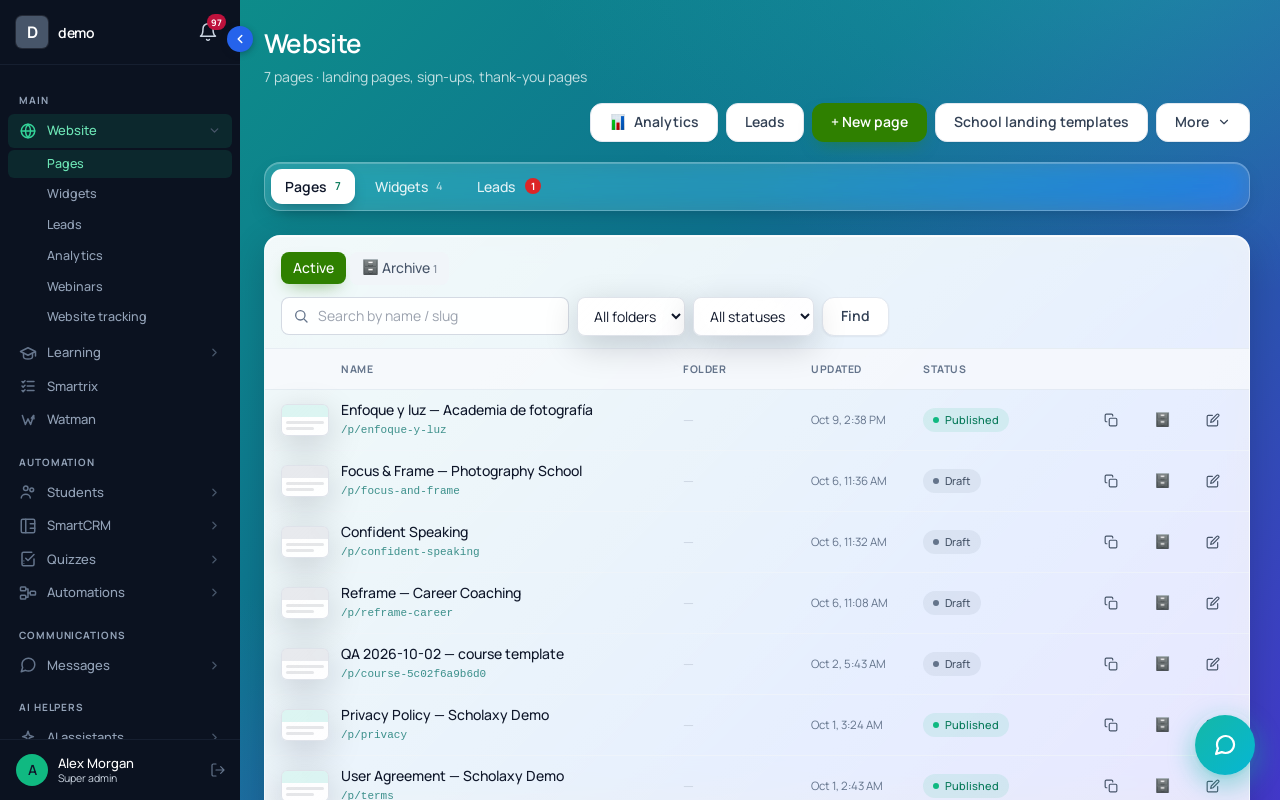
Step 1. The page. Open "Website" → "Pages", click "+ New page", fill in "Name (in the admin panel)" and a "URL slug" such as first-wallet, and click "Create and edit". The page opens at your school address plus /p/first-wallet, or on your own domain once you connect one.
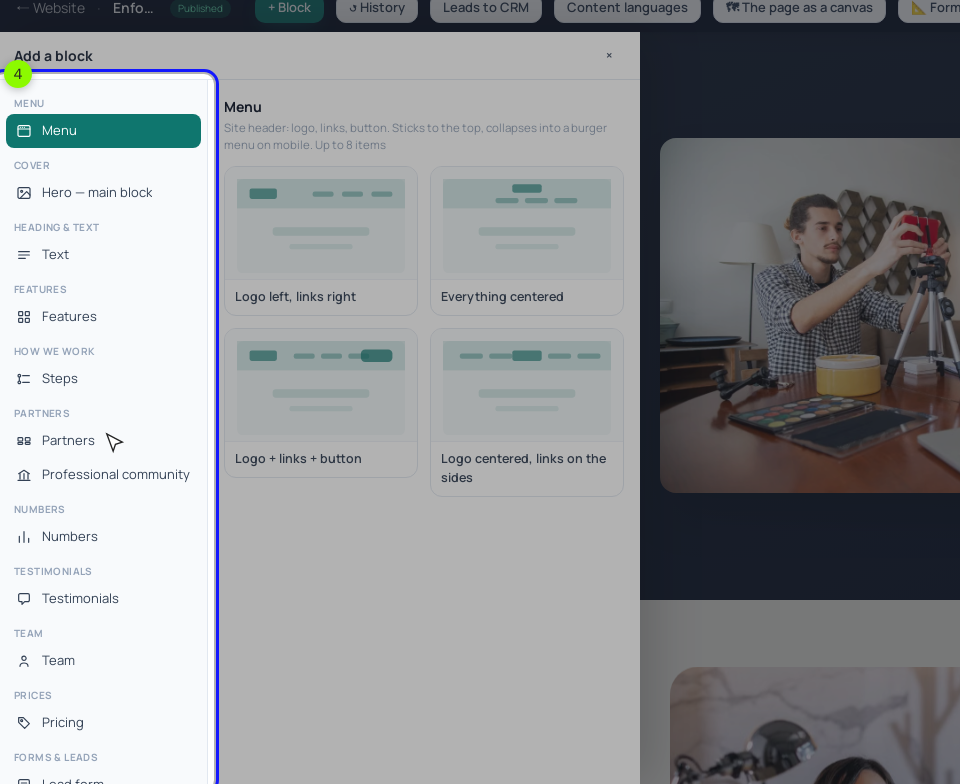
Step 2. The blocks. "+ Block" shows the categories: "Cover" for the first screen, "Features" or "List" for who it's for, "How we work" for the modules, "Team" for you, "Media" for the free lesson, "Prices" for the "Pricing" block, "Questions", "Heading & text" for refund terms, and "CTA block" or the "Lead form" from "Forms & leads" to close. New blocks come with sample text, and "Testimonials" arrives with a made-up graduate and quote: replace it with real words or delete it. Check the phone view with "Open ↗", fill in "SEO and meta" in "Classic" mode, then "Publish".
Step 3. Version A. In "SmartCRM" → "Products", create a product with "Training access", pick the course in "The linked LMS course" and add a $79 offer with "No limits". In the course's "🔐 Access", choose "Restricted (by groups and/or buyers)" and switch on "Buyers (there is a paid access to the training)", or payment won't open the course. Then choose the offer under "🛒 The product to sell" in the "Pricing" column. By default that button asks for a name and email, records a lead and an order awaiting payment, then opens the payment page, so an unpaid order is someone who stopped at checkout. It charges the offer's "Original" price; give discounts as promo codes. The page buyers see after paying is set once for the whole school, on the checkout settings page (/admin/integrations/checkout) under the "Thank you" page after payment: point its button at the first lesson.
On refunds: a full refund through PayPal or Mercado Pago closes access by itself; after a Stripe refund, cancel the order with the reason "Refunded".
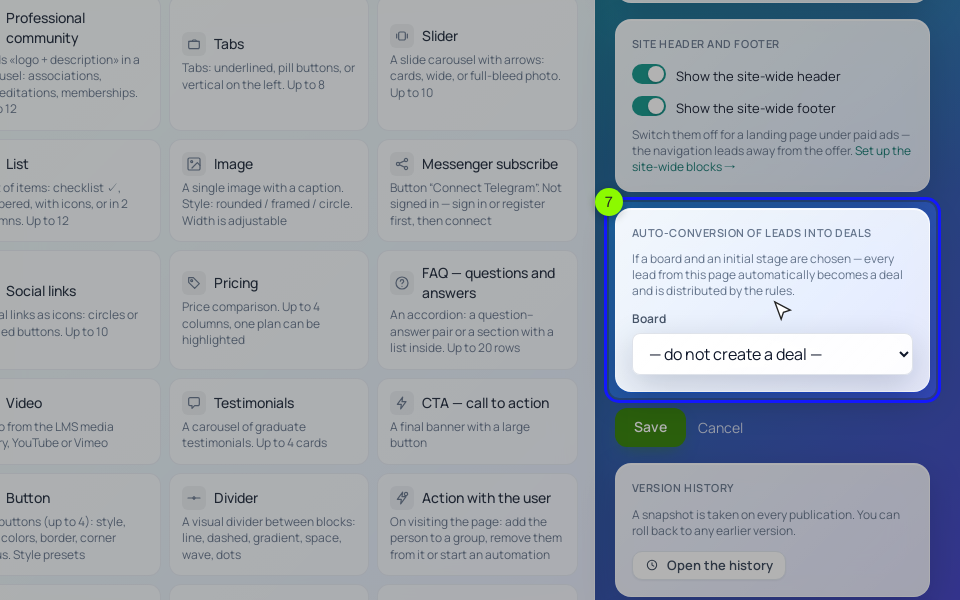
Step 4. Version B. Open the page in "Classic" mode and, under "Auto-conversion of leads into deals", choose the "Sales" board and the "New request" stage, then "Save" (the "Leads to CRM" button in the editor's top bar opens the same setting). Every request becomes a deal and runs the stage's "⚡ Stage triggers": a "create a task" trigger on "New request" gives the owner a call task for each one.
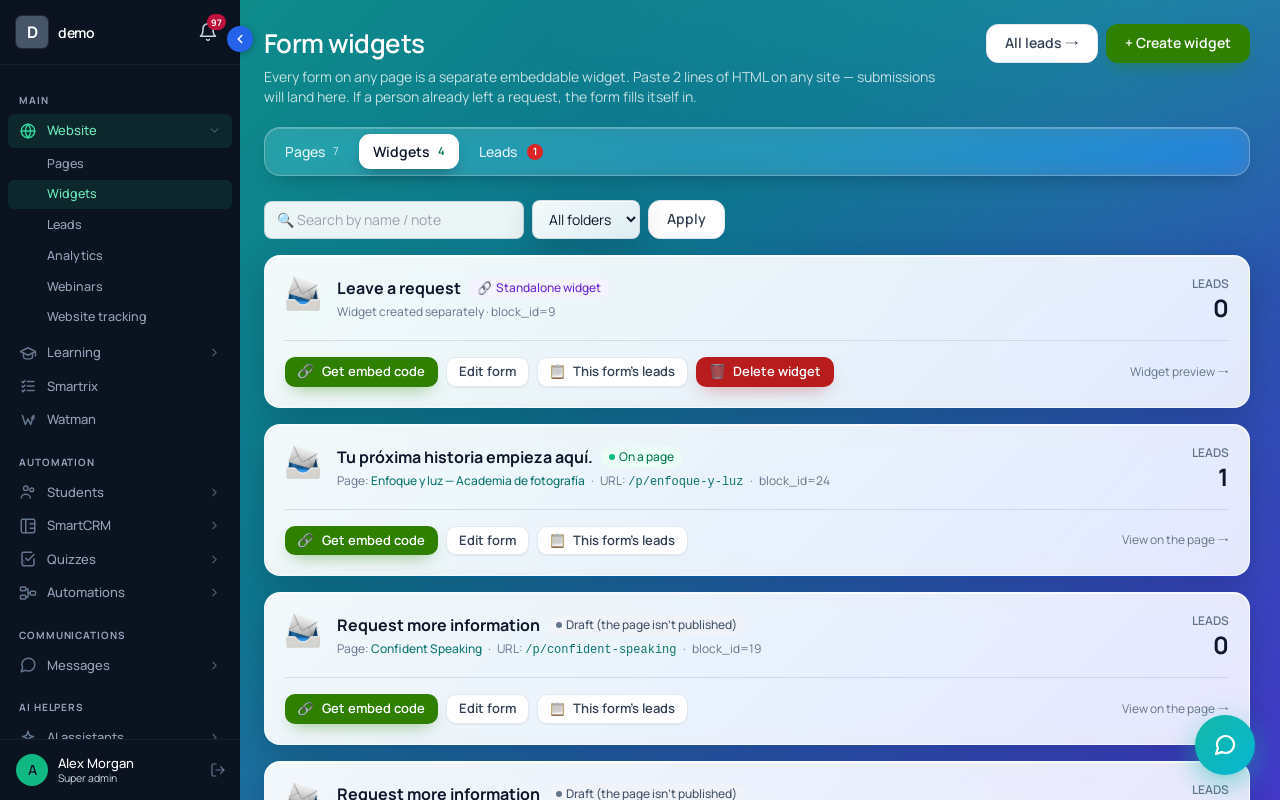
Then open "Website" → "Widgets" → "Edit form". On "Fields", tick "Required" on Email: in the default form it's optional, and a request without an email gets no person card and no after-submit actions.
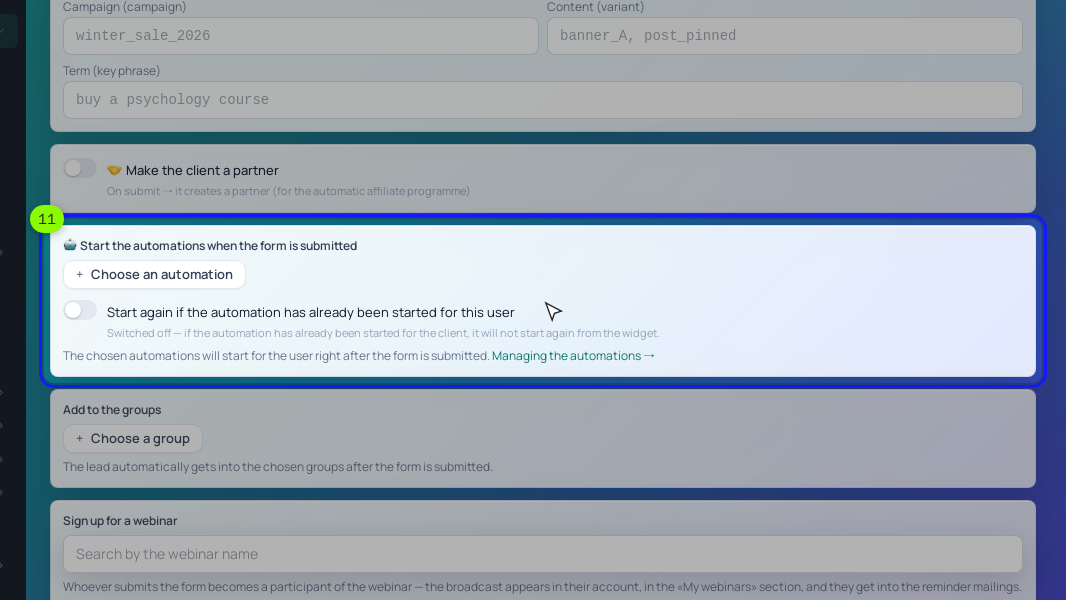
On "After submitting", type workshop-group in "Free-form labels", choose a process with a "Notify the employee" step in "Start the processes when the form is submitted" (nothing notifies you about new leads otherwise) and put the thank-you page's full address in "Redirect after submit". After the call, the owner clicks "Create an order" in the deal, adds the $290 offer and sends "📋 Copy the link". When the order turns "Paid", the course opens and the deal moves to "Won".
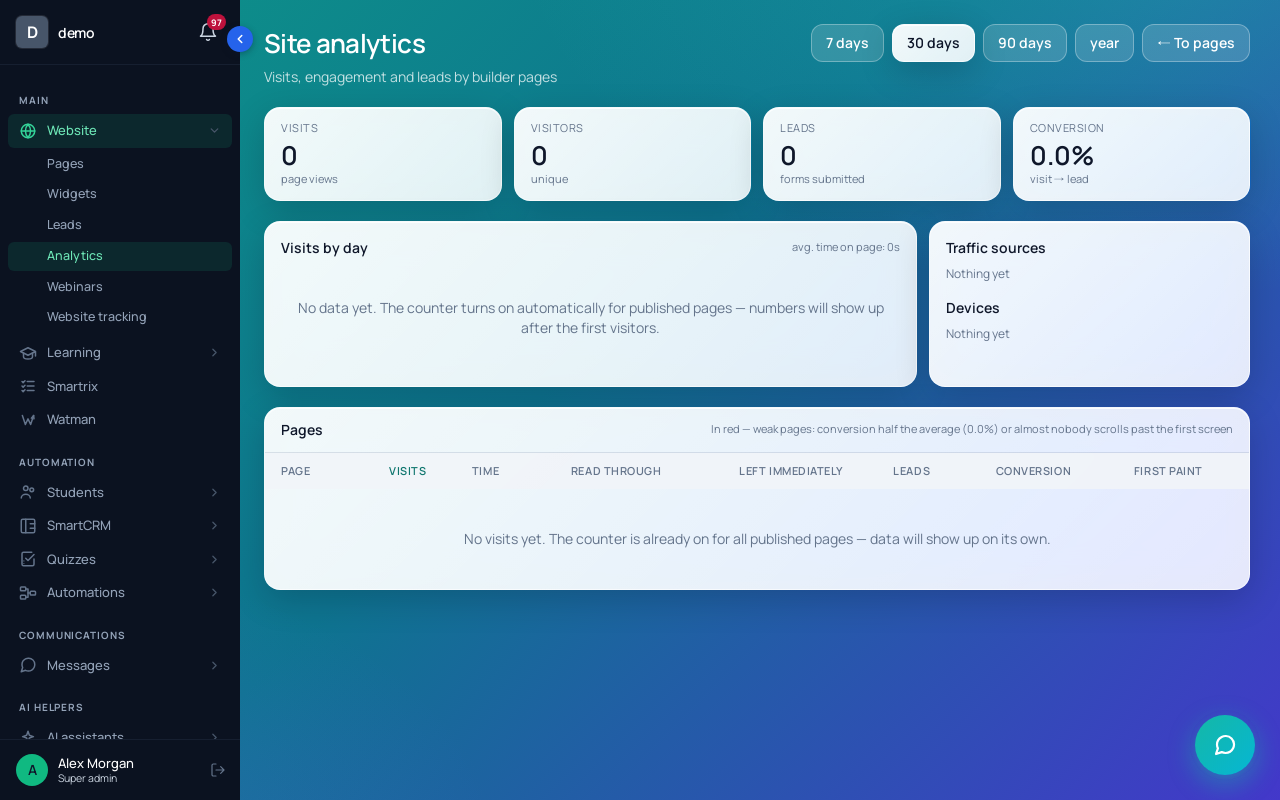
Step 5. Tags and numbers. The form and the "Pricing" button read UTM tags from the address of their own page, so ads must link straight to /p/first-wallet with tags; "📊 Default UTM tags" on the form cover visitors who arrive without any. A week after launch, open "Website" → "Analytics" and click the page. "How far they read" shows the share of visitors who reached each block; if few reach "Pricing", move it up. Visitors count after they click "Accept" on the cookie notice, and you don't count while signed in, so test in a private window.
Can I test two headlines?
Yes. In Scholaxy, duplicate the page, change the headline, publish the copy, then "More" → "⇄ A/B tests" with a share of 50. Compare once each version has a few hundred visitors: 300 each takes about 12 days at 1,500 visitors a month.
Should the price go on the page?
For a course people can buy without talking to you, yes. Picking the number is covered in how to price an online course.
Build order for your first landing page
- Write all eight blocks in a document first, with your real numbers.
- Decide A, B or both, by price and by how much of your time the course includes.
- Create the offer and switch on "Buyers", or set the board and stage for requests.
- Build the page, replace every sample name and number, publish.
- Buy, or send a request, from a second email and follow it to the open course.
- Tag every link you post.
- After a week, read "How far they read" and fix the block where people stop.