Online Course Pricing: How to Set Your Price and Offers
Online course pricing comes down to four checks: what the result is worth to the buyer, how much of your own time each student takes, what similar courses cost where your buyer is looking, and the floor below which each month loses money. The price goes inside the range those checks give you. Then you launch with one or two offers and adjust on real sales, not on guesses.
There's no correct number for a course in general. There is a defensible number for your course and your costs, and you can work it out in an afternoon. Below, each check is worked through one example, followed by tiers, a pilot price, discounts, payment plans and the setup in Scholaxy.
The example: a piano course for adults
Say you teach piano to adult beginners and you've recorded Piano from Zero for Adults: six modules, 32 videos, and by the end the student plays three songs with both hands from a lead sheet. You're considering two versions:
- Self-paced: the videos and the sheet music PDFs, lifetime access.
- With feedback: the same, plus three reviews of recordings the student sends you (hand position and posture, the first two-hand piece, the final song), about 25 minutes each.
The prices we'll test are $149 and $349. They're example numbers, not a recommendation for piano courses.
Four checks for online course pricing
1. What the result is worth
People don't pay for 32 videos. They pay for playing a song they like at a family dinner, and for not spending a year on habits they later have to unlearn. Write down what your buyer would do instead of your course, and what that costs them in money and time: a local evening class, private lessons with a teacher, a piano app, a method book and a lot of trial and error. Look up real prices near your buyer rather than guessing.
The course should cost less than the option that needs the most of their time and money (private lessons), and more than the option that gives information without help (a method book). Where it lands between them depends on how much of the help you include.
2. What each student costs you in time
Videos cost you once. Feedback costs you every time someone buys. That's why the two versions of the piano course can't be priced the same way.
Three reviews at 25 minutes each is 75 minutes per feedback student. In the calculator below a $349 sale nets $338.58 after a 2.9% plus $0.30 card fee, and a $149 sale nets $144.38. The difference, $194.20, pays for 75 minutes of your time: about $155 an hour. If that's less than you'd charge for a private lesson, raise the price or cut a review. If 15 people a month take the feedback version, that's 18.75 hours of reviewing; decide now whether you have them.
3. What the market shows
Find five to ten courses your buyer could find for the same result. For each one, note the price, the length, whether feedback is included and the refund terms. You aren't copying anyone's price; you're finding where yours sits. A course with feedback goes toward the top of that list, a shorter self-paced one toward the bottom.
We wouldn't aim for the lowest price on the list. You'd need more sales for the same income, and every sale brings the same support questions. And a cheap price only helps if the buyer compares prices; someone who found you through a free lesson they liked is comparing you with doing nothing.
4. The cost floor
Below some price, every month loses money. Put your own costs into the calculator. It starts with the piano example: $149, a $79 platform plan, a card fee of 2.9% plus $0.30, $400 of ads, $30 of other tools, $0.80 per ad visitor and 1.5 buyers per 100 visitors.
Example inputs, to be replaced with yours: price $149, platform $79 a month, payment fee 2.9% plus $0.30, ads $400 a month, other costs $30 a month, $0.80 per visitor, 1.5% of visitors buy.
| Line | Example result |
|---|---|
| Payment fee per sale | $4.62 |
| Net per sale | $144.38 |
| Monthly costs (platform, ads, other) | $509 |
| Sales needed to break even | 4 a month (3.5 exactly) |
| Visitors needed at 1.5% | 267 a month |
| Cost per buyer from ads | $53.33 |
Four sales a month cover the costs. The line to watch is the cost per buyer from ads: $53.33. At $149, each ad-bought sale leaves $91.05 after the fee and the ads. At a $99 price it would leave $42.50, less than half. That's the real argument against a low price when you sell through ads: the clicks cost the same whatever you charge.
Self-paced and feedback tiers
Two tiers work when the difference between them is something the buyer can feel. "Bonus videos" isn't. "I watch your recording and tell you why your left hand drags" is. For the piano course:
| Self-paced | With feedback | |
|---|---|---|
| Price | $149 | $349 |
| What's inside | 32 videos, sheet music PDFs | The same, plus three recording reviews |
| Access | Lifetime | Lifetime for the videos; reviews within 90 days |
| Your time per student | Answering the odd email | About 75 minutes |
| Places | No limit | 15 a month |
The limit on places isn't a sales trick here. It's the 18.75 hours from above. Say so on the page, and stop selling the tier when it's full.
We'd launch with these two and no third "VIP" tier. A third tier makes the middle one look reasonable, and that's the usual reason to add one. But if nobody buys it you've spent a page explaining something you didn't want to sell.
An online course pricing strategy for the first launch
For a first launch, the pricing strategy we'd use has three parts: a pilot price for the first group, a full price after it, and as few discounts as you can manage.
The pilot. Offer the first 20 places at $99 instead of $149, to people on your list, in exchange for feedback on the lessons. Give the pilot a real end: 20 places or a date, whichever comes first. The pilot buyers find the confusing lessons for you, and you fix them before the full price goes on.
After the pilot. Go to $149 and don't apologise for it. Pilot buyers paid less because they took a risk on an unfinished course; new buyers get a finished one.
Discounts. A promo code is better than a lower price on the page, because it ends without you changing anything. 20% off $149 is $119.20; $30 off is $119. Keep sales rare: if your list sees a discount every month, waiting for the next one is the sensible move.
Payment plans and subscriptions
A payment plan lowers the first payment, so it helps most on the expensive tier. For the $349 version we'd offer three payments of $125, $375 in total. The extra $26 (about 7%) covers the admin and the people who stop paying halfway. Whether the course opens after the first payment or the last is your call: opening it early is kinder to the buyer and riskier for you.
A subscription is a different product. It fits a library that keeps growing (new song arrangements every month), not a course with an end. Sold by the month, Piano from Zero for Adults can be finished in six weeks and cancelled, and then you've sold a $149 course for less.
Where pricing advice goes wrong
- Pricing by the hour of video. A four-hour course that gets someone playing a real song with both hands is worth more than a twenty-hour one that doesn't.
- A feedback tier priced like the self-paced one. Do the time sum first, or the tier becomes your second job.
- Changing the price every week. With a few hundred visitors a month, a week of sales can't tell a good price from a bad one. Change one thing, then wait a month.
- A price on the page that doesn't match the checkout. Test the buy button yourself before every price change.
- Taxes. Decide whether $149 includes VAT or sales tax before you print it anywhere. Selling courses from your own website covers what that means for EU buyers.
This approach also stops working for corporate training sold per team, where the price is a quote, and for very small audiences, where you'd do better asking ten likely buyers directly what they'd pay.
How to set this up in Scholaxy
In Scholaxy the course and the price are separate. The product says what the buyer gets (access to Piano from Zero for Adults); each offer on it is a price and an access term. One product can carry both tiers. If the course isn't built yet, start with how to create an online course.
Step 1. The product. "SmartCRM" → "Products" → "+ Add a product", type "Training access", and pick the course in "The linked LMS course". Switch off "Create the first offer", or you'll get an offer priced at 0. In the course, open "🔐 Access", choose "Restricted (by groups and/or buyers)" and switch on "Buyers"; without it, payment won't open the course.
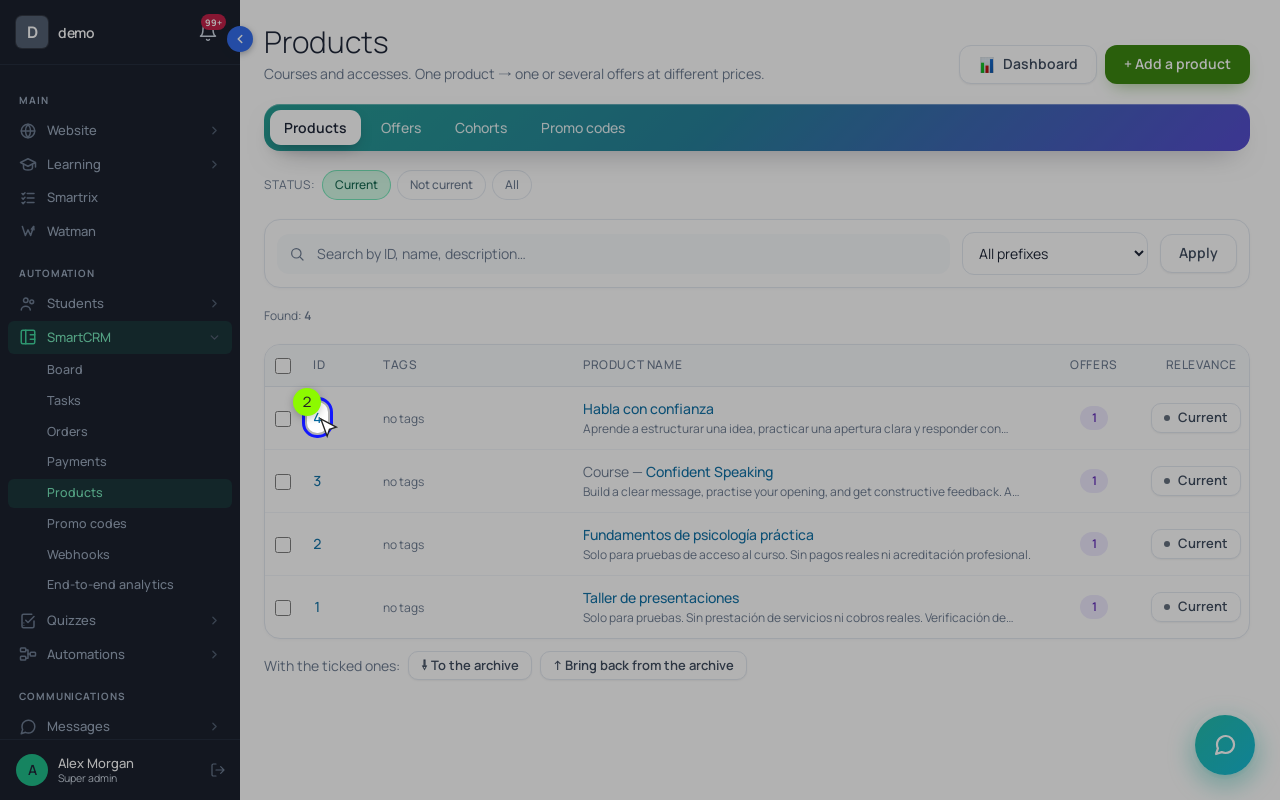
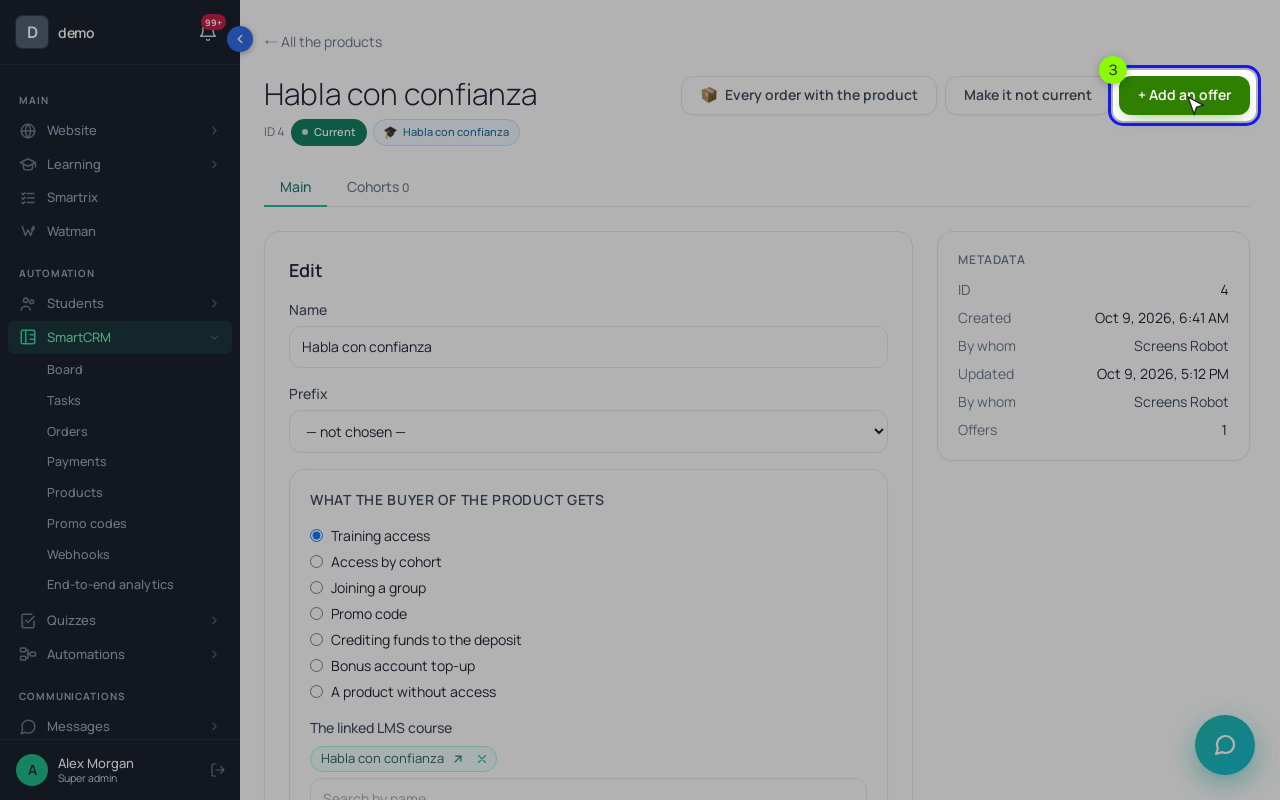
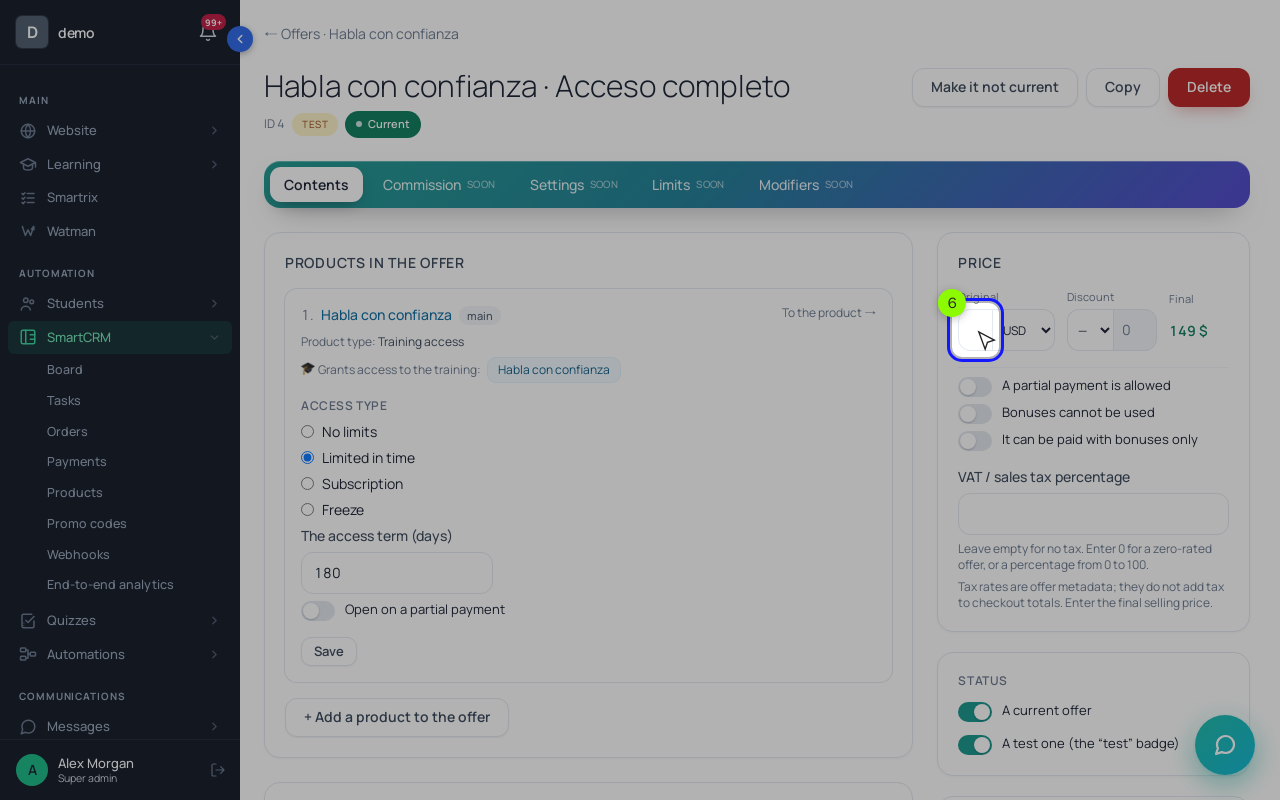
Step 2. The two offers. In the product card, click "+ Add an offer": "Self-paced", $149, access type "No limits". Then a second one: "With feedback", $349, "No limits".
The feedback reviews need somewhere only $349 buyers can reach. One way: put the three review assignments in a small second course with its own product, then add that product to the feedback offer as an additional product in its bundle block (and switch on "Buyers" in that course's access too). A $349 purchase opens both courses; a $149 purchase opens one.
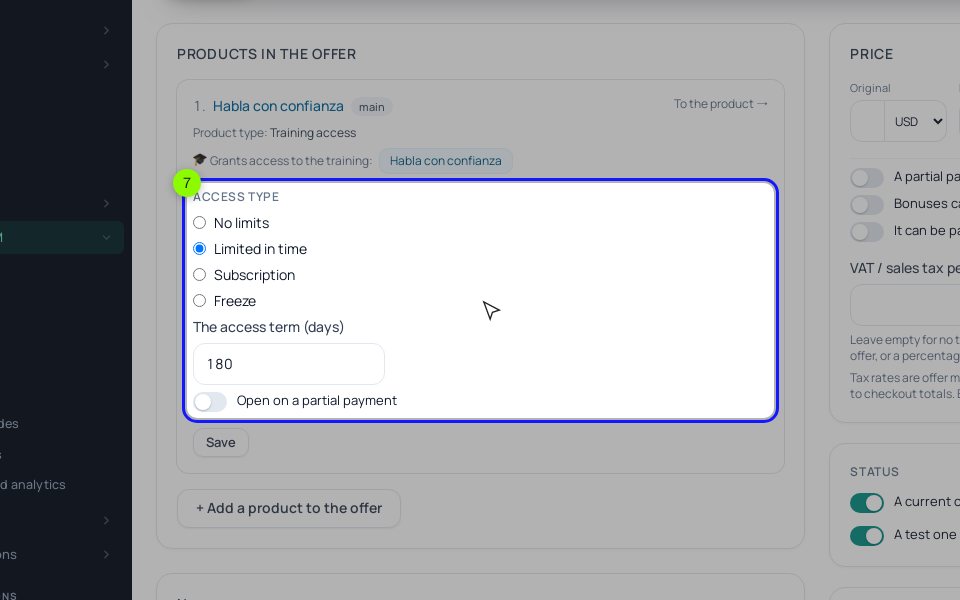
The "Access type" options matter for the price. "No limits" is lifetime access. "Limited in time" closes the course after "The access term (days)" (365 if you leave it empty). "Subscription" only sets a term: nothing is charged automatically, and the next purchase extends it. Put each offer on the sales page with a "Pricing" block, one column per offer. A website button charges the "Original" price; the "Discount" field only works in CRM orders.
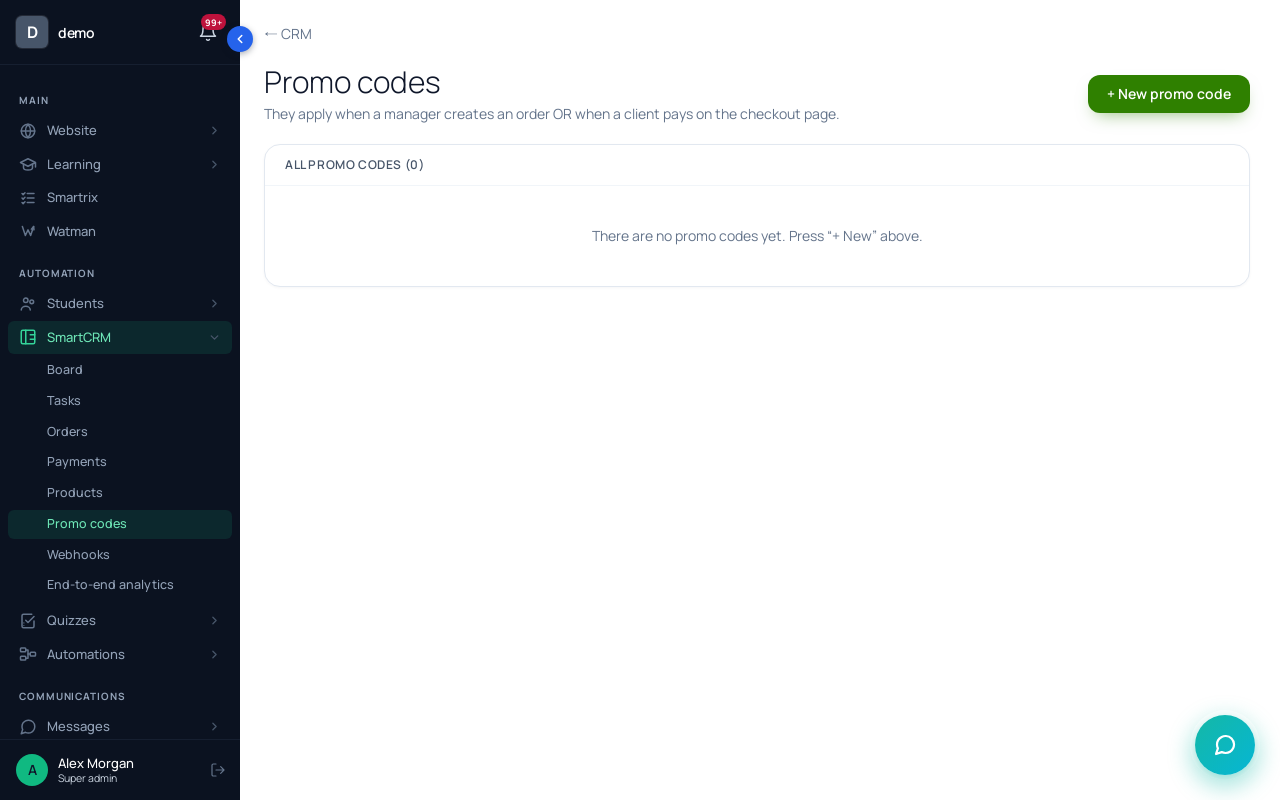
Step 3. The pilot and discounts. Open /crm/promocodes → "+ New promo code". For the pilot: code PILOT, "Fixed amount" 50, "Max uses" 20, a "Valid until" date, and the self-paced offer's ID in "For one offer only (ID)". Buyers type it into the "Promo code:" field on the payment page and pay $99.
Step 4. Payment plans. Scholaxy has no installment feature: the payment page asks for the order's full amount. For three payments by bank transfer, add a third offer to the same product, "With feedback, 3 payments" at $375 with the same bundle, keep it off the website, and create an order for it in the CRM. Add each $125 as a "Received" payment with "+ Add a payment". When the payments reach $375, the order turns "Paid" or "Completed" by itself and the course opens. To let the student start after the first payment, add them to a group that you list in the course access, and take them out if the payments stop.
Step 5. Subscriptions, currency and tax. Only Stripe subscriptions charge a card every month: you create a monthly price in Stripe and a plan under "Subscription plans" on the Stripe card in "Integrations". Each offer has its own currency, and new offers start in the "Currency for new offers" set under "System settings" → "Language and region". Amounts are never converted. Mercado Pago only charges in its account's local currency, so an offer paid through it must be priced in that currency. The "Default VAT rate" in "System settings" → "💰 Finance" is only a label on offers: it isn't added to the price or sent to the payment provider, so include any tax in the price yourself.
Before you announce anything, buy each offer once with a test payment and check that the right course opens. For everything else to check before the first sale, see the course launch checklist.
Before you publish the price
Tick these off in order; the list is saved in your browser.
- Write down what your buyer would do instead of your course and what it costs them.
- Count your time per student for every tier with feedback, and the hourly rate it gives you.
- Note price, length and feedback for five to ten courses your buyer could find.
- Put your real costs into the calculator and check the break-even and the cost per buyer from ads.
- Pick one or two offers. Write on the page what the higher tier adds and how many places it has.
- Set a pilot: a fixed number of places, an end date, a promo code for your list.
- Decide whether the price includes tax, and whether you offer a payment plan.
- Buy each offer once with a test payment and check that the course opens.
- After a month, compare sales of the two tiers with the hours you spent on reviews.