How to Build an Online Course Sales Funnel, Step by Step
An online course sales funnel is the path a stranger takes from a first visit to a paid course, and later to a second purchase. For most course creators it has five stages: traffic to one page, a free resource that turns a visitor into a lead, a few emails that get the lead a first small result, one paid offer with checkout, and then course access plus a next offer for buyers. Each stage has one job and one number that tells you whether it does that job.
Draw that map before you open any tool. Write down what each stage must achieve, what you offer there and at what price, where people are likely to drop off, and what you will measure. The software part is short once the map exists. It comes down to a form, a tag or group, an email chain, an offer, payment and access, with every link between them set on purpose.
The five stages of an online course sales funnel
We'll use one example the whole way through. Say you sell Calm Walks, a $97 video course that teaches dog owners to stop leash pulling. The free resource is a one-page plan with three exercises for the first week. Short videos on Instagram and YouTube bring 3,000 visitors a month to the plan's page. These are example numbers for the walkthrough, not benchmarks.
| Stage | Its one job | What you offer | Where people drop | Number to watch |
|---|---|---|---|---|
| 1. Traffic | Bring the right people to one page | Nothing yet | They land on a page that asks for three things | Visits by source |
| 2. Lead | Get an email and know where it came from | The free 3-exercise plan | The page doesn't match the post they clicked | Visitor to lead, % |
| 3. Warm-up | Give a first small result, then show the course | 3–4 emails over a week | The plan is long, or it's unrelated to the course | Lead to buyer, %; days from lead to payment |
| 4. Purchase | Turn a decision into a paid order | Calm Walks, $97 | Checkout: surprise price, extra fields | Orders created vs paid |
| 5. After purchase | Get buyers started, then offer the next step | A $249 month of group coaching | Buyers who never open lesson one | Second payments |
Run the example through: 3,000 visits, 20% leave an email, so 600 leads. Of those, 2.5% buy the course within the email sequence, which is 15 sales and $1,455. Two of the 15 buyers take the coaching month, another $498. That's $1,953 for the month, and about two thirds of a dollar per visitor.
Stage 1 and 2: traffic to a page that asks for one thing
The first stage only has to get the right people onto one page. Count visits by source from day one, because "Instagram is working" and "YouTube is working" lead to very different weeks. Tag your links with UTM so every lead carries its source.
The second stage turns a visitor into a lead. The page asks for one thing, an email, and gives one thing in return. The free resource should be a small slice of the course's promise: three leash exercises lead naturally to a leash course, while a dog nutrition guide brings in people who want something else. If you're still choosing the freebie, these lead magnet examples are a good place to start.
Should you skip the free step and send traffic straight to the $97 sales page? For people who already know you (newsletter readers, past students) that's fine. For people who saw one video, a $97 page is a big ask, and they leave without a trace. The free step costs you a week of delay and gives you an address to write to. We'd keep it for cold traffic.
Stage 3: the warm-up gets a first result
The emails between the form and the offer have one job: help the person get a small, visible win (a calmer first walk) and then show what the course adds. Three or four emails over a week is enough for a $97 course. Longer sequences give people more reasons to unsubscribe before they see the offer.
What to watch here is lead to buyer within the sequence, and how many days pass between the form and the payment. If most buyers pay within two days of the offer, a two-week chain adds little. Opens tell you about subject lines and not much more.
The exact order of emails, the delays and the rule that stops the chain once someone buys are a separate topic. They are covered step by step in the automated sales funnel guide. This article stays with the map.
Which offer at which price point
A sales funnel for an online course usually has three price levels: free, the main course, and something bigger for people who already bought. For Calm Walks:
- Free: the 3-exercise plan. It costs you nothing per lead and filters for people with a leash-pulling dog.
- $97: the course itself, the offer the whole funnel is built around.
- $249: a month of group coaching calls, offered only to buyers, two or three weeks after purchase.
What about a $9 "tripwire" between the free plan and the course? We wouldn't add one to a first funnel. It's another product to make, another checkout where people drop off, and another email sequence to write, all before you know whether the main offer sells. It makes more sense once the core course costs several hundred dollars and buyers clearly want a smaller first commitment. Even then, a cheaper option of the same course (three months of access instead of lifetime) is often simpler than a separate product.
Above a few hundred dollars, we'd end the funnel in a call, not a checkout. The emails then sell the call, and someone on your side closes the sale.
Stage 4 and 5: checkout, access and the next offer
People who clicked "Buy" have decided. Losses here are usually technical: a price on the checkout page that differs from the email, or a discount code that doesn't apply. Compare orders created with orders paid. If a third of orders stay unpaid, test the checkout yourself before you rewrite any email.
Access has to open at the moment of payment, without anyone on your side doing it by hand. Someone who pays at 11 pm should be watching lesson one at 11:05, not waiting for you to wake up and send a login.
The fifth stage starts after the sale. Get buyers into the first lesson within a few days, then offer the next step to the people who used the course. Exclude buyers from every message that still pitches the $97 course. A "last chance" email to someone who paid yesterday tells them you don't know who your students are.
Where to put your effort
Put your own numbers into the calculator. The forward mode shows what one point at each step is worth; the reverse mode shows how many visitors a target needs.
Example values for the $97 Calm Walks course (change them to your own):
| Step | Example | Result |
|---|---|---|
| Visitors per month | 3,000 | |
| Visitor to lead | 20% | 600 leads |
| Lead to buyer | 2.5% | 15 buyers |
| Price | $97 | $1,455 revenue, about $0.49 per visitor |
| Visitors +10% | 3,300 | $1,600.50 (+$145.50) |
| Visitor to lead +1 point | 21% | $1,527.75 (+$72.75) |
| Lead to buyer +1 point | 3.5% | $2,037 (+$582) |
| Target $3,000 a month | 31 sales, 1,240 leads, 6,200 visitors |
The reverse mode is the sobering one. To make $3,000 a month from the course alone at these rates, Calm Walks needs 6,200 visitors, about twice the current traffic. Lift lead to buyer from 2.5% to 5% and the same target needs 3,100 visitors, close to what you already have. With numbers like these, the warm-up emails and the offer email deserve your next month, and more videos can wait. If your page converts fewer than one visitor in ten, the order flips: fix the page first.
Where this funnel map goes wrong
The map breaks in predictable places:
- Too many stages. Each extra step (a quiz before the form, a webinar before the offer, a tripwire before the course) loses people. Add one only when you can say what it filters.
- A freebie that doesn't lead to the course. Leads pile up, sales don't follow, and the emails get blamed.
- Judging the funnel on a few dozen leads. With 40 leads a month, one sale more or less moves lead to buyer by 2.5 points. Wait for a few hundred before you rewrite anything.
- A dated launch disguised as evergreen. If the course runs as a cohort starting on a fixed day, a launch with real dates sells better than a chain that runs every day with a fake countdown.
- Measuring opens and clicks instead of payments by source. The sales funnel analysis guide shows what to track at each step.
How to set this up in Scholaxy
Every link between two pieces of the funnel is a setting you choose in Scholaxy. Nothing connects by default, which is good: you can see each link and test it.
| Link | Where you set it |
|---|---|
| Payment → course access | Product type "Training access" with "The linked LMS course", plus "Buyers" on in the course's "🔐 Access" |
| Sales page → offer | "Pricing" block on the page, "🛒 The product to sell" |
| Form → tag and group | Form editor, "After submitting": "Free-form labels" and "Add to the groups" |
| Form → email chain | Same tab: "Start the processes when the form is submitted" |
| Chain → stop for buyers | A dynamic segment of buyers used as the process's stop condition |
| Lead, order, payment → report | UTM tags on your links, read by "End-to-end analytics" |
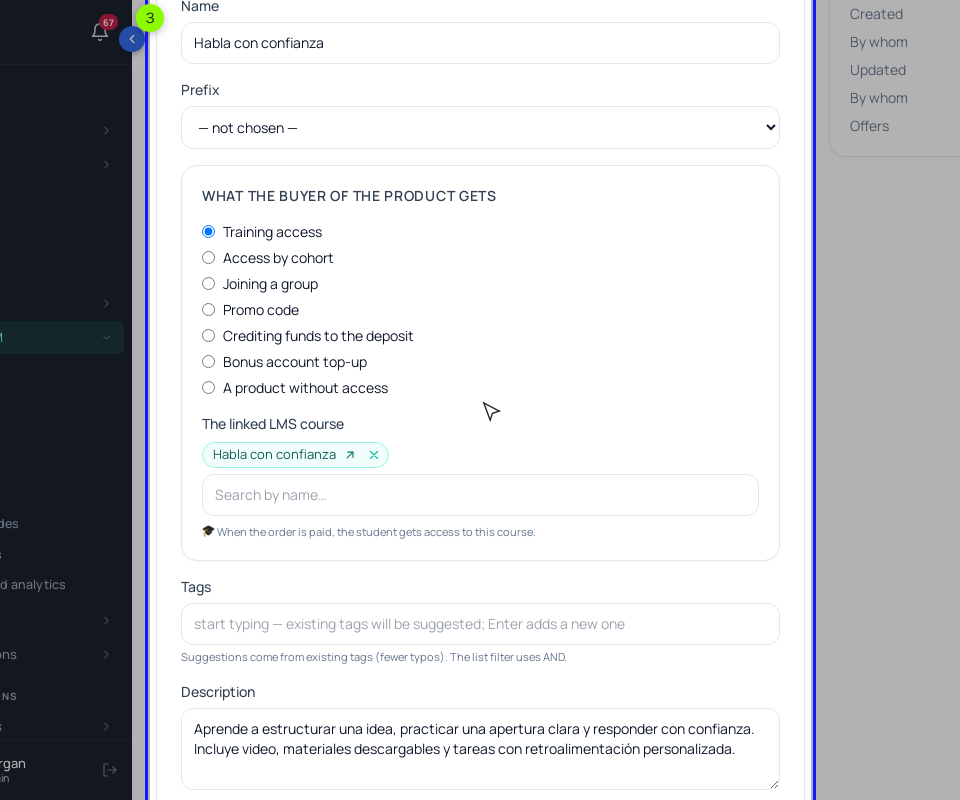
Step 1. The sale. In "SmartCRM" → "Products", click "+ Add a product", choose "Training access" and pick the course in "The linked LMS course". In the product card, "+ Add an offer": $97, "Access type" "No limits". Then in the course, open "🔐 Access", choose "Restricted (by groups and/or buyers)" and switch on "Buyers (there is a paid access to the training)". Without that switch, payment won't open the course.
Connect a payment provider under "Admin panel" → "Integrations" (Stripe, PayPal or Mercado Pago, each in your own account) and add a payment method on the checkout page. On the sales page, add a "Pricing" block and choose the offer in "🛒 The product to sell". That button charges the offer's "Original" price; for a discount, use a promo code, which the buyer types on the payment page.
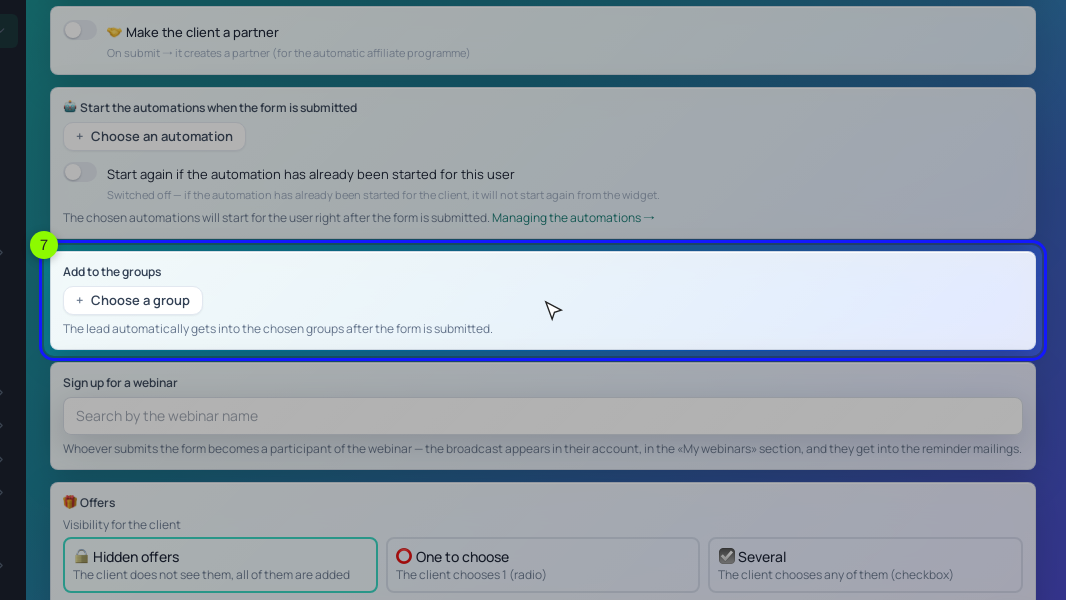
Step 2. The form. On the plan's page, add a "Lead form" block. On the "Fields" tab tick "Required" on Email: in the default form it's optional, and a lead without an email gets no groups and no processes. On "After submitting", type a label such as calmwalks-plan in "Free-form labels", pick a group like "Calm Walks: free plan" in "Add to the groups", choose the warm-up process in "Start the processes when the form is submitted" and set "Redirect after submit" to a thank-you page with the plan. Click "Save the block" and publish.
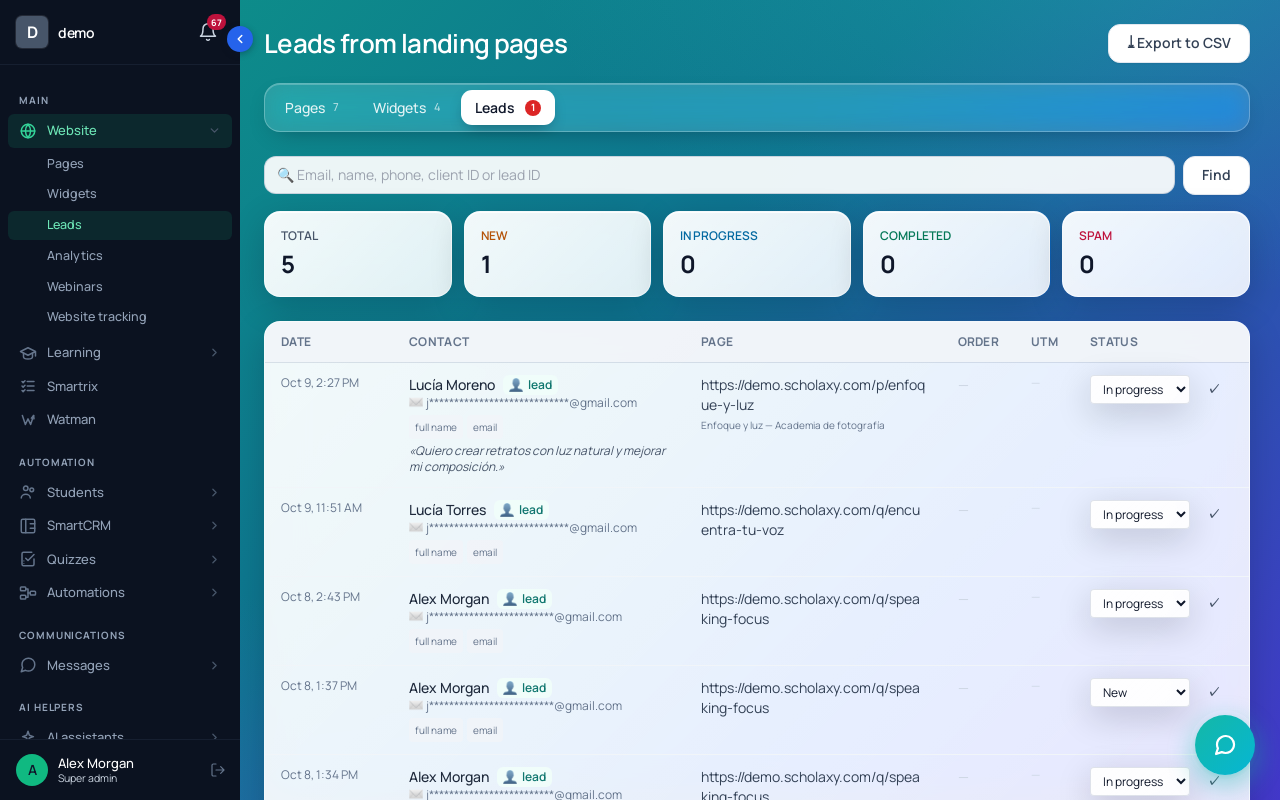
Send yourself a test lead. It shows up in "Website" → "Leads" with the page and the UTM tags, and the lead card links to the person it created or found.
Step 3. The email chain. It's a process with emails, delays, a check for course access and a stop condition: a dynamic segment of buyers ("Students" → "Segments", the "Training access" condition with the "open now" option). Build it with the automated sales funnel guide. For the coaching offer, a second product ("A product without access", since it's calls) and a campaign to the buyers segment ("Messages" → "Campaigns", audience "By segment") is enough. Campaign emails need your own SMTP or SendPulse connected.
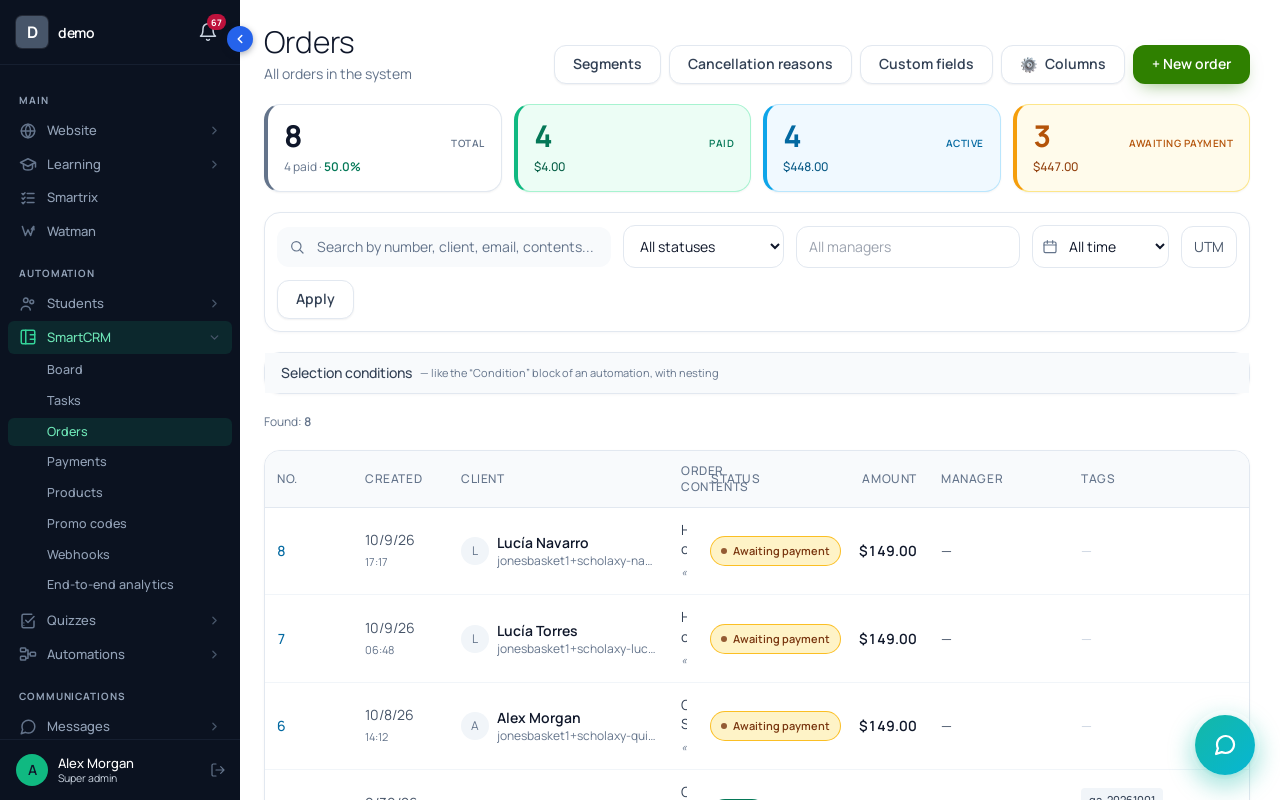
Step 4. Payment and access. When an order becomes "Paid" (or "Free" for a zero-price order), the course opens by itself, and the order card shows it under "Course access granted from this order". Orders that stay unpaid are your checkout losses.
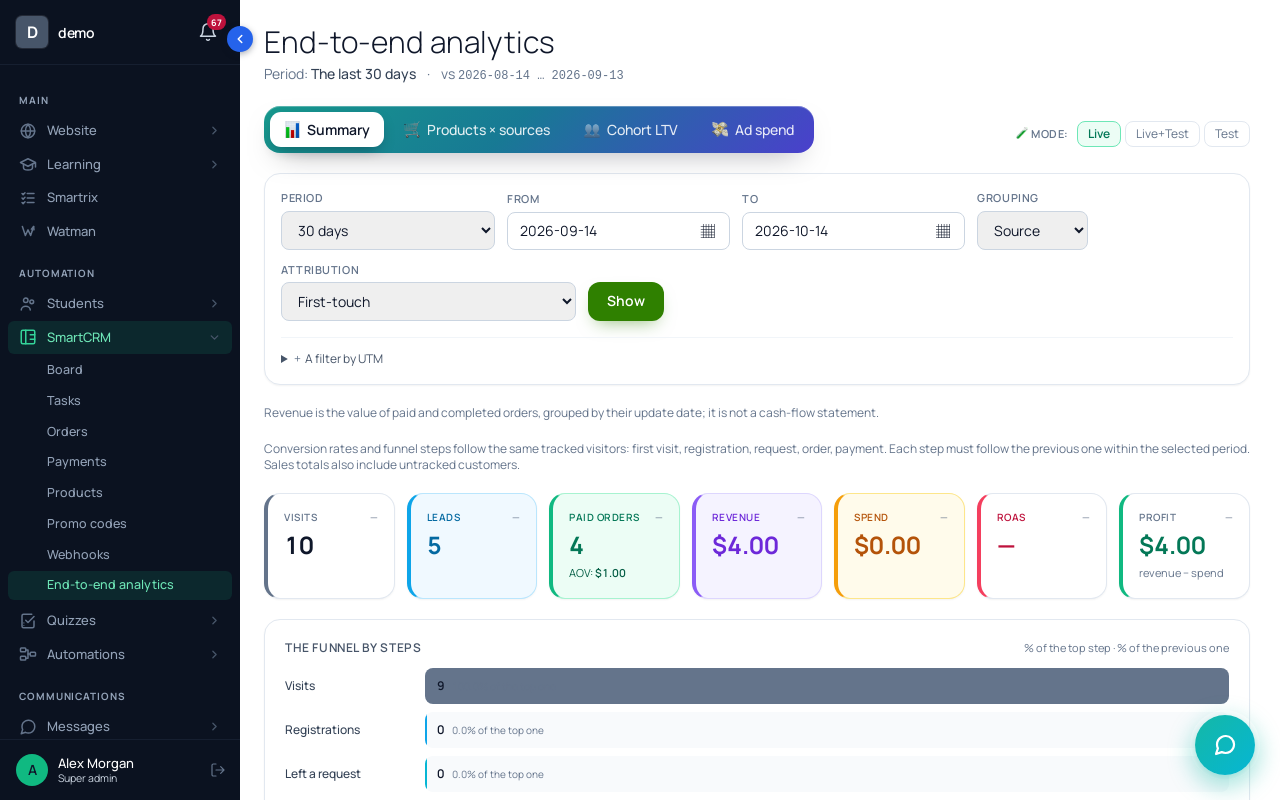
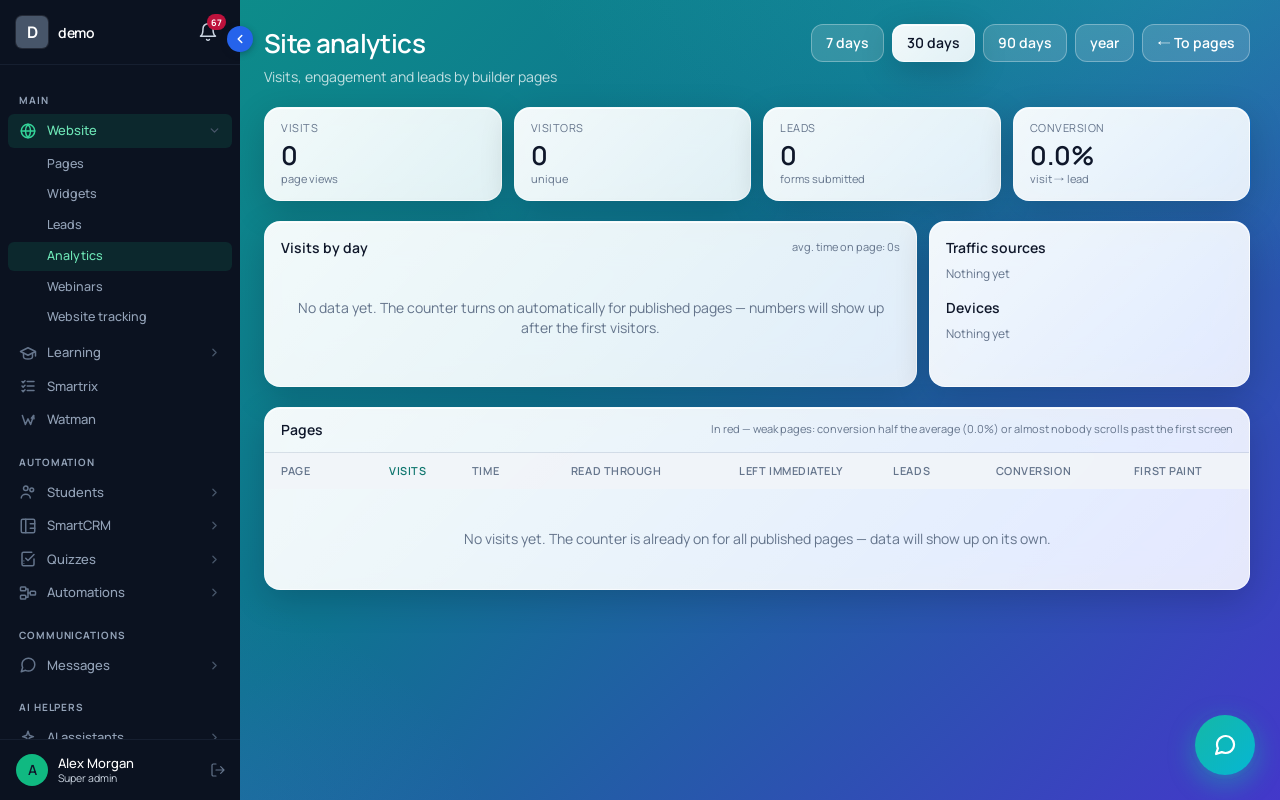
Step 5. The numbers. "SmartCRM" → "End-to-end analytics" lines up visits, leads and payments by UTM source and shows "The funnel by steps" up to the first payment and a repeat payment. "Website" → "Analytics" shows the "Conversion" of each page, so you can tell whether the plan's page or the emails are the weak step.
Setup order for the first week
- Write the map: five stages, one job, one offer and one number each.
- Create the product with "Training access", the $97 offer and "Buyers" in the course access. Buy it once with a test payment and check that the course opens.
- Add the "Pricing" block with the offer to the sales page.
- Build the free plan's page with a form: Email required, label, group, thank-you page.
- Build the warm-up process with a buyers segment as the stop condition, then pick it in the form.
- Tag every link you post with UTM.
- Send a test lead from a second address and follow it to the paid order.
- After a week, compare visitor to lead, lead to buyer and orders created vs paid, and fix the weakest step first.