Email Segmentation for Online Schools: Leads, Buyers and Active Students
Email segmentation means splitting your list by what people have done, so each group gets the email that fits it. For an online school, five segments go a long way, and they follow the student's path: people who took something free but never paid, buyers who haven't started, students who are working through the course, graduates, and buyers who went quiet. Each segment gets its own message. Each one also needs a rule for who to leave out, and that rule is where most setups break.
Most segmentation advice comes from shops with hundreds of products and splits people by age, city or interests. A school usually sells two or three courses, so the split that matters is where the person is on the path to finishing one. The facts you need are already in your platform: did they pay, did they open lesson one, when did they last log in, did they reach the final lesson.
Say you run a small online calligraphy school. Modern Calligraphy, the beginner course, costs $69. Brush Lettering, the follow-up, costs $149. The free lead magnet is a set of practice sheets. Your list has 3,200 contacts: 2,400 downloaded the sheets and never bought, 800 bought the beginner course. These are example numbers for the walkthrough, not benchmarks.
What one list for everyone costs you
Send the $69 offer to all 3,200 contacts and 800 of them, one in four, get a sales email for a course they already own. Send the $149 Brush Lettering offer to everyone and 2,400 people who haven't done the beginner course hear about the advanced one, which for most of them is the wrong next step. Meanwhile the 140 buyers who are stuck before lesson one get promotions instead of the one email that would get them started.
Buyers who keep getting pitched for something they own start ignoring you, and they are the people most likely to buy the second course. Segmentation has a price too: every segment is one more email to write and one more rule to test. We'd start with three and add the rest when those work.
Email segmentation examples for an online school
Here are the five segments for the calligraphy school, with the rule, the message and the exclusion for each. Of the 800 buyers, 140 haven't finished lesson one, 260 visited in the last two weeks, 190 finished the course and 150 haven't logged in for over a month. The remaining 60 sit in between (they visited 15–30 days ago and are still working) and get no extra email this month. That's fine: a segment exists to change what someone receives, and not everyone needs a change.
Example plan for the calligraphy school (3,200 contacts):
| Segment | Who is in | Size | Message | Exclude |
|---|---|---|---|---|
| Leads: practice sheets | Downloaded the sheets, no paid order | 2,400 | Welcome series, then the $69 offer | Bought Modern Calligraphy |
| Bought but not started | Access to the course, lesson 1 not completed | 140 | Where lesson 1 is and which pen to buy | Anyone who finished lesson 1 (they leave by themselves) |
| Active students | Access to the course, visited in the last 14 days | 260 | Weekly practice prompt, homework reminder | Graduates; Bought but not started |
| Graduates | Completed the final lesson | 190 | The $149 Brush Lettering offer | Bought Brush Lettering |
| Quiet buyers | Access to the course, no visit for 30+ days | 150 | One check-in email | Graduates; Bought but not started |
Overlap to watch: most buyers downloaded the sheets first, so they also match the lead rule. Exclude buyers from the lead sequence.
Look at the graduates row. The Brush Lettering offer goes to 190 people instead of 3,200, and those 190 already have the basics the advanced course assumes. The other 3,010 never see an offer they can't use. Turning graduates into buyers of the next course is its own topic, covered in upselling to existing students.
What to segment on: the data you already have
You don't need a survey or a scoring model for these five. Each rule uses facts a course platform records anyway.
Purchases and course access come first. "Has access to Modern Calligraphy" splits buyers from leads, and nothing else matters until that split is right. Prefer access to orders where you can: someone you enrolled by hand after a bank transfer has access but no online order.
Progress inside the course comes next: lesson one done or not, the final lesson done or not, the date of the last login. This separates "bought and stuck" from "bought and working", and those two need opposite emails.
Groups and tags are labels you put on people. Where a group decides who opens a course (as it does in Scholaxy), we'd keep groups for access, cohorts and freebie lists, and use tags for smaller facts: which webinar someone signed up for, whether they asked about a payment plan.
Source matters less than people expect. UTM tags tell you whether a lead came from Instagram or a podcast ad, which helps you decide where to spend. It should change the email only when the two audiences saw different promises.
Exclusions and overlaps
A person can match several rules at once. Most of your 800 buyers downloaded the sheets first, so the lead rule "downloaded the sheets" still matches them after they pay. Without an exclusion, they keep getting the $69 offer for the course they're taking. The bug is easy to miss, because each segment, on its own, is correct.
Two habits prevent it. Write the exclusion into the segment ("leads, minus anyone who bought Modern Calligraphy"), not into each email. And let the rule move people: a dynamic segment recalculates from its conditions, so a lead who pays drops out by themselves. A static list is a snapshot. It suits a hand-picked group (the twelve students you invited to a live critique) and goes stale for anything defined by behaviour.
The second trap is timing. A lead on day 3 of a five-email series who buys on day 4 is no longer in the lead segment, but the series doesn't know that unless it checks. Whatever sends it has to stop the run when the person lands in the buyers segment, at any step. The drip campaign guide covers stop rules in detail.
An email segmentation strategy: start with three
If you're setting this up for the first time, we'd build them in this order:
- Leads who haven't bought, excluding buyers. This is your sales series.
- Buyers who haven't started. One email, sent a few days after purchase. It's cheap to write, and a buyer who never opens lesson one is unlikely to buy your second course.
- Graduates, excluding buyers of the next course. This is where the second sale comes from.
Active students and quiet buyers come next, after a month. The active segment needs a new practice prompt every week, which is real writing work. The quiet one needs restraint: one check-in helps, three in a row feels like nagging. Keeping students going is its own subject; see student retention.
Judge each segment by the one thing it exists to change. For leads, purchases of the $69 course. For not started, lesson one completions within a week. For graduates, Brush Lettering purchases. Open rates tell you about subject lines, and some mail apps load images automatically, so an "open" isn't always a person reading.
Where segmentation goes wrong
A few mistakes show up again and again:
- Segments too small to learn from. If "graduates who came from the podcast" has eleven people, merge it back: at that size you can't tell a good email from a bad one.
- Rules built on data nobody records. Before you plan a segment of "people who attended the webinar" or "people who watched 80% of lesson 3", check that your platform stores that event per person and that segments can read it. If it doesn't, the segment will be empty or wrong and nothing will warn you.
- A segment instead of access. A segment helps you write to people. It doesn't open a course, so don't use one as the list of who may enter.
- Forgetting unsubscribes. People who unsubscribed should drop out of every promotional segment. Check how your tool treats them in automated sequences too, not only in one-off broadcasts.
This approach has limits. A school with one course and a few hundred contacts gets little from five segments; leads and buyers are enough. A cohort course that starts on a fixed date often runs better on one dated launch sequence for everyone, with a single exclusion for people who already paid.
How to set this up in Scholaxy
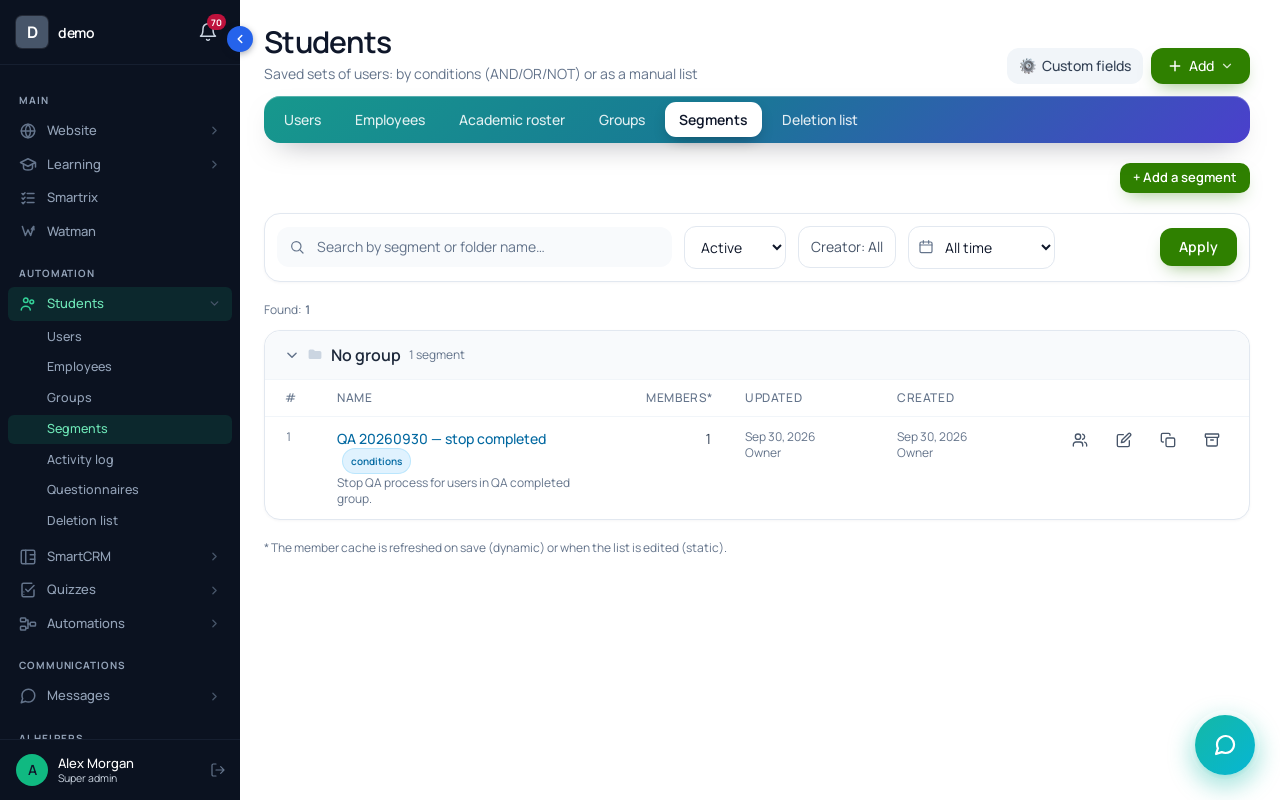
In Scholaxy, segments live in "Students" → "Segments", and the same conditions work in three places: in a segment, as a broadcast audience and inside processes.
Step 1. Groups and tags. Groups are lists of people that courses can be opened to. A lead form can add people to a group under "Add to the groups", and a process can do it with "Operation" → "Add to a group". Tags are added and removed by a process with "Operation" → "Add a tag" or "Remove a tag". For the calligraphy school, the practice-sheets form adds everyone to a "Practice sheets" group. Tick "Required" on the form's Email field: without an email the lead gets no person card and no group.
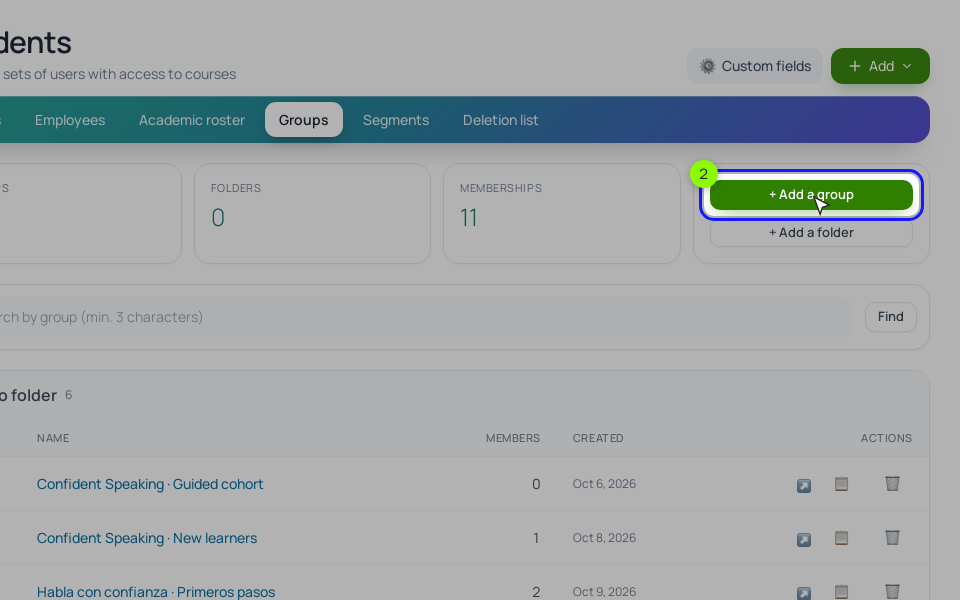
Step 2. The buyers segment. Click "+ Add a segment", name it "Bought Modern Calligraphy", choose "Dynamic" and click "Create and open". A dynamic segment recalculates itself by its conditions; a "Static" one is a list you fill by email or ID, and it changes only by hand.
In the card, click "+ Add a group of conditions", choose "Training access", pick the "ever was" option and your course. It keeps people whose access has since closed, so they never get the beginner offer again. Click "Save and recalculate" and check "Members right now".
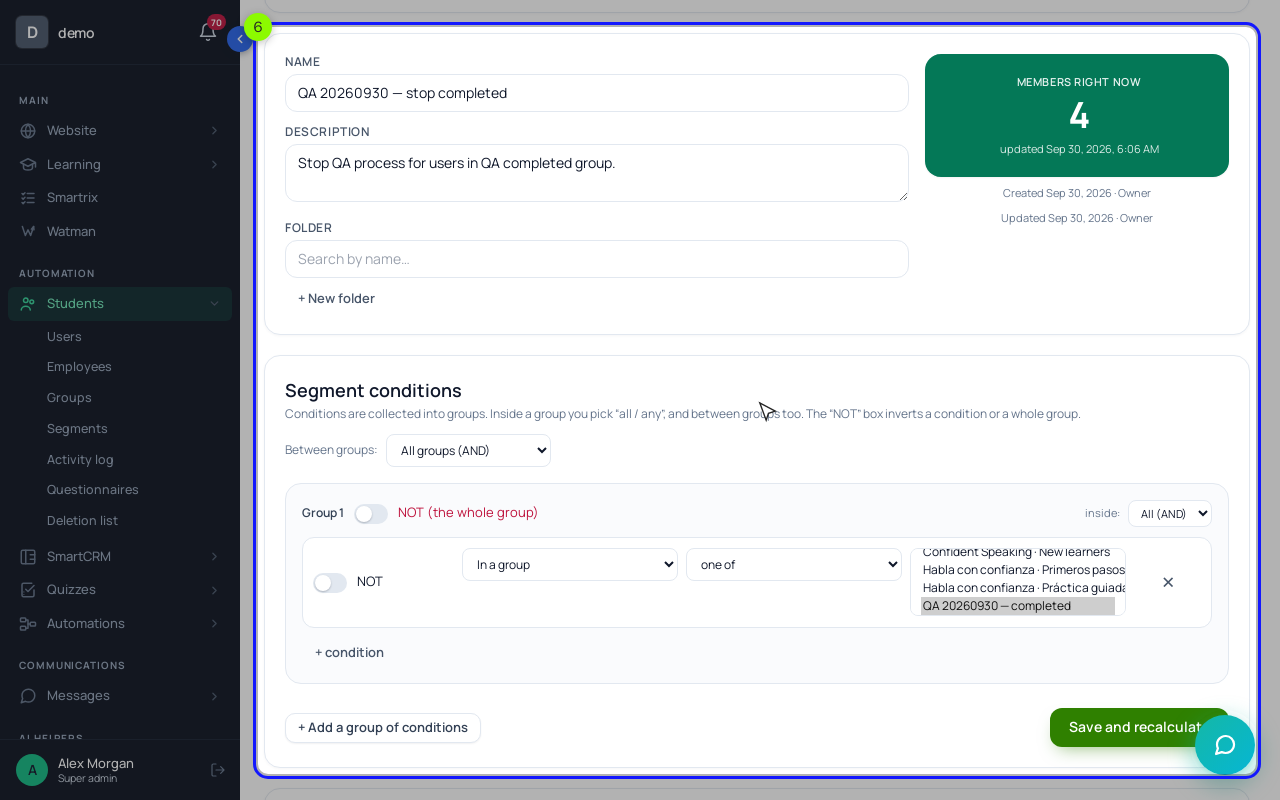
The other four segments use the same builder. Inside a group of conditions you choose "All (AND)" or "Any (OR)", the same choice sits between groups, and the "NOT" box inverts a condition or a whole group.
- Leads: "In a group" → "Practice sheets", plus "Belongs to a segment" → "does not belong to" → "Bought Modern Calligraphy".
- Bought but not started: "Training access" with the "open now" option and the course, plus "Course participant: lesson (entry, homework, video)" → "not matching the rule" → lesson 1 with "Lesson completed".
- Active students: "Training access" open now, plus "Last visit" → "no more than N days ago" → 14, plus "does not belong to" the not started segment.
- Graduates: "Course participant: lesson (entry, homework, video)" → the final lesson with "Lesson completed", plus "does not belong to" a "Bought Brush Lettering" segment.
- Quiet buyers: "Training access" open now, plus "Last visit" → "more than N days ago" → 30, plus "does not belong to" for graduates and for not started.
Other conditions include "Tag", "Has an order" (order status and product inside), "UTM source" and "Email activity". "Email activity" counts opens and clicks in emails sent by processes; broadcast opens are checked with "An email was sent". "Show users" in the segment list opens the student list filtered by the segment, so you can look at real people before you send.
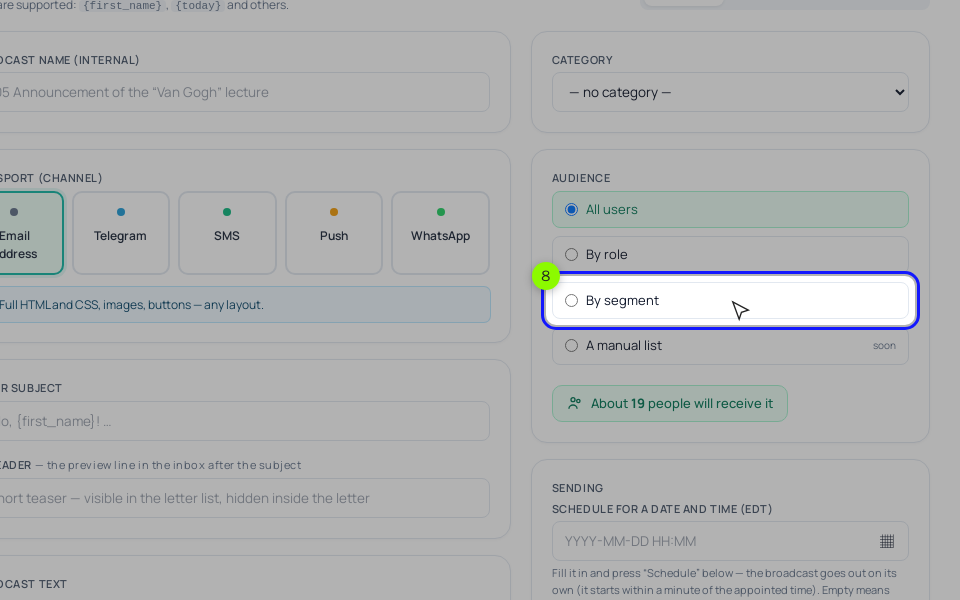
Step 3. Broadcasts to a segment. In "Messages" → "Campaigns", click "New broadcast" and choose "By segment" under "Audience". The segment is recalculated at the moment of sending, and people who unsubscribed never count. There is no audience "by group", which is why the leads segment uses the "In a group" condition. Broadcast emails go out only through SendPulse or your own SMTP, so connect one of them in "Integrations" first.
Step 4. Segments inside processes. The sales series for leads is a process (lead nurturing builds one step by step). Segments help in three spots. The process's entry rule uses the same conditions. A "Condition" block can check "Belongs to a segment" and send the run down "Yes" or "No", which is how you build separate branches for, say, graduates and everyone else in one process. And on the "General" tab, under "Execution control", "A stop condition by segment" takes the run out of the process as soon as the person lands in that segment, whichever block they are waiting on.
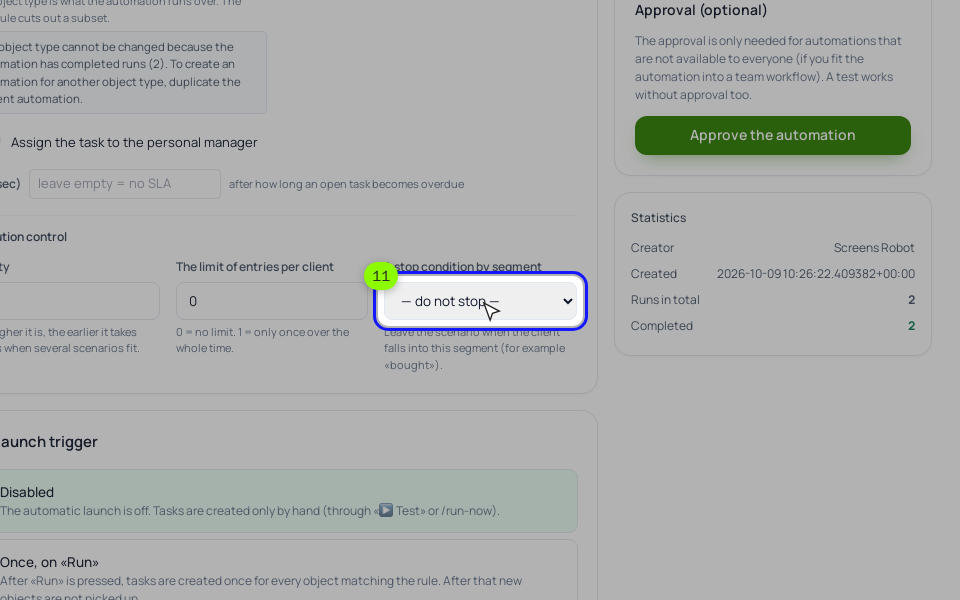
For the lead series, pick "Bought Modern Calligraphy" there. Use "Send an email" blocks for the series: chain emails from the "Run a broadcast" block don't respect unsubscribes yet.
How is segmentation different from personalization?
Segmentation decides who gets which email. Personalization changes details inside one email, like the first name. "Hi Anna" in a pitch for a course Anna already owns doesn't help.
Should I segment by country or language?
Only if the email itself changes. A live Q&A at 18:00 in one time zone is a real reason to split by country. For a self-paced course, country rarely changes the message.
What about contacts who never open anything?
After a few months of silence, send one email asking whether they still want to hear from you, and stop writing to those who don't respond.
Setup order for the first month
Tick them off as you go; the list stays in your browser.
- Write each segment down: rule, message, who to exclude. Start with leads, not started and graduates.
- Make the freebie form's Email field required and add everyone to one group.
- Create a dynamic "Bought" segment per course with "Training access" and the "ever was" option.
- Build the leads segment: the freebie group minus "Bought". Check the count and "Show users".
- Set "Bought" as "A stop condition by segment" in the lead process and test on your own email.
- Build "Bought but not started" and send it one email a few days after purchase.
- Build "Graduates" minus buyers of the next course and send the offer "By segment".
- After a month, check each segment against its one number, then add the other two.
If the lead series still reaches buyers after all this, check the stop segment first.