Gamification in Education: Badges and Milestones for Your Course
Gamification in education means borrowing parts of games (points, badges, levels, progress bars, challenges, leaderboards) so that progress through learning becomes visible. For a course you sell to adults, most of that list is decoration. What helps is smaller: a few milestones placed where students give up, and at each one a reward that makes the next step easier. A message that arrives the minute they finish the hard module, say, or a bonus lesson that opens at that moment.
So the work starts with your completion numbers, not with a points system (if the course isn't built yet, start with how to create an online course and come back with real numbers). Find the module where most students stop, put a milestone inside it, decide what the student gets there, and automate the message so it doesn't depend on you being at your desk. Badges come last. In some setups, Scholaxy's included (more on that below), the student never sees them at all.
Say you teach silver jewelry and sell Make Your First Silver Ring, a $95 video course for adult beginners working at a kitchen-table bench. It has 6 modules of 4 lessons each: three teaching lessons and one project, where the student uploads a photo of the piece. We'll use it all the way through. The numbers are made up for the walkthrough.
What gamification in education looks like in a paid course
Each game element answers a different question for the student. Here is how they behave in a course people buy to learn a skill.
| Element | What the student sees | Where it helps an adult | Where it backfires |
|---|---|---|---|
| Progress and lesson statuses | Which lessons are done, which is next | Almost always: it answers "how much is left?" | When it counts lessons nobody needs |
| Points (XP) | A number next to each lesson | Shows which lessons are the real work | When points come for clicking through videos |
| Badges | A named icon for an achievement | When the name is a skill: "Saw a curve without snapping a blade" | When there are 30 of them for trivial actions |
| Levels | A title that changes with points | Long programmes with several courses | A six-week course has nothing to level up into |
| Leaderboards | Your rank among other students | A cohort chat, where activity helps everyone | Self-paced courses, where the slow learner sees they are last |
| Certificates | A document with a name, a date and a number | A skill people show to clients or employers | When it's given for watching, not doing |
Adults paid for a result, so an element works when it points at the result and fails when it points at activity. A progress bar that says "4 of 24, next: sawing your first straight line" is useful. A badge for logging in three days in a row is not.
Where students stop: the silver ring numbers
Here is one month of the example. 140 people bought the course. The table counts how many finished each stage; for a module, that means its project lesson.
| Stage | Students | Lost here | Share lost of those who reached it |
|---|---|---|---|
| Bought | 140 | ||
| Finished lesson 1 | 126 | 14 | 10% |
| Module 1: tools and safe handling | 112 | 14 | 11% |
| Module 2: sawing and filing | 91 | 21 | 19% |
| Module 3: shaping and sizing a band | 80 | 11 | 12% |
| Module 4: soldering | 52 | 28 | 35% |
| Module 5: polishing and finishing | 46 | 6 | 12% |
| Module 6: your own ring | 42 | 4 | 9% |
42 of 140 buyers finish, 30%. Module 4 loses more than a third of the people who start it. In our example that's where the torch comes in: it's the first module where the student needs to buy a torch and set up a safe spot for it, the first solder joints come out lumpy, and the project (a closed, soldered band) takes two or three tries.
What can a milestone do about it? Suppose a milestone in the middle of module 4 keeps eight more people, so it loses 20 instead of 28 and 60 finish it. If the later modules keep their rates (42 of 52 finish from there, about 81%), 60 × 42/52 = 48.5, so about 48 people finish the course instead of 42. Six more finished rings a month. That's the scale to hope for, and nothing guarantees it: if module 4 is simply too hard, no congratulation fixes it.
How to design milestones adults care about
Put the milestone inside the hard module
A milestone at the end of module 4 congratulates the 52 who made it. The 28 who quit never see it. Split the hard part instead: "first clean solder joint" after lesson 14, and "first ring soldered shut" at the module's project, lesson 16. The first one is a small win in the middle of the frustrating stretch, when the student is deciding whether to light the torch again on Saturday.
Reward the work, not the click
Tie milestones to project lessons (a photo uploaded and accepted), not to watched videos. If you show points, weight them. In our example a teaching lesson is worth 10 XP and a project 40: 18 × 10 + 6 × 40 = 420 XP for the course, 240 of them from projects. The student sees at a glance which lessons are the real work. Watching a video to the end earns nothing extra, on purpose.
Make each reward useful for the next step
"Solder master" helps nobody. A message that says "Your ring is closed. Lesson 17 starts polishing; before it, try the five-minute fix for lumpy joints in the bonus lesson that just opened for you" does. For this course we'd rank rewards like this: a person's comment on the photo, a bonus lesson opened at the milestone, a certificate for the hard module, the course diploma, and points last.
Keep it to four or five milestones
For 24 lessons we'd pick five: lesson 1 done (what happens before it, from payment to the first login, is customer onboarding), the module 2 project (first shape sawn to a pattern), the middle of module 4, the module 4 project, and the final ring. More milestones means more messages, and by the sixth "Congratulations!" people stop reading them. The cost of five is five short texts and one process for each.
Why automate at all? Timing. A milestone message works in the minute after the student finishes, while the ring is still on the bench. If you congratulated every finished module by hand, that would be 112 + 91 + 80 + 52 + 46 + 42 = 423 messages a month, about 14 hours at two minutes each, and most of them would arrive the next morning.
Gamification in education examples for course creators
The same method in four other adult courses. Each has one milestone in the place where people usually stall, and a reward that serves the next step.
- Python for data analysts. Milestone: the first script that cleans a CSV from the student's own job. Reward: a code review of that script. Skip points for quiz answers; the script is the proof.
- Conversational Italian for travel. Milestone: a two-minute voice recording ordering dinner. Reward: a reply from the teacher with three corrections, and a certificate for the speaking module. It shows they did the work in your course, nothing more.
- Home strength training, 12 weeks. Milestone: the week 4 test workout logged. Reward: the next block opens with weights adjusted to the test. No leaderboard of weights lifted: it invites injuries.
- Portrait photography. Milestone: the first set of ten portraits uploaded. Reward: a critique, and a spot in the cohort chat where other students react to the photos.
Where gamification backfires
- Points for opening lessons. Students click through, the numbers grow and completion doesn't move.
- Leaderboards in a self-paced course. Someone who started yesterday sees they are 89th and decides the course is for other people.
- Badges with no meaning outside the course. Nobody puts "Level 3 Silversmith" on a profile.
- Streak pressure. Adults with jobs miss days; "You lost your streak!" makes them feel behind and leave.
- Congratulations that arrive late or twice. Both say "a machine sent this, carelessly".
- Gamification as a patch. If module 4 has a 40-minute video, cut it into four before adding any reward.
Small numbers mislead too. With 30 buyers a month, one person is about 3% of a stage, so the drop table jumps around. Read three months together before you move a milestone.
How to set this up in Scholaxy
Scholaxy has the parts this method needs: lesson statuses and XP in a "Lesson map" view of each module, certificates for a module and diplomas for a course, and processes that start on "Lesson completed", "Course completed", "Homework checked" and "Test passed". It doesn't give your students a badge collection, levels or a course-wide leaderboard. There is a process operation "Award a badge", but the badge is a label for your team: it shows on the student's card under "Badges (N)" and works in segments through the "Has a badge" condition. The student doesn't see it. The one leaderboard students see is inside group chats: the 🏆 in a chat's header opens the "Chat leaderboard", with +1 point for a message and +2 for a reaction to your message, capped per day.
Step 1. The diploma and the completion rule.
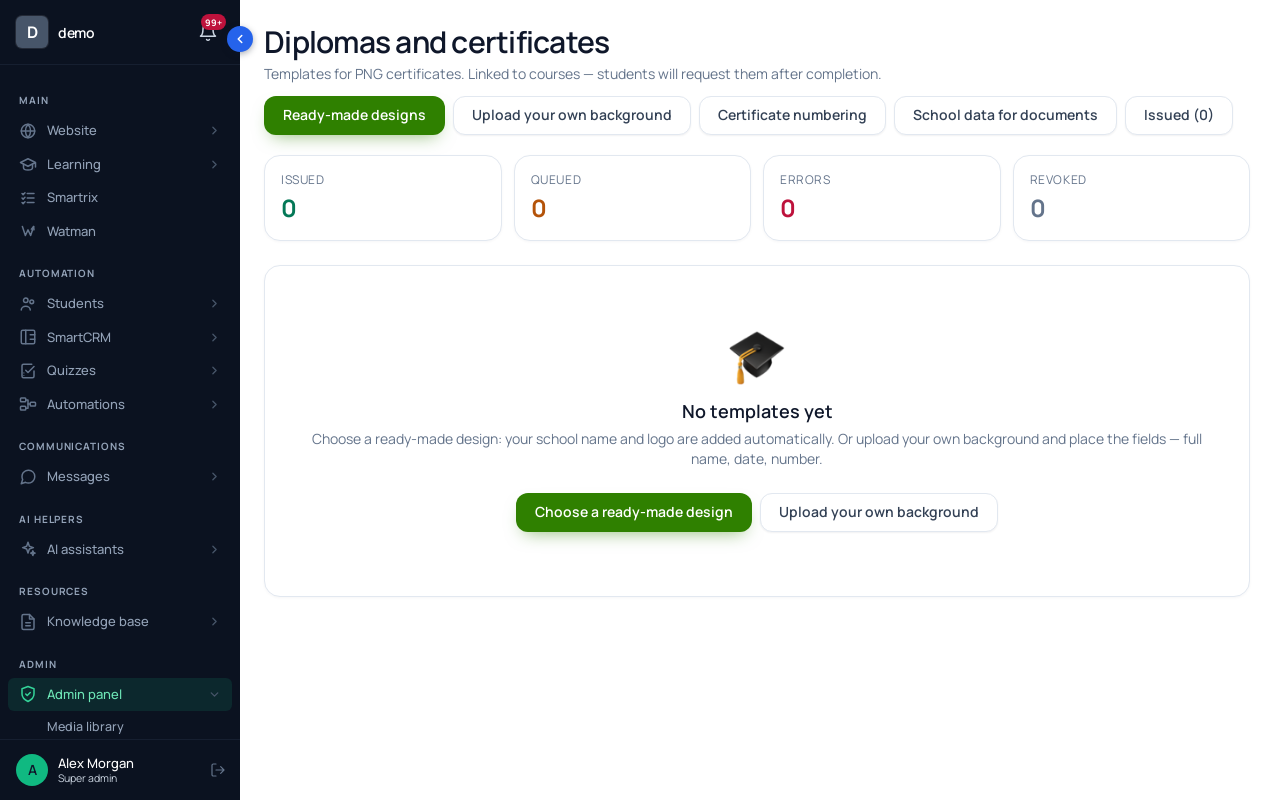
In "Learning" → "Diplomas", click "+ New template" and place the name, course title, date and number on your background. Make a second template for the module certificate.
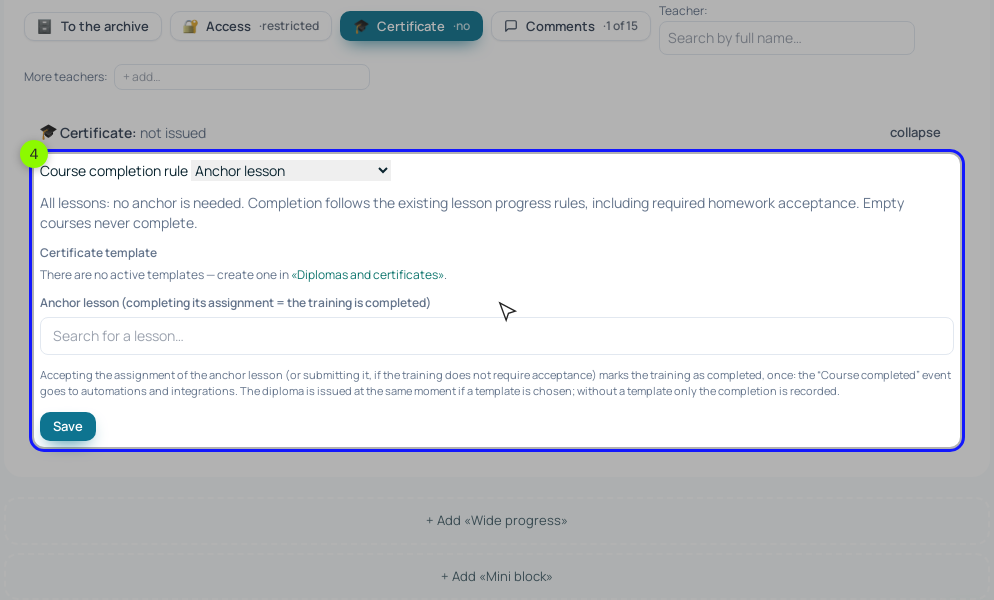
On the training page, click "🎓 Certificate". In "Course completion rule" choose "Anchor lesson" (the final ring, lesson 24) or "All visible lessons completed", pick the "Certificate template" and save. When the anchor lesson's assignment is accepted (or submitted, if your course doesn't require acceptance), the course is marked completed once, the diploma is issued and the "Course completed" event goes to processes. Students find the diploma under "Learning" → "Diplomas", with a verification link they can share. The same "Course completed" event can start the offer of your next course; upselling to existing students has that setup.
Step 2. The Lesson map and XP.
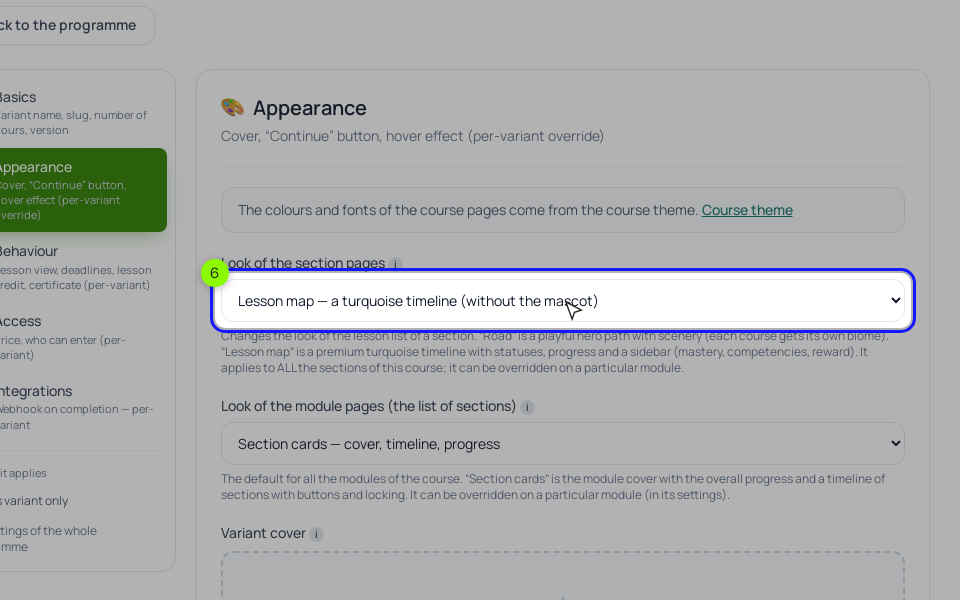
"🎨 Cover" on the training page opens its settings. In "Look of the section pages" choose "Lesson map": a timeline of lessons with their statuses, the section progress and a sidebar. The other option, "Road", is a game-style path with scenery; for adults we'd take the map. Each module can override this in its own "Module page design".
Then open a module's settings and click "XP for lessons (all at once) →". "For completion" is 10 XP by default; set 40 on the project lessons. It's awarded once, when the homework is accepted, or, in a lesson without an assignment, when the student clicks "I completed the lesson". Leave "For watching" at 0. In the Lesson map each lesson shows its "+N XP", which turns green once earned.
Step 3. The hard module.
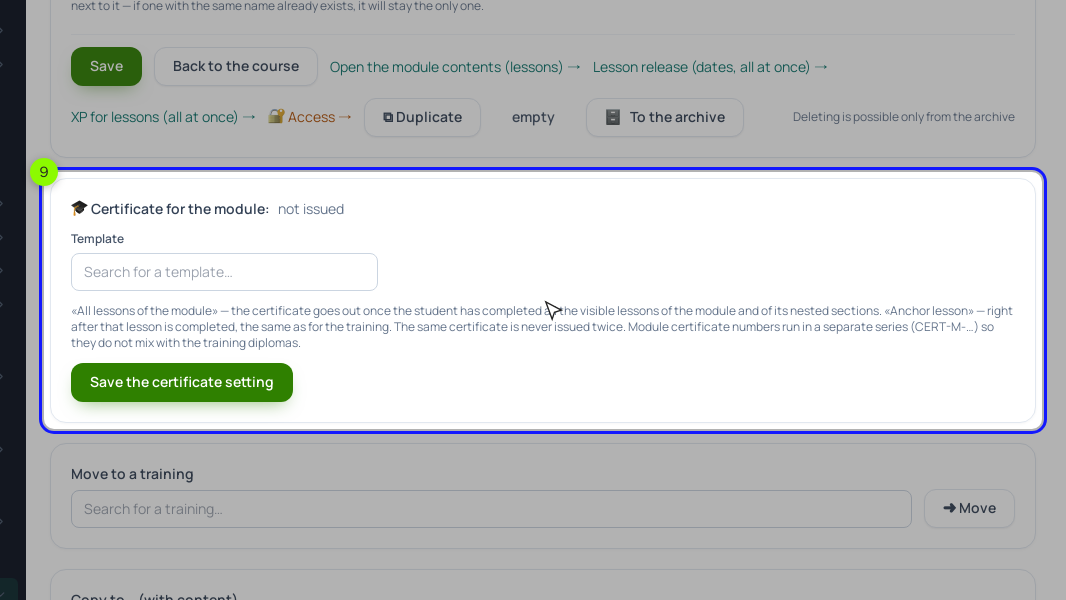
Open module 4 with ✎ on its card. In "🎓 Certificate for the module:" choose the template and either "When all the lessons of the module are passed" or "When the anchor lesson is passed". Module certificates have their own number series, CERT-M-…, so they don't mix with course diplomas.
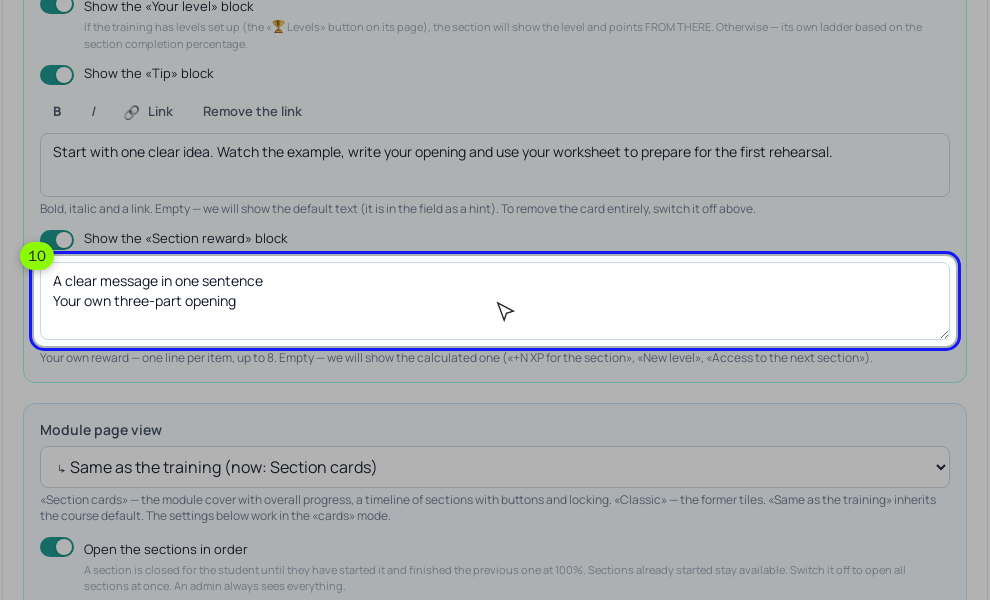
On the same page, under "Sidebar blocks of the Lesson map", turn on the "Section reward" block and write your own lines, up to 8: "Module certificate: Soldering", "Bonus lesson: fixing lumpy joints in five minutes". Left empty, the block shows "+N XP for the section", "New level" and "Access to the next section". A school doesn't set up levels, so replace that default text.
Step 4. The milestone messages.
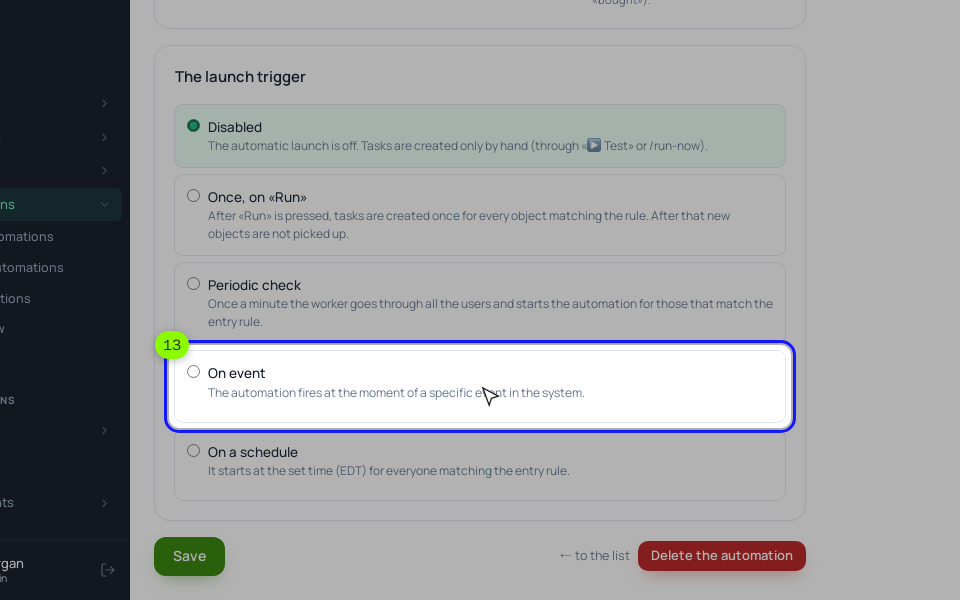
In "Processes" create one process per milestone, "By LMS users". On the "General" tab choose "On event" under "The launch trigger", pick "Lesson completed" and the specific lesson (lesson 14 for the middle of module 4). On the canvas, add "Send an email" or "Inbox message" with {first_name} in the text. For the bonus lesson, add an "Operation" "Grant lesson access"; the lesson itself must be set to open "By access" in its "Settings" → "Lesson release schedule", or the grant does nothing. The other release modes (by date, by days after the start) are covered in drip content. A lesson counts as completed once, whichever way it closes (the button, a submitted or accepted assignment), so the student gets the message once. Run "▶ Test" with your own email before "▶ Activate".
Should I show students a points total?
Scholaxy shows XP per lesson in the Lesson map, not a running total. For a course of a few weeks we'd keep it that way: the project weights already show what matters.
Can a diploma from my course count as a qualification?
It confirms that the student finished your course, with a public verification page. It isn't a state-accredited qualification, so don't present it as one.
Setup order for your first milestones
- Count how many students finished each module last month and find the stage that loses the largest share.
- Pick four or five milestones, one of them inside that stage, and tie each to a project lesson.
- Write one short message per milestone that names the next step.
- Make a diploma template and a module certificate template, then set the course completion rule.
- Switch the course to the Lesson map, set XP for project lessons and write the Section reward for the hard module.
- Create one process per milestone on "Lesson completed", test it with your own email and activate it.
- After a month, fill in the stage table again and compare the drop in the hard module with the month before.