CRM for Education: How to Track Enquiries and Enrolments
A CRM for education is one list of every enquiry your school gets (a parent asking about classes, an adult asking about a course) where each enquiry has a stage, an owner and a dated next step, from first contact to a paid enrolment. It answers three questions a spreadsheet keeps getting wrong: who is handling this family, what happens next and when, and where the enquiries that never enrolled dropped out.
For a tutoring center, a language school or a paid academy, a working setup has four parts. The enquiry form creates the record by itself. Each new enquiry gets an owner within hours. Every stage where someone has to act carries a task with a date. And once a week someone reads a report by stage, not just the total.
This guide is about businesses that sell education: courses, tutoring, academies, online schools. A university admissions office with applications, transcripts and a student information system needs a different class of tool, and we don't cover it here.
The example: a math tutoring center
Say you run a math tutoring center for students aged 13–17. Parents enquire, teens attend. You sell a term of 12 weekly group sessions for $360, and every new student starts with a free 40-minute assessment so a tutor can place them in the right group. In the weeks before a term starts you get about 60 enquiries a month, and two coordinators answer them: Ana works mornings, Tom works afternoons and early evenings.
At 20 working days a month, that is three enquiries a day, easy to track in a shared sheet until it isn't. A parent writes at 9 p.m., Ana thinks Tom will call because he works later, Tom assumes Ana took it in the morning, and the family books elsewhere on Thursday. A lost enquiry makes no noise.
Education also has two people per sale. The parent talks and pays; the teen gets assessed, placed and taught. Your CRM needs room for both, or coordinators type "son, Year 10, struggles with algebra" into notes, and you can't sort or report on notes.
Stages from enquiry to enrolment
A stage is worth having only if something different happens there: a different person acts, or the next step changes. For the tutoring center we'd use four working stages and the two closed ones.
| Stage | The enquiry is here when | Next step | Leaves when |
|---|---|---|---|
| New enquiry | The form was sent or a call was logged | Call the parent | Someone has talked to them |
| Contacted | You know the student's year and goal | Book the assessment | A date is set, or they say no |
| Assessment booked | A tutor and a time are fixed | Remind the parent the day before | The assessment happened, or they didn't come |
| Place offered | You proposed a group and sent the payment link | Follow up on payment | The term is paid, or they say no |
| Enrolled | The term is paid | (closed) | |
| Lost | They said no or stopped answering | (closed, with a reason) |
We would not add "No-show" as a stage. A family that missed the assessment goes back to "Contacted" with a task to rebook, or closes as lost with a reason. A stage for it would collect cards nobody owns.
Here is that path with last term's example numbers (each percentage is the share of the stage above).
Keep the student's name, school year and subject in fields, not notes. Make "school year" mandatory from "Assessment booked", when the tutor needs it. At "New enquiry" nobody knows it yet, and a mandatory box gets filled with anything.
One owner per family, from first call to enrolment
Give each enquiry one owner who keeps it to the end. A parent who talks to Ana on Monday and Tom on Wednesday explains everything twice, and neither coordinator feels the enrolment is theirs.
Hand out new enquiries in turn, only to whoever is working: a 9 p.m. enquiry should wait for Ana's morning shift, not sit with Tom until 1 p.m. the next day. Then set a deadline for the first call. We'd mark "New enquiry" as stalled after 3 hours and create a "Call today" task when it is; enquiries answered in time never see that task.
Two edge cases are common. A parent comes back for a younger sibling: that enquiry should go to the coordinator who knows the family. A parent submits the form twice in five minutes: you want one card, not two calls.
Tasks: every open enquiry has a next step with a date
A card without a dated task is a card nobody will touch. In the example:
- "Contacted": a task "Book the assessment", due in 2 days. Still here after a week? Tag the card "cold" so it shows up in its own list.
- "Assessment booked": a task dated the day before the assessment, "Remind the parent". The date depends on the booking, so the coordinator sets it by hand.
- "Place offered": if the card sits here 3 days, a task "Ask what's stopping them". A person asking beats a third automatic email (automated follow-up emails covers where email does help).
Rules that create tasks on entering a stage or when a card stalls are covered stage by stage in CRM automation for course sales. Plan your version below; the defaults are the tutoring example.
Example rules for a tutoring center with 60 enquiries a month and two coordinators:
| Stage | On entering | Stalled after | When stalled |
|---|---|---|---|
| New enquiry | Assign the coordinator on shift | 3 hours | Create task "Call today" |
| Contacted | Create task "Book the assessment", due in 2 days | 7 days | Add tag "cold" |
| Assessment booked | Nothing (reminder task set by hand) | None | None |
| Place offered | Create the order | 3 days | Create task "Ask what's stopping them" |
| Enrolled | Nothing (a paid order moves the card here) | None | None |
| Lost | Nothing (closing reason required) | None | None |
Read the report by stage, not by total
"We got 60 enquiries and enrolled 15" tells you the conversion is 25% and nothing about what to fix. The stage numbers do. In the example, 15 of 60 parents were never reached (25%), 15 of the 45 reached never booked an assessment, 6 of 30 booked assessments were no-shows (20%), and 9 of the 24 students who were assessed didn't enrol.
Each of those is a different fix. Unreached parents are a speed problem: owners, shifts, the 3-hour rule. No-shows are a reminder problem. The 9 assessed students who didn't enrol are the expensive ones, since a tutor already spent 40 minutes on each, so read their closing reasons. If most say "timetable", you need another group slot, not a better follow-up.
Of the 45 parents reached, 15 enrolled: one in three. Reach 5 more of the 15 you missed and, at that rate, you get about 1.7 more enrolments, roughly $600 for the term.
Once a week, check which open enquiries have sat longest, the new closing reasons and each coordinator's enquiries and enrolments. For page visits and lead sources, see sales funnel analysis.
Where this goes wrong
Stages copied from a B2B sales board. "Negotiation" means nothing to a parent choosing a Tuesday group.
Cards that jump. A card dragged from "New enquiry" straight to "Enrolled" is never counted in the middle stages, and the report shows a hole that isn't there. Move cards one stage at a time.
Enquiries outside the CRM. Walk-ins and calls to the owner's phone count too. If a third of enquiries never become cards, every percentage above is wrong.
The CRM as a class register. After enrolment, attendance and progress belong in groups and courses (student onboarding after payment).
And sometimes you don't need one. With eight enquiries a month and one person answering them, a shared sheet with "next step" and "date" columns does the job. A CRM pays off when two people share enquiries or volume spikes before each term.
What to look for in a CRM for educational institutions
If you are comparing CRMs for the education industry, these are our checks. Each missing one means a spreadsheet next to the CRM.
- Website forms create a record in a chosen stage, with the parent as the contact.
- Student fields, mandatory from the stage where they matter.
- Owners assigned in turn, only to people on shift, with a log.
- Dated tasks and one list of today's and overdue ones.
- Your own closing reasons, required when an enquiry is lost.
- A report by stage for any period, and an export.
- Payment marks the enquiry enrolled and opens the class in the same system.
How to set this up in Scholaxy
The steps follow the tutoring example. The video walks through the same screens.
1. See where enquiries land
"Website" → "Leads" lists every form submission with its status ("New", "In progress", "Completed" or "Spam"), page and UTM tags. It is the log; the coordinator works on the deal.
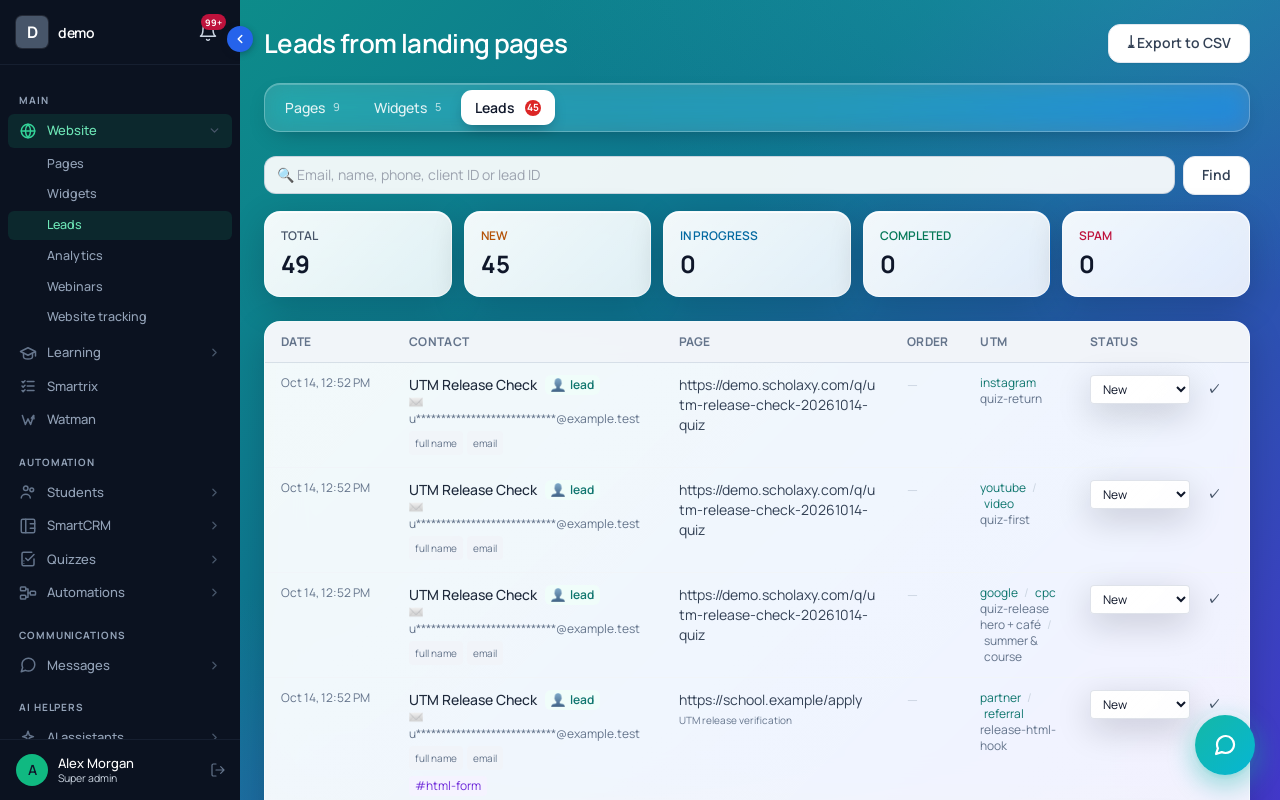
First, tick "Required" on the form's Email field. Without an email no person card is created, so the deal has no contact and can't get an order later.
2. Send the form's enquiries to the board
Open the page, click "Classic" and, under "Auto-conversion of leads into deals", pick the "Board" and the "Initial stage" ("New enquiry"). The "Leads to CRM" button in the visual editor opens the same choice. Only new submissions become deals; enquiries already in "Leads" stay where they are.
For a phone call or a walk-in, click "+ Deal" on the board; "Add a contact" links a parent who is already in the school.
3. Rename the stages and add the student fields
"SmartCRM" → "Board". A new school already has a "Sales" board with stages from "New request" to "Won" and "Lost".
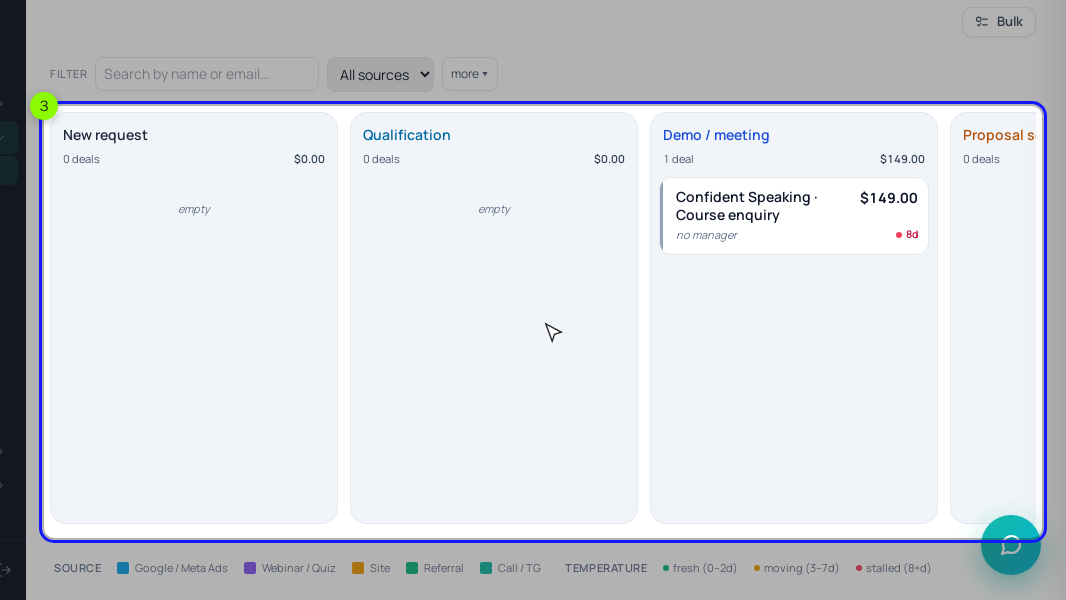
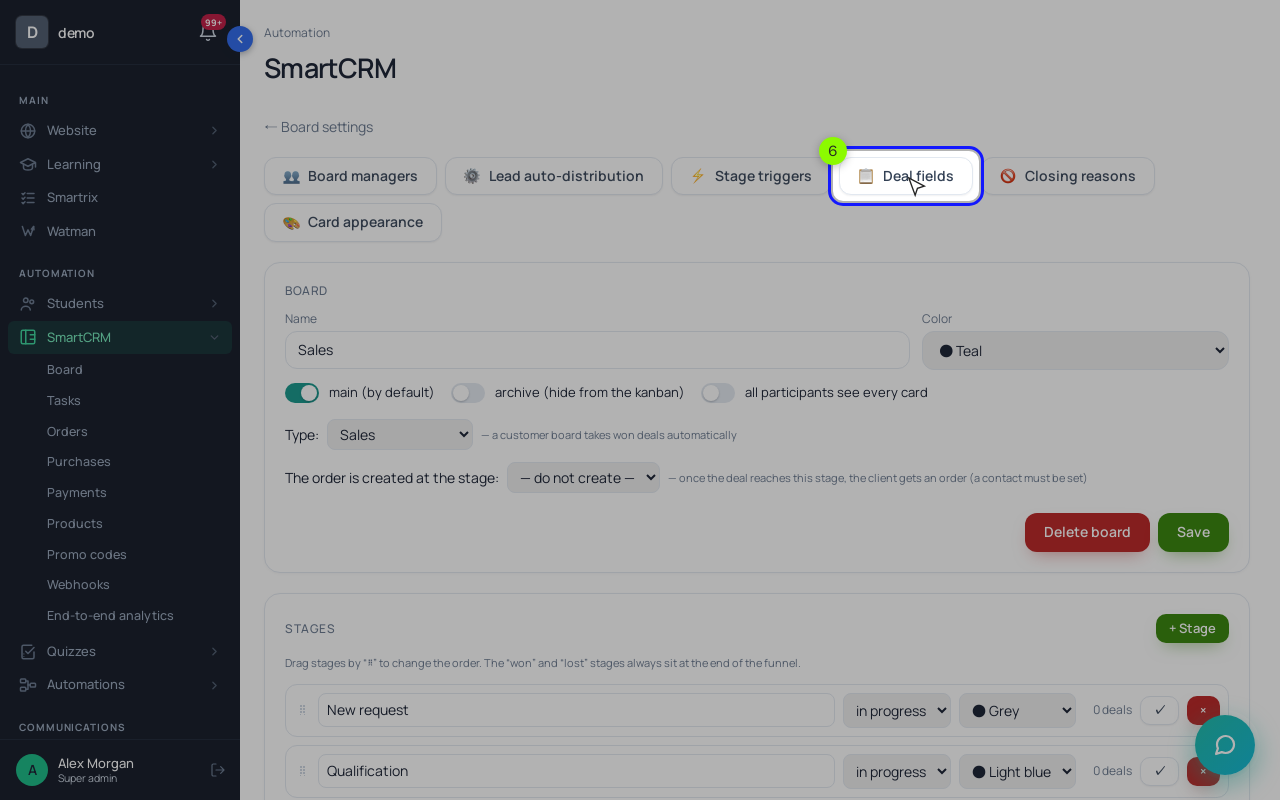
Click the gear, then "Open" next to "Sales". Rename the stages, add one with "+ Stage" and drag "⠿" to reorder (only empty stages can be deleted). Then click "📋 Deal fields": add "Student name" (text), "School year" (list) and "Subject" (list), make "School year" required from the "Assessment booked" stage and click "Save the requirements". In "🚫 Closing reasons" add "Price", "Timetable", "Chose another tutor", "No reply" and "Not this term".
4. Give every enquiry an owner
On the "Auto-assignment" tab, set the "Entry point" to "New enquiry". Add a channel whose marker "stage (name)" equals that stage's name, add Ana and Tom under "Managers in the distribution" and switch on "Auto-distribution by channels". Each new deal goes to the connected coordinator who has waited longest.
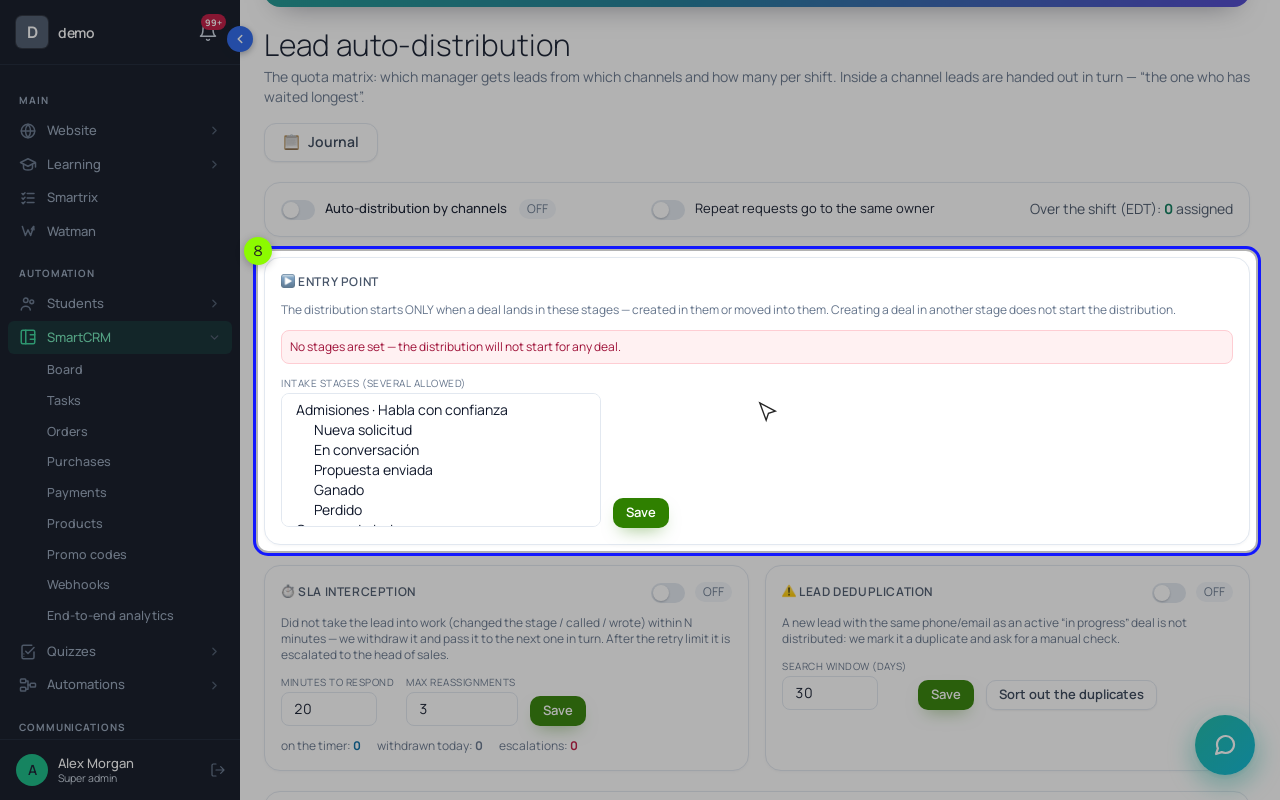
On "Shift schedule", "Take the schedule into account when distributing" is on by default: enter the shifts, or deals wait in a buffer. Turn on "Repeat requests go to the same owner" for siblings. Careful with "Lead deduplication": it holds back a new lead with the same phone or email as an open deal for a manual check, and that includes a parent enquiring for a second child. "SLA interception" hands an enquiry nobody touched within the minutes you set to the next coordinator; with two people on different shifts we'd leave it off. The "Journal" explains every assignment.
5. Work from tasks
Open a deal and, in "Deal tasks", type what to do and pick a date or "today", "tomorrow", "in a week". By default, closing a task asks for its outcome. "SmartCRM" → "Tasks" is each coordinator's day list; automatic tasks live under "⚡ Stage triggers" in the board settings.
6. Let payment close the enquiry
Enrolment means a paid order. Sell the term as an offer whose product has the type "Joining a group", so payment adds the student to the group. In the deal, click "Create an order" (or set "The order is created at the stage:" to "Place offered" in the board settings). The new order carries the deal's amount but no offer, so open it, add the term offer under "Order items", then use "📋 Copy the link". When the order turns "Paid" (a bank transfer you record counts once payments cover the amount), the deal moves to won by itself.
Decide whose account gets the place. The order opens access for the deal's contact, which is the parent if the parent filled in the form. If the teen signs in with their own account, add the teen to the school, link them as the deal's contact before you create the order, and send the payment link to the parent: the payment page opens without signing in.
7. Read the report on Mondays
The chart icon next to the board name opens the "Funnel report" (for administrators and heads of sales). Pick a period from "Week" to "All time"; "Quarter" covers a term.
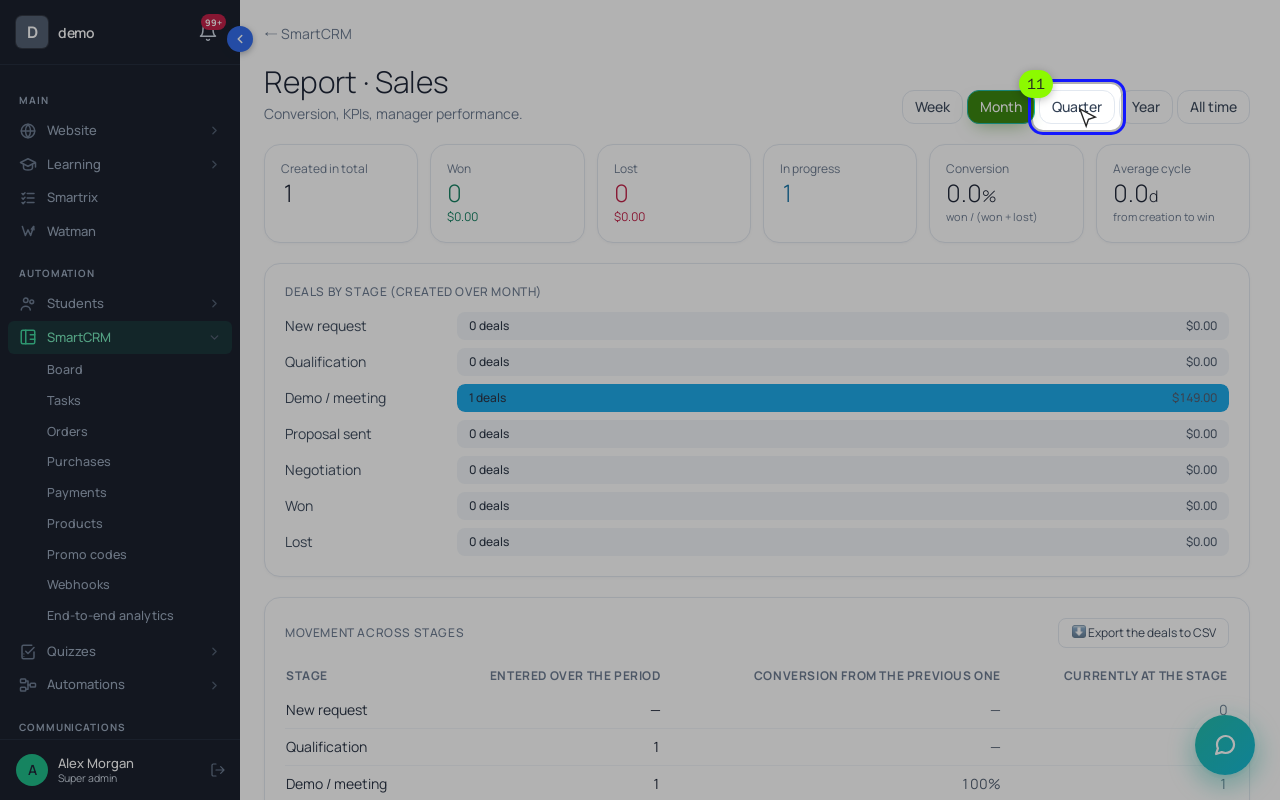
"Created in total" is your enquiry count. "Movement across stages" shows how many deals entered each later stage and the conversion from the previous one. "Where the deals get stuck" lists open deals by days without movement, "Refusal reasons" groups closing reasons, and "Manager performance" shows each coordinator's deals and wins. "Export the deals to CSV" gives you the raw list.
Setup order for the first two weeks
Work through these in order. Steps 2 and 7 are tests; don't skip them.
- Make Email required on the enquiry form.
- Connect the form to the board, stage "New enquiry", and send a test enquiry.
- Rename the stages: New enquiry, Contacted, Assessment booked, Place offered, Enrolled, Lost.
- Add student name, school year and subject as deal fields; school year required from "Assessment booked".
- Add 4–6 closing reasons.
- Turn on auto-assignment and enter both coordinators' shifts.
- Create the term offer and push one test enquiry through to a test payment.
- After the first week, open the report: stuck deals, closing reasons, enquiries per coordinator.
Should tutors have access to the CRM?
Usually not: the coordinator records the assessment result. If a tutor needs to see enquiries, give them CRM rights and add them to the board as a "Manager"; they see their own deals and unassigned ones.
One board for all subjects, or one per subject?
One board with the subject as a field, so the report covers the whole center. A second board makes sense when another team handles it, such as adult courses with their own coordinator.