Online Assessment Tools for Teachers: Tests, Feedback and Next Steps
Online assessment tools for teachers do three jobs: they check what a student knows (a test that grades itself), they collect work a person has to judge (an assignment you review), and they send the result somewhere. That last job is the easiest to skip. A score that only sits in a gradebook teaches nothing; a score that opens the next module, triggers a study plan or issues a certificate does.
So before you compare tools, decide four things for each check in your course: what it proves, the pass mark, how retakes work, and what happens in the hour after the result.
Say you sell a $349 self-paced course that prepares people for a medical coding certification exam. It has 8 modules. Each module ends with a 15-question practice quiz. Modules 4 and 7 each have a coding case: the student gets a short, made-up patient chart, assigns the codes and writes one line of reasoning per code, and an instructor reviews it. The course ends with a mock exam: 50 questions drawn from a bank of 100, two hours, three attempts. About 60 students a month reach it. All of these numbers are invented for the example.
What online assessment in education is for
There are two kinds of checks, and they need different settings. Formative checks happen during learning: they exist to show the student a gap while there's still time to close it. Summative checks happen at the end and answer one question: is this person ready? Mix them up and both suffer. A practice quiz with a strict time limit and hidden answers frustrates people for no reason. A final exam that shows the right answer after each question becomes a memorisation game by the second attempt.
| Check | Kind | What it proves | Who grades | What happens after |
|---|---|---|---|---|
| Module quiz, 15 questions | Formative | The student remembers the module's coding rules | The platform | Explanations on the spot, the next module opens |
| Coding case, modules 4 and 7 | Formative | They can turn a chart into codes and explain why | An instructor | A written comment, accepted or sent back |
| Mock exam, 50 questions | Summative | They are ready to book the real exam | The platform | A certificate, or a study plan and a retake |
Only one row needs a human. Instructor time is the most expensive thing in this course, so it goes where a machine can't judge: the reasoning in a coding case.
Pass marks and retakes, with numbers
A pass mark is a percentage, but students experience it as a count of questions. Do the conversion before you publish.
- Module quiz: 15 questions, pass mark 80%. 12 correct is exactly 80% and passes; 11 correct is 73.3% and fails.
- Mock exam: 50 questions, pass mark 75%. 38 correct is 76% and passes; 37 correct is 74% and fails. Tell students "38 of 50", not "75%".
Retakes need three settings: how many attempts, how long to wait between them, and whether the next attempt shows the same questions. For the quizzes we'd allow unlimited attempts and no pause, since they're for practice. For the mock exam we'd give 3 attempts with a 2-day pause. The pause is the point: without it, a student who fails retakes ten minutes later, and the second score measures luck. The cost: some students will be annoyed that they can't retry tonight.
Drawing questions from a bank changes what a retake measures. If each attempt takes 50 random questions from 100, any two attempts share about 25 questions on average (each of the 50 questions in the first attempt has a 50% chance of being drawn again). Grow the bank to 150 and the overlap drops to about 17. That's why the mock exam should never reveal the correct option: with 100 questions and three attempts, a student who wrote down every answer would have seen most of the bank. Showing which questions they got wrong is fine; showing the right answer isn't.
Who passes in a month? In our example, 36 of the 60 pass on the first attempt. Of the 24 who fail, 15 pass on the second, then 5 of the remaining 9 pass on the third. 56 pass in total, and 4 use up all three attempts. That's 24 + 9 + 4 = 37 failed attempts a month, and each one is a moment when the student decides whether to keep going.
Feedback that students actually use
What do students need from online assessment tools for students? The rules before they start (time, attempts, pass mark), a count of attempts left, the date the next attempt opens, a way to see which questions they missed, and a human answer on open work within a couple of days. Your settings decide most of this.
For the practice quizzes, write an explanation for every question: one or two sentences on why the right code is right. You write it once, and it answers the same question for every student.
For the coding cases, a short comment with three parts works: what's correct, the one thing to fix, and where in the course it's explained. "Your diagnosis codes are right. The procedure code misses the laterality; see module 4, lesson 3. Resubmit with that fixed." One fix per comment. A list of seven problems gets read as "you failed".
The cost is time. With 60 students and two cases each, that's 120 first submissions a month. If a quarter come back for revision, add 30 resubmissions: 150 reviews. At 12 minutes each, that's 1,800 minutes, or 30 hours a month. Budget for it before you promise "personal feedback" on the sales page.
What online assessment tools for teachers should do after a result
Every check in the table needs an answer to "and then?". Here is the mock exam, which matters most.
For the 37 failed attempts we'd send an automatic email, not a personal one. Writing each by hand at 10 minutes is 370 minutes a month, a bit over six hours, and the content barely changes from student to student: where to see the attempt review, how to pick quizzes to redo, when the next attempt opens. The personal touch goes to the 4 students who run out of attempts. A 20-minute call each is 80 minutes a month, and those are the people most likely to ask for a refund.
Here's the retake sequence for a failed mock exam. Every email stops once the student passes.
Retake sequence after a failed mock exam ($349 course). Day 0 is the day of the failed attempt.
| Day | What it contains | Stops when | |
|---|---|---|---|
| 0 | Your mock exam: what to review before the next attempt | Pass mark (38 of 50), attempt review, which quizzes to redo, next attempt date | Passed the mock exam |
| 2 | Your next attempt is open | 120 minutes, 50 new questions, lesson link | Passed the mock exam |
| 5 | Want a second pair of eyes on your weak spots? | A 20-minute review with the instructor | Passed the mock exam |
The other checks are simpler. A passed module quiz opens the next module and needs no message (the result screen is the message). A failed module quiz needs nothing either: the explanations do the work, and attempts are unlimited. An accepted coding case can open a bonus lesson with harder charts. A case sent back already comes with the instructor's comment; what helps is a nudge if the student hasn't resubmitted after 3 days, sent to the instructor rather than the student.
To mark the finish with more than a certificate, see course milestones and rewards. If modules open on a schedule, drip content shows how dates and checks fit together.
Where online assessment goes wrong
- The quiz tests recall when the exam tests application. "Which chapter covers fractures?" is easy to grade and useless. Ask the student to code a two-line scenario instead.
- The pass mark is copied without a check. Run the mock exam on a colleague first. If a well-prepared person scores 95%, the questions are too easy.
- The final shows correct answers. With a bank of 100 and three attempts, the third attempt measures memory of the first two.
- The certificate is issued for submitting, not for passing. Check when your platform issues it: when the last assignment is sent, or when it's passed.
- The certificate is presented as a credential. The credential comes from the certifying body after the real exam. Yours says the student finished your course and passed your mock exam.
- Online checks are treated as proctored. A browser test can't confirm who is typing, so keep high stakes out of it.
- The numbers are too small to read. With 15 students a month, one person is almost 7% of the pass rate. Look at three months before you change a pass mark.
How to set this up in Scholaxy
Scholaxy has the pieces this design needs: graded tests with pass marks, attempts and a question bank, homework that an instructor accepts or sends back with a comment, diplomas, and processes that start on "Test passed", "Test failed", "Homework submitted" and "Homework checked". One thing to know first: the "Quizzes" item in the menu is a different tool (marketing quizzes that end with a contact form). Course tests live under "Learning" → "Testing".
Step 1. The tests.
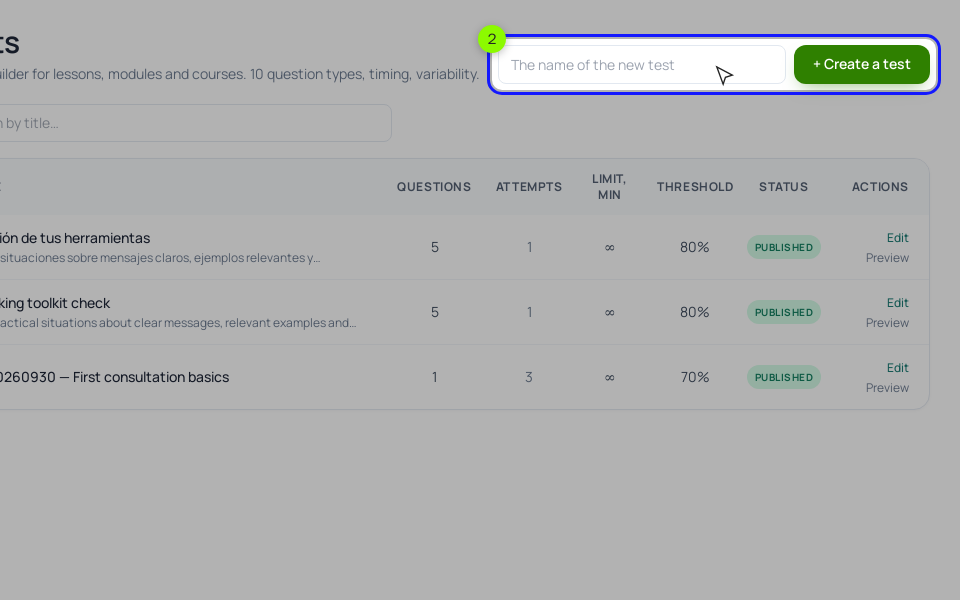
In "Learning" → "Testing" → "⚙ Test builder", create the mock exam. In "Test settings" set "Pass threshold, %" to 75, "Max. attempts" to 3 and "Pause between attempts, min" to 2880 (two days). Under "Variability", set "Questions per attempt (from the pool)" to 50 and turn on "Shuffle the question order". Set "When to show the correct answers" to "Show whether the chosen one is right": the student sees which questions they missed, not the right option. For the module quizzes, use 80%, 0 attempts (unlimited), "Right after the answer", and an explanation on each question. Then attach each test to a lesson: in the lesson editor, the "📋 Homework" block, "🧪 Test in the assignment". Keep course tests as drafts; a published test appears in the shared "Testing" list for every student of the school. Turn on "Accept the test automatically (auto-pass for the homework)" so a passed test closes the lesson without an instructor.
Scholaxy counts tab switches during an attempt and shows them to you and the student. The score doesn't change, and it isn't proctoring. To find the question most students miss, open "📊 Test answers" on the "Testing" page and use "📥 Export to Excel": one sheet per test, a column per question with each student's answer.
Step 2. The coding cases.
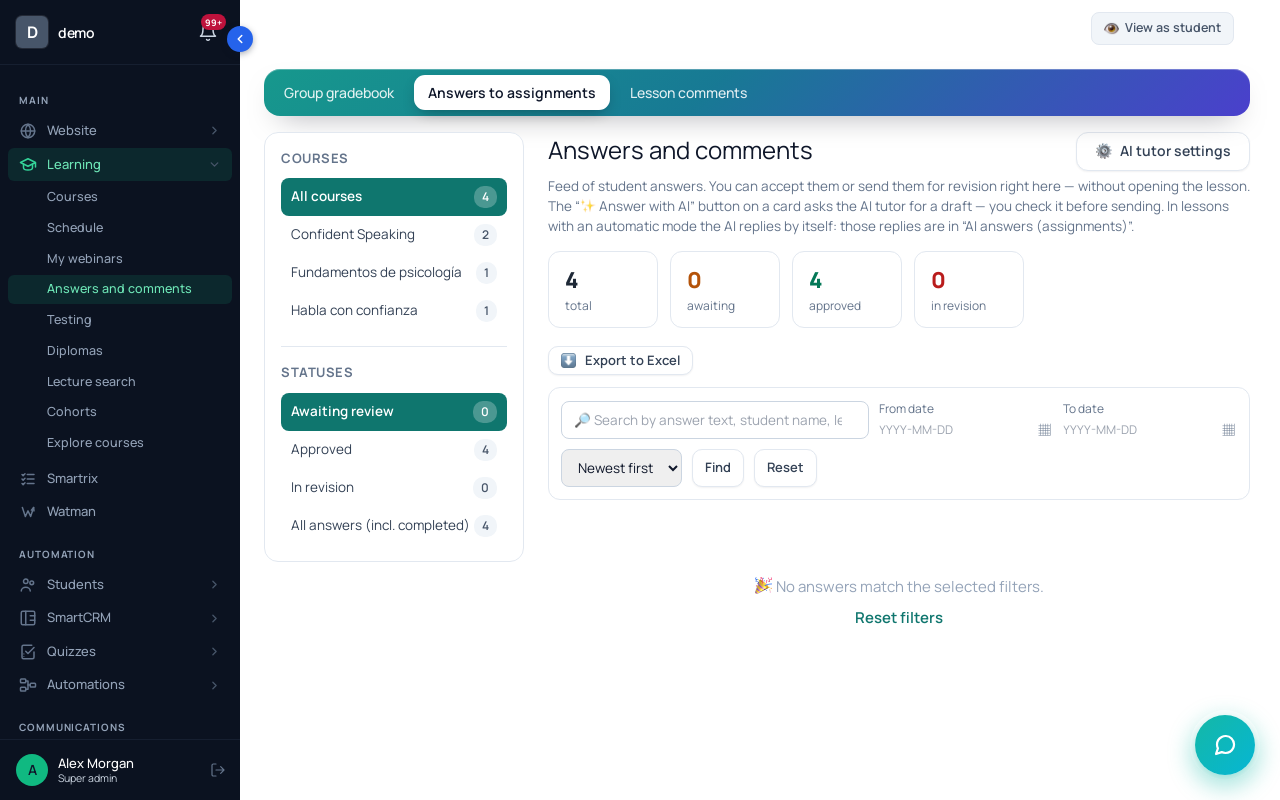
A case is a homework assignment with a "+ Long answer" question. Set the instructor in "Teacher:" on the training page; they see answers in "Learning" → "Answers and comments", write a comment and click "✓ Approve" or "↻ For revision". The student gets a "Homework reviewed" notification with the comment. Reviewers aren't notified about new answers, so add a process on "Homework submitted" with "Notify the employee".
Step 3. The certificate.
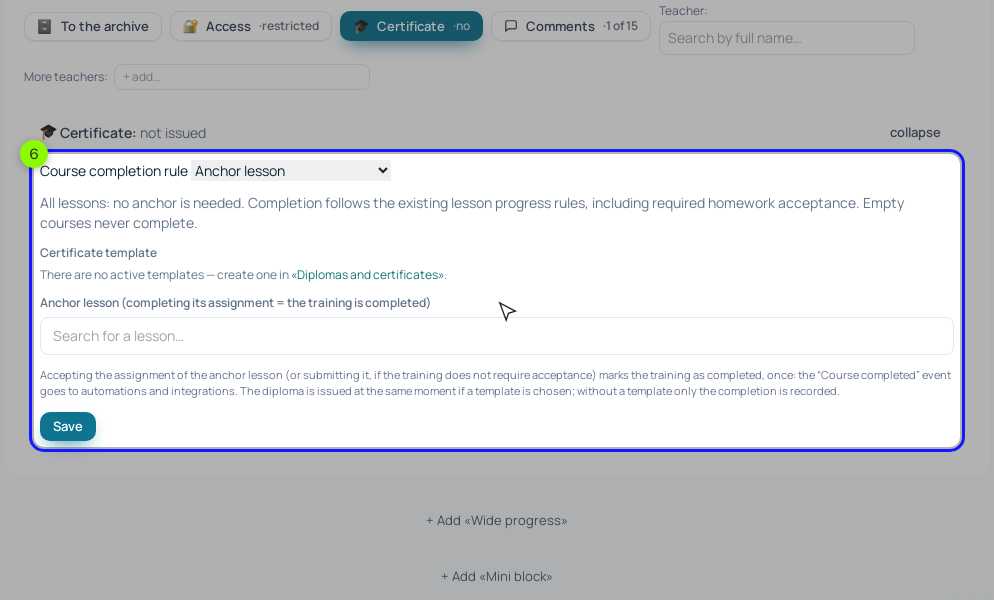
Make a template in "Learning" → "Diplomas". Then decide how it's issued, because the default doesn't fit this course. With the "Anchor lesson" rule in "🎓 Certificate", the diploma is issued when the anchor lesson's assignment is submitted, before anyone checks it. For a result-based certificate, you have two options: choose "All visible lessons completed" and keep the training setting "Count the lesson only after the homework is accepted" on, or issue it from a process on "Test passed" with the "Issue a diploma / certificate" operation. We'd use the process here, since the certificate means "passed the mock exam".
Step 4. The processes.
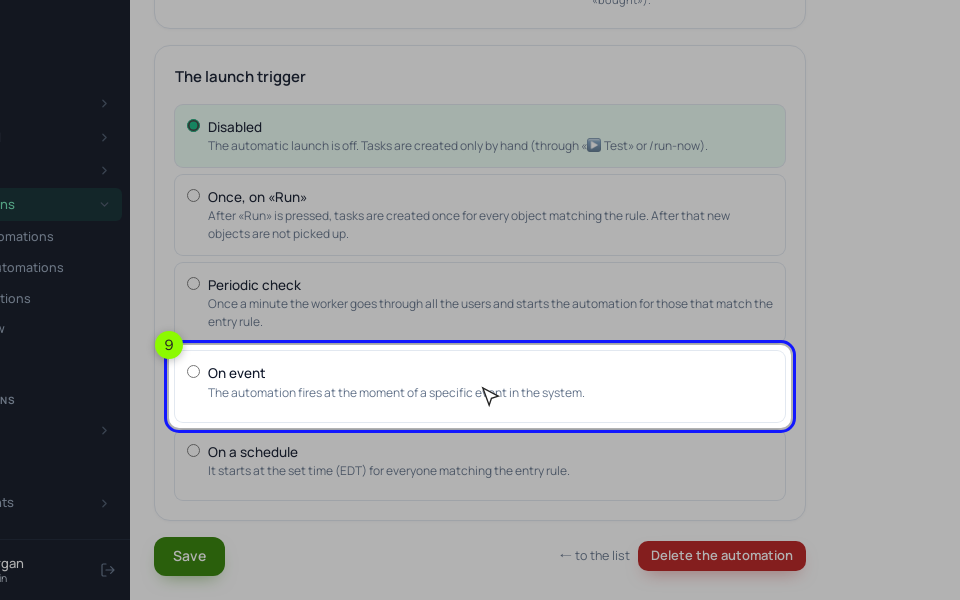
Create a process "By LMS users" and choose "On event" under "The launch trigger".
- Mock exam passed: "Test passed". This event fires for any test in the school, and there's no picker for one test, so narrow it in the rule for entering the process: "Took a test", matching the rule "Testing (assessment)" one of the mock exam and "Status" equals "passed". The rule looks at all of the student's attempts, so set "The limit of entries per client" to 1. Then "Issue a diploma / certificate" and "Send an email" about booking the real exam.
- Mock exam failed: "Test failed", the same rule with "not passed", and the three emails above with a 2-day and a 3-day "Delay" between them. Put a segment of students who passed the mock in "A stop condition by segment". A student has one active run of a process at a time, so a second failure during those five days doesn't restart the sequence.
- Coding cases: "Homework checked" lets you pick "Only for a specific" assignment. It fires on both verdicts, so add a "Condition" with "Course participant: lesson (entry, homework, video)" and "Homework" equals "answer accepted". The "Yes" output gets "Grant lesson access" to the bonus lesson (set that lesson to open "By access" in its settings); the "No" output gets a 3-day "Delay", then a "Condition" with "Homework" equals "answer rejected" (still not resubmitted), and "Notify the employee" on its "Yes".
Build the next step on "Test passed", not on "Lesson completed". In our check of the code, a lesson that closes because its test was passed doesn't send "Lesson completed" to processes. And if a test has an essay question, both test events wait until someone grades it under "👥 Who took it". Try each process with "Test on" before "▶ Activate".
Setup order
- Write down every check in the course, mark it formative or summative, and decide who grades it.
- Convert each pass mark into a number of correct answers and put that number in the test description.
- Build the module quizzes with unlimited attempts and an explanation for every question.
- Build the mock exam from a bank at least twice the size of one attempt, with hidden answers, 3 attempts and a pause.
- Add the coding cases as homework, set the instructor, and write a comment template with one fix per comment.
- Choose how the certificate is issued so that it depends on the result, not on submission.
- Create the processes for a passed mock, a failed mock and a reviewed case, test them, then activate them.
- After a month, count first-attempt passes and failed attempts and compare them with your plan.