How to Run a Cohort-Based Course with Groups and Lesson Schedules
A cohort-based course is a course that a group of students takes together: everyone starts on the same day, the lessons open on one calendar, assignments have the same deadlines, and the group meets live, in our example once a week. It sits between a self-paced video course and live group coaching. The recorded lessons do the teaching; the calendar, the calls and the other students keep people moving.
To run one you need five pieces: an intake with a start date and a seat limit, a group that holds the students, a lesson calendar with deadlines, a recurring live session, and a place where the group talks between calls. The work is mostly in deciding the rhythm of a week and sticking to it for every cohort.
Here is the example we'll use. Say you run Grant Writing Sprint, a six-week course for staff of small nonprofits who have never written a grant proposal alone. It costs $390 and takes 24 people per cohort. The January cohort starts on Monday, January 11, 2027. Every Monday a lesson opens, a section of the proposal is due on Saturday, and on Tuesdays at 6 p.m. there's a 90-minute call where you go through the drafts. At the end of week 6 each student has a complete proposal for a real funder.
What cohort-based learning changes
| Self-paced course | Cohort-based course | |
|---|---|---|
| Start | Any day | A fixed date, enrolment closes |
| Lessons | All at once, or counted from each purchase | Open for the whole group on the same dates |
| Deadlines | Usually none | One per week, shared |
| Live part | None or optional | A weekly call, part of the price |
| Your time | Front-loaded: you record once | Every week of every cohort |
| Price | Lower | Higher, because the calls and feedback cost hours |
Cohort-based learning works for skills that need feedback on the student's own work. A grant proposal is that kind of skill: watching a lesson about need statements doesn't produce one, and a curator's comments on a real draft help produce it. It also works when the deadline is the product. Much of the material on grant writing is free online. What a Grant Writing Sprint buyer pays for is six Saturdays that make them write.
It's the wrong format when the buyers can't commit to a calendar (shift workers, parents in the busy season), when the course is reference material, or when you can't give the hours. A self-paced course with lessons opening day by day, as in drip content, keeps some of the pacing without the calls.
How many seats a cohort-based course can take
A seat limit can look like a sales trick. In a cohort it's arithmetic. Every student sends six drafts; say a useful written review takes 20 minutes.
| 24 students | 12 students | |
|---|---|---|
| Revenue at $390 | $9,360 | $4,680 |
| Draft reviews (6 each × 20 min) | 48 hours | 24 hours |
| Six live calls of 90 minutes | 9 hours | 9 hours |
| Your hours in total | 57 | 33 |
| Revenue per hour | about $164 | about $142 |
Two things show up. The calls cost the same with 12 people or 24, so a half-empty cohort earns less per hour. And reviews grow with every seat: at 40 students, the drafts alone would take 80 hours over six weeks, which is 13 hours a week on top of the calls. That's where we'd stop selling, or hire a second curator.
We'd also set a minimum and say it on the sales page: if fewer than 8 people join, the cohort moves to the next date and everyone can ask for a refund. With fewer than 8 on a call we'd expect the discussion to run dry, and the discussion is what people paid for. The cost is the occasional moved cohort and some refunds to process. How to arrive at the $390 itself is a separate question, covered in online course pricing.
Build the week, then repeat it six times
The weekly rhythm matters more than any single lesson. For Grant Writing Sprint it looks like this:
And the calendar of the January cohort:
| Week | Lesson opens (Mon) | Call (Tue, 6 p.m.) | Section due (Sat) |
|---|---|---|---|
| 1 | Jan 11: Finding the right funder | Jan 12: welcome, questions | Jan 16: shortlist of three funders |
| 2 | Jan 18: The need statement | Jan 19: shortlists | Jan 23: need statement |
| 3 | Jan 25: Goals and outcomes | Jan 26: need statements | Jan 30: goals and outcomes |
| 4 | Feb 1: The programme plan | Feb 2: goals | Feb 6: plan and timeline |
| 5 | Feb 8: Budget and budget narrative | Feb 9: plans | Feb 13: budget |
| 6 | Feb 15: Putting it together | Feb 16: budgets | Feb 20: full proposal |
The cohort ends on Sunday, February 21. Final proposals get written feedback in the following week, since there is no seventh call.
Why one lesson a week and not two? A section of a proposal is a few hours of work for someone with a day job, and the call needs drafts to discuss. Two lessons a week would, we think, leave part of the group behind by week 3. The cost is a longer course, and some fast students will be bored in week 2.
Each lesson opens for the whole group on Monday, not on day 7 of each student's access. That is the core difference from a self-paced drip: the group has to be on the same page when the call starts.
Where cohorts go wrong
- Late joiners. Someone who pays on January 20 has missed a deadline and two calls. We'd close enrolment at the end of the first Wednesday and offer anyone later a seat in the next cohort.
- Deadlines that slide. Accept late drafts without a rule and each Saturday brings more of them. Say once what happens to a late draft (it gets a review after the on-time ones, or in the next cohort) and keep to it.
- A quiet chat. 24 people who don't know each other have no reason to post first, so give the chat a job. Ask for one thing per week there: post your funder shortlist, post the first sentence of your need statement.
- Time zones. Tuesday 6 p.m. in New York is 11 p.m. in Lisbon in January. Put the time zone in the sales page and the calendar, and record the calls for people who can't attend one of them.
- Rolling enrolment that becomes a self-paced course. If people can join any week, the calls stop matching the lessons. Either run fixed cohorts or sell the course self-paced; the middle version is the hardest to teach.
The sales side of the first intake (page, launch emails, first students) is in the online course launch checklist. Once the cohort runs, watch the Saturday numbers. If 22 of 24 submit in week 1 and 14 in week 3, the problem is in weeks 2 and 3 (too much work, or a lesson that doesn't lead to a draft), and the next cohort is where you fix it.
How to set this up in Scholaxy
In Scholaxy a cohort is built from pieces you already use: a group for the students, a cohort card with dates and a seat limit, a cohort schedule that opens lessons and sets deadlines, schedule events for the calls, and a group chat. The course itself stays one course; each new cohort gets a new group and new dates.
Step 1. The group. In "Students" → "Groups", click "+ Add a group" and name it "Grant Writing Sprint, January 2027" (group names must be unique, so the month helps). On the training page, open "🔐 Access", choose "Restricted", add the group to "Allowed groups" and click "Save the access", so everyone in the group gets the course.
Step 2. The cohort card. Open "Learning" → "Cohorts" and click "+ Create a cohort". Pick the product and the offers it is sold with, the course in "The primary course and additional courses of the cohort" and the January group in "Group (the student is added on payment)". Set "Start date" to January 11 and "End date" to February 21, then "Seat limit" 24, the "Curator" and the "Cohort chat (URL)". Sell it with a product of the type "Access by cohort": the courses and groups then come from the cohort the order belongs to. You can also attach someone by hand on their student card, with "Add to a stream:".
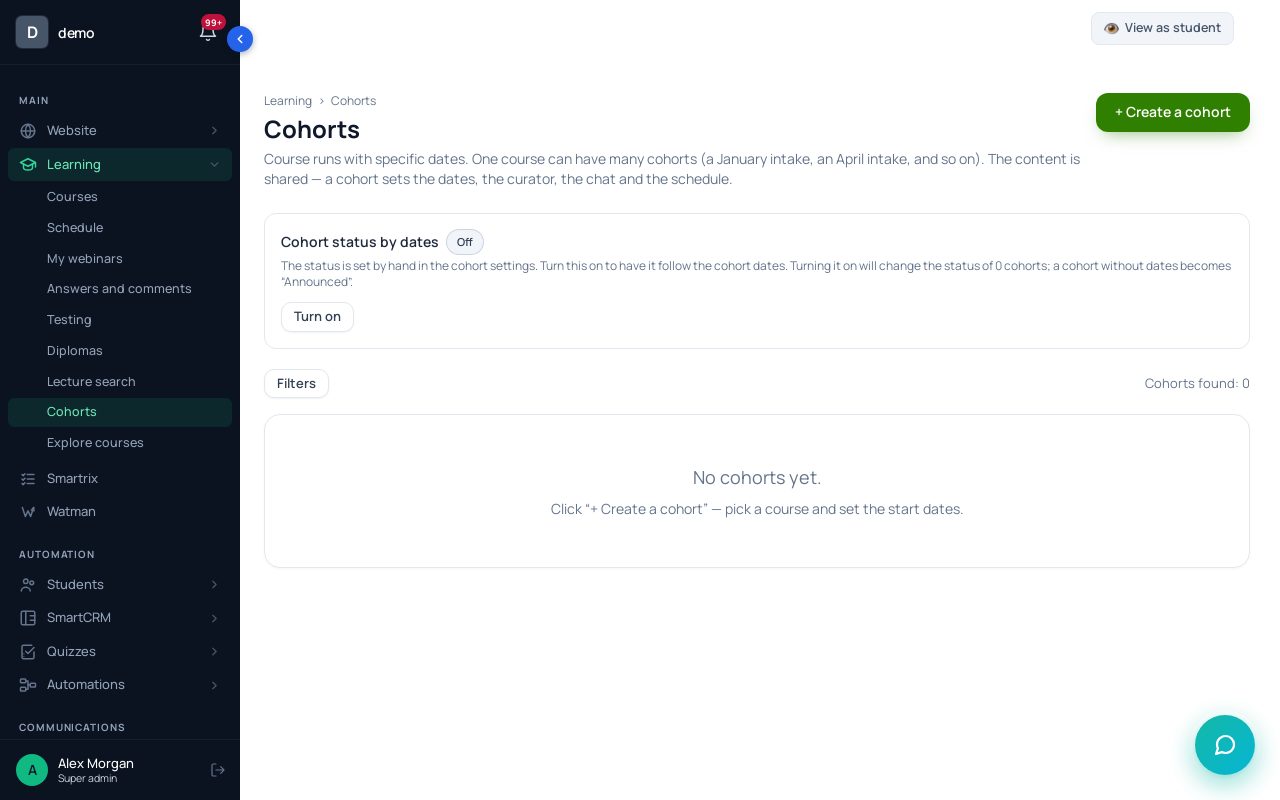
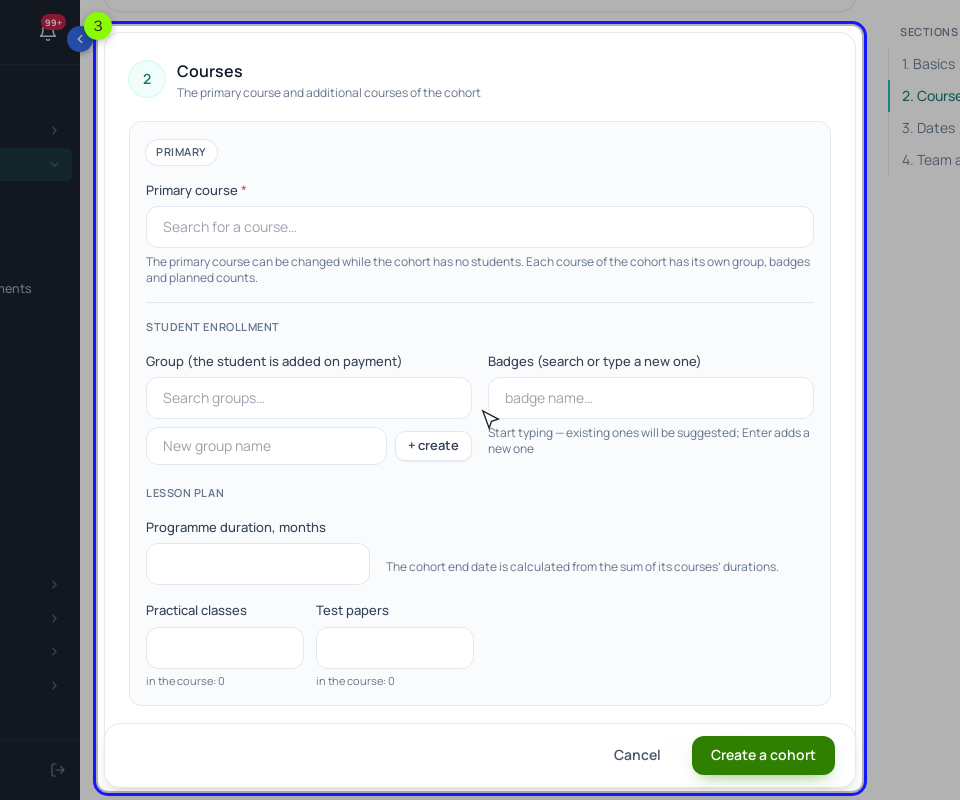
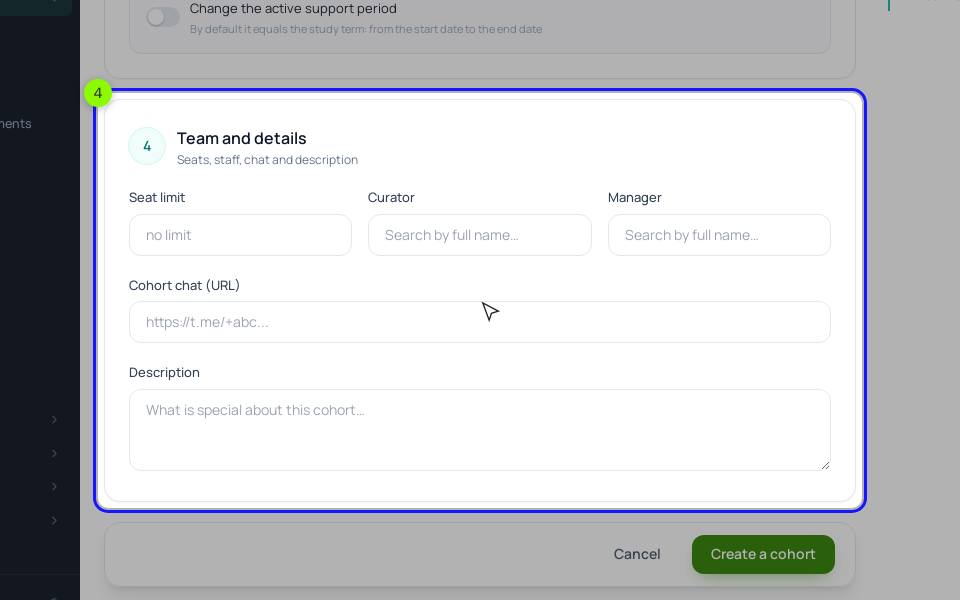
The "Seat limit" is a counter, not a lock. The list of cohorts and the cohort card show enrolled students against it ("18 / 24"), but nothing in the checkout stops a 25th payment. When the count reaches 24, take the buy button off your sales page yourself.
Step 3. The lesson calendar and deadlines. In "Learning" → "Schedule" → "More" → "Cohort schedule", click "+ Create a schedule". Fill in "Training", "The study group" (the January group) and "The cohort start date" (January 11), save, and click "⤓ Pull the lessons". Give lesson 1 "Interval, days" 0 and lessons 2 to 6 an interval of 7, so they fall on the Mondays from the table. Set "Submit within, days" to 5 for every lesson: that puts each deadline on the Saturday. Students see these dates on their "Learning schedule" tab, and a lesson with a submission date sends a reminder ("Assignment deadline is approaching") on the day before the deadline or on the deadline day to students with unfinished homework. The plan date doesn't block a late answer.
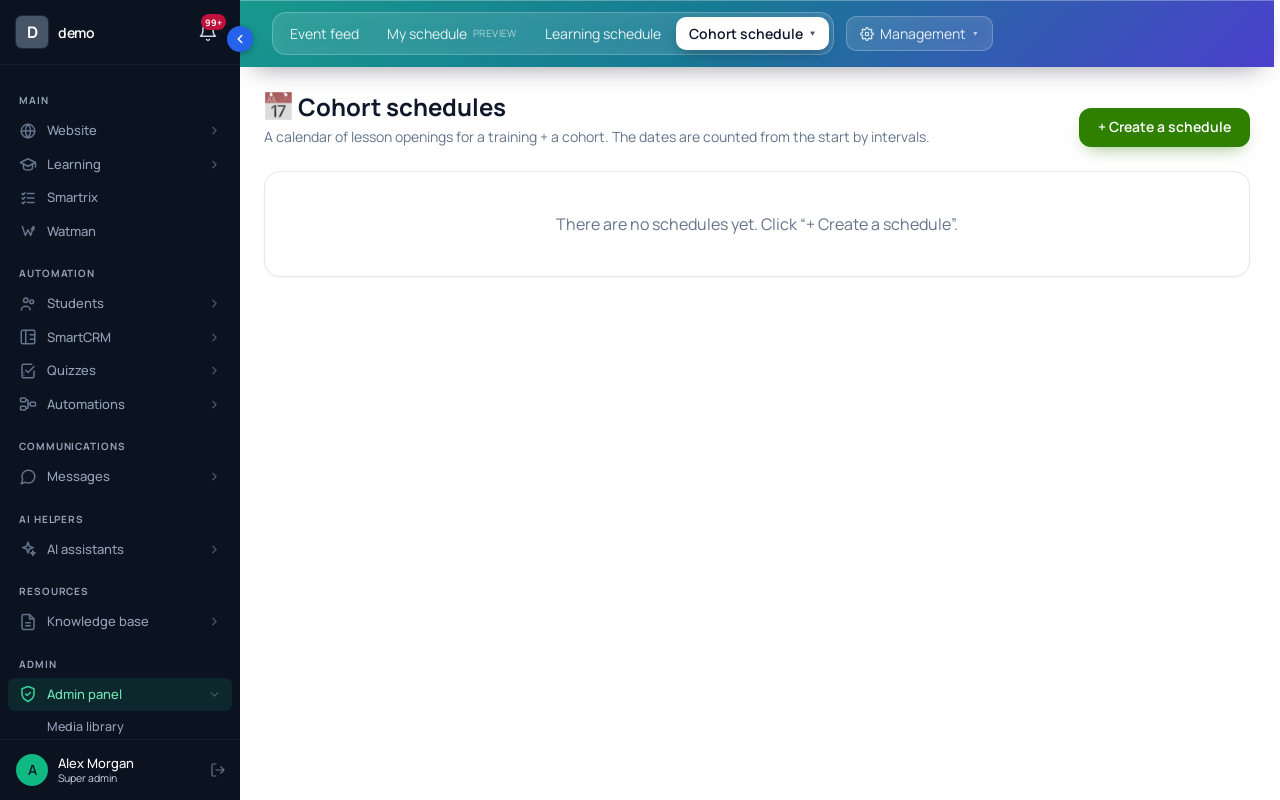
How the plan opens lessons is worth knowing before the first Monday. It opens lessons set to "Unavailable and not shown" plus "By access (a process / an action will open it)", and it does so when a student opens the "Learning schedule" tab on or after the lesson's date. So link that tab in your Monday email. With only one cohort running at a time, you can instead give each lesson "From a specific date" (January 11, 18 and so on) and keep the plan for the deadlines and the student's calendar. With two cohorts in the same course, fixed dates would open the lessons for both, so stay with the plan.
Keep the plan's start date equal to the cohort's: the cohort card's "Schedule" tab shows the plans of its groups, but the dates come from each plan's own start date, not from the cohort.
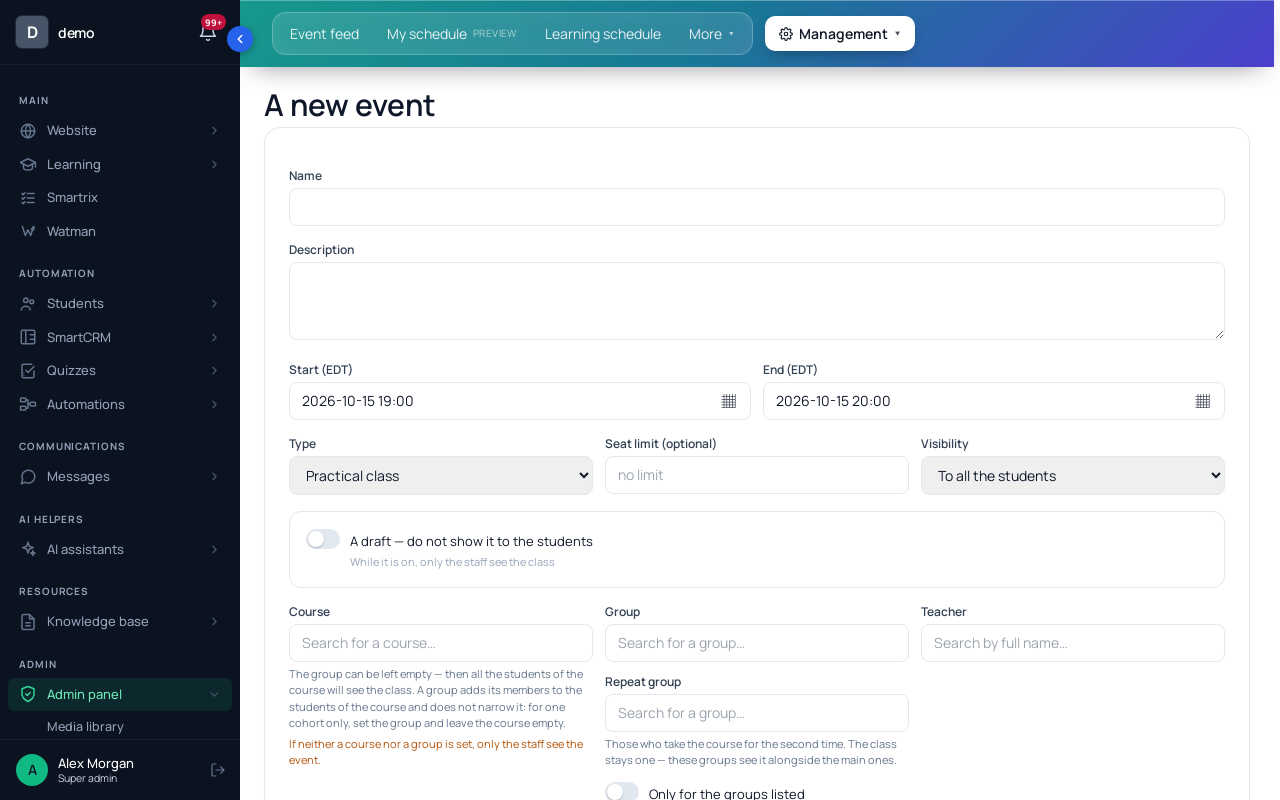
Step 4. The Tuesday calls. In "Learning" → "Schedule" → "Management", click "+ A new event". Pick the January group in "Group" and leave "Course" empty; with the course filled in, every student of the course would see the call, including the next cohort. Set "Repetition" to "Weekly" on TU until February 16, paste your Zoom or Google Meet link (Scholaxy doesn't host the video for these classes), and tick the reminders. Reminders reach only students who clicked "+ Book", and they book each date of a series separately, so ask for it in the first email. The "🔗 Join" button becomes active 15 minutes before the start.
Step 5. The chat and the Monday email. In "Messages" → "Group chats", create a chat for "Everyone from a group" with the January group and the curator as a moderator. For the weekly email, build a dynamic segment with the condition "In a group" and send a scheduled broadcast to it each Monday morning, with the link to the "Learning schedule" tab and the Saturday deadline. Broadcast emails need SendPulse or your own SMTP connected first.
For the next cohort, create a new group and a new cohort card, then clone the plan with "⋯" → "⧉ Clone", changing the group and the start date. Interval dates are recalculated; lessons with "The event date (fixed)" are not copied, so add those again.
Checklist for the first cohort
- Count your hours per student (reviews plus calls) and set the seat limit and the minimum from them.
- Write the week: when the lesson opens, when the call is, when the work is due, when you review.
- Fill in the six-week calendar with real dates and the time zone.
- Create the group and add it to the course's allowed groups.
- Create the cohort card: course, group, dates, seat limit 24, curator, chat link.
- Create the cohort schedule: start date, lessons pulled, intervals of 7 days, "Submit within, days" 5.
- Set the lessons to "Unavailable and not shown" with "By access", or to fixed dates if this is the only cohort running.
- Create the weekly call for the group, with the meeting link and reminders.
- Create the group chat and the segment for the Monday broadcasts.
- Decide the cut-off for late joiners and the rule for late drafts, and put both on the sales page.
- When the cohort card shows 24 enrolled, take the buy button off the page.
- After week 3, compare Saturday submissions with week 1.